 National Holiday Calendar
Add Shared Calendar In Outlook - Here are the steps to add a shared calendar to outlook: If you're using microsoft 365 and exchange online, see how to enable and disable the outlook calendar sharing updates. Adding an event to a group calendar is very similar to adding one to your personal calendar. In outlook for microsoft 365*, select the. To create a shared calendar in outlook for windows, go to calendar > add calendar > name your calendar > share calendar > enter email addresses. To add and view a shared calendar in ms outlook.

How Do I Create A Shared Calendar In Outlook
Adding a shared calendar in outlook can seem like navigating a maze, but we’re here to guide you. If you're using microsoft 365 and exchange online, see how to enable and disable the outlook calendar sharing updates. To create a shared calendar in outlook for windows, go to calendar > add calendar > name your calendar > share calendar > enter email addresses.
How To Add Shared Calendar In Outlook
To add a shared calendar in outlook, simply accept the sharing invitation or use an ics link. To create a shared calendar in outlook for windows, go to calendar > add calendar > name your calendar > share calendar > enter email addresses. Now, let’s break down the process of adding shared calendars in the new outlook. If you're using microsoft exchange server, see the article that's.

How To Add Shared Calendar In Outlook
Now, let’s break down the process of adding shared calendars in the new outlook. If you're using microsoft 365 and exchange online, see how to enable and disable the outlook calendar sharing updates. To create a shared calendar in outlook for windows, go to calendar > add calendar > name your calendar > share calendar > enter email addresses. To add and view a shared calendar in ms outlook.

How To Add Shared Calendar Outlook
Now, let’s break down the process of adding shared calendars in the new outlook. Microsoft outlook’s shared calendar functionality is a cornerstone of modern collaborative workflows. Here are the steps to add a shared calendar to outlook: If you're using microsoft 365 and exchange online, see how to enable and disable the outlook calendar sharing updates. If you're using microsoft exchange server, see the article that's.

Calendar Add Shared Calendar To Outlook Office Of Technology
Open outlook and click on calendars section to view and manage your calendars. Now, let’s break down the process of adding shared calendars in the new outlook. When you create an event on a group calendar, it appears as organized by the group. Here are the steps to add a shared calendar to outlook: Adding an event to a group calendar is very similar to adding one to your personal calendar.
Open Outlook And Click On Calendars Section To View
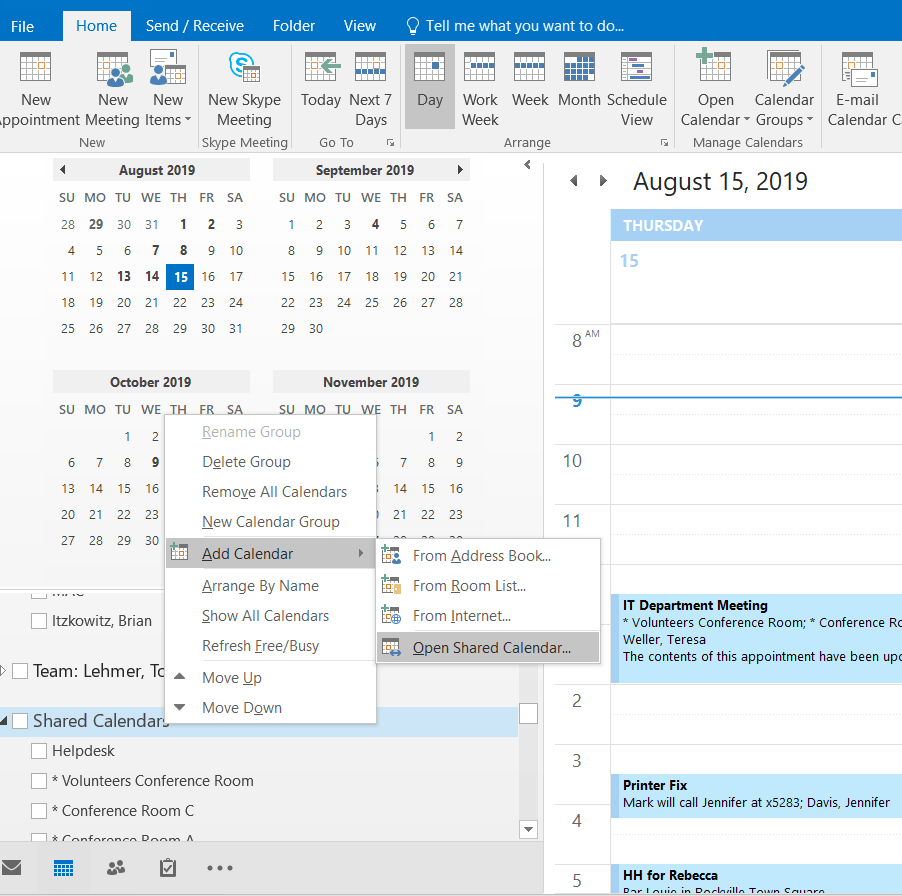
Outlook makes it easy to create a shared calendar that keeps everyone aligned. To add and view a shared calendar in ms outlook. If you're using microsoft 365 and exchange online, see how to enable and disable the outlook calendar sharing updates. From your calendar folder, go to the home tab > manage calendars group, and click add calendar > open shared calendar.
Adding An Event To A Group Calendar Is Very
Here are the steps to add a shared calendar to outlook: If you're using microsoft exchange server, see the article that's. When you create an event on a group calendar, it appears as organized by the group. To create a shared calendar in.
In Outlook For Microsoft 365*, Select The
Now, let’s break down the process of adding shared calendars in the new outlook. To add a shared calendar in outlook, simply accept the sharing invitation or use an ics link. To create a shared calendar in outlook for windows, go to calendar > add calendar > name your calendar > share calendar > enter email addresses. Microsoft outlook’s shared calendar functionality is a cornerstone of modern collaborative workflows.
By Enabling Controlled Access To Scheduling Data
Adding a shared calendar in outlook can seem like navigating a maze, but we’re here to guide you.