 National Holiday Calendar
Adding A Calendar To Sharepoint - Learn how to add a calendar to sharepoint online using two methods: To add a calendar to sharepoint: In this section, we will explore three popular methods: However, they are not the same. Click “add an app.” then select “calendar.” customize it by adding a new event with details like date, time, location, and. In this tutorial in the sharepoint online from scratch series, peter kalmström, ceo and systems designer of kalmstrom.com business solutions, shows how to create a team calendar and.

Adding Calendar To Sharepoint Printable Calendar 2023
In this article, i will guide you on how to create a calendar in sharepoint & how to use it. Sharepoint calendars allow site owners to check team member’s schedules for events &. There are different methods to add a calendar to your sharepoint site, depending on the version of sharepoint you are using and the features you need. With a calendar on the sharepoint site, you and your colleagues will have easy access to common schedules and dates.

Adding Calendar To Sharepoint Page Rea Leland
In this article, i will guide you on how to create a calendar in sharepoint & how to use it. However, they are not the same. In this section, we will explore three popular methods: This blog explores how to create and manage a sharepoint calendar, highlighting its benefits, integration with outlook and teams, and security measures. The list itself sits within a custom sharepoint site.

Sharepoint 2024 Calendar Permissions Tansy Florette
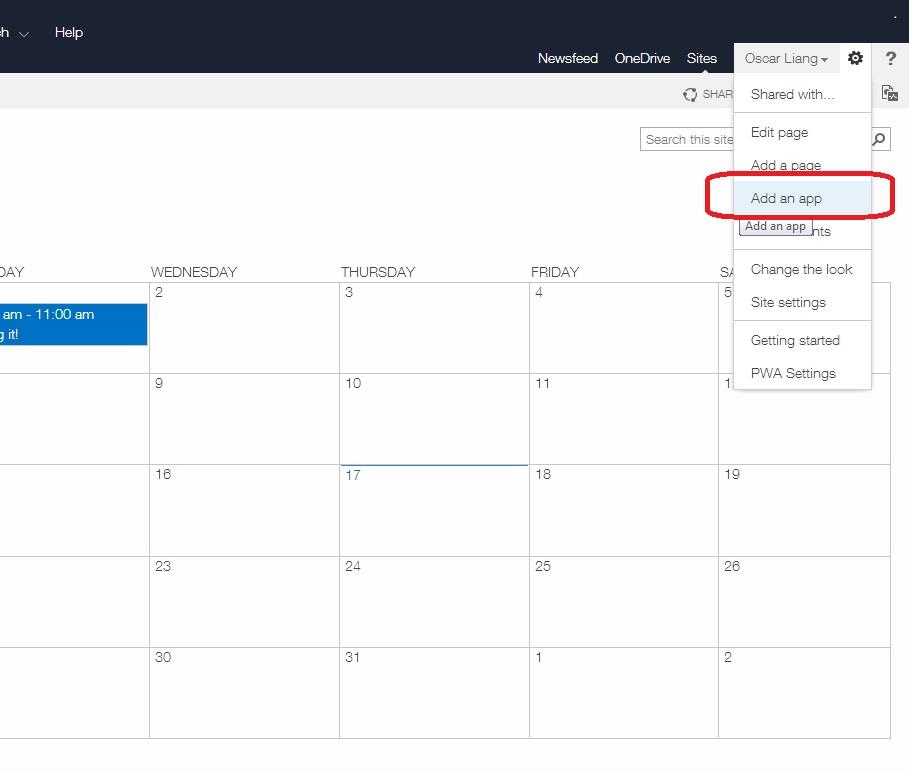
Click “add an app.” then select “calendar.” customize it by adding a new event with details like date, time, location, and. The list itself sits within a custom sharepoint site. Adding a calendar app or creating a custom list with the calendar template. For the sharepoint modern view, follow these steps: Also, discover how to use.

Sharepoint Calendar Color Coding Calendar Template 2023
In this article, we’ll guide you through the process of adding and customizing a calendar in sharepoint online. It contains all the metadata relating to events, appointments, and reminders. Click “add an app.” then select “calendar.” customize it by adding a new event with details like date, time, location, and. Sharepoint shared calendar is often confused with outlook group calendar.
How To Create Additional Calendar In Sharepoint Oscar Liang
Sharepoint calendars allow site owners to check team member’s schedules for events &. When you add a calendar to sharepoint, you are essentially creating a custom list within sharepoint. There are three ways you can create a shared calendar in sharepoint. Click “add an app.” then select “calendar.” customize it by adding a new event with details like date, time, location, and.
Click “Add An App.” Then Select “Calendar.” Customize
How to create a shared calendar in sharepoint? There are different methods to add a calendar to your sharepoint site, depending on the version of sharepoint you are using and the features you need. In this article, i will guide you on how to create a calendar in sharepoint & how to use it. Learn how to add a calendar to sharepoint online using two methods:
Sharepoint Calendar
The list can then be added to pages on the sharepoint online site and can. It contains all the metadata relating to events, appointments, and reminders. In this article, we’ll guide you through the process of adding and customizing a calendar in sharepoint online. This sharepoint tutorial will demonstrate how you can add a calendar to a sharepoint online site.
There Are A Few Calendar
In this section, we will go through the steps of adding a calendar to sharepoint, including creating a new calendar, customizing it to fit your team’s needs, and adding events to keep your team. Go to the “site contents” menu. As a sharepoint admin, a common request that you may get from various site stakeholders is to add a team calendar on their landing page. In this tutorial in the sharepoint online from scratch series, peter kalmström, ceo and systems designer of kalmstrom.com business solutions, shows how to create a team calendar and.
A Calendar
However, they are not the same. In this section, we will explore three popular methods: With a calendar on the sharepoint site, you and your colleagues will have easy access to common schedules and dates. There are three ways you can create a shared calendar in sharepoint.