 National Holiday Calendar
Connect Google Calendar To Slack - How do i connect my google calendar to slack? With only a few clicks, you’ll be able to get notifications, enhance procedures, and access what you need. • get notified when an event is starting soon, and join a hangout, zoom, webex, or microsoft teams meeting directly from the calendar reminder in slack. This guide will walk you through the process of connecting your. If you want your team updates to sync with your schedule effortlessly, you need to integrate google calendar into slack. This guide will walk you through the process of integrating google.

Google Workspace For Slack Slack App Directory Slack
By linking with google calendar, you can: Use google calendar in slack to: • automatically sync your calendar to your slack status to let your team know when you are in a meeting. Let’s break it down step by step. Follow the simple steps below to sync slack with google calendar and enhance your scheduling and communication efficiency.

Google Team Calendar Slack Jobie Lynelle
If you want your team updates to sync with your schedule effortlessly, you need to integrate google calendar into slack. In this comprehensive guide, we’ll walk you through the process of setting up and maximizing the slack google calendar integration. This guide will walk you through the process of connecting your. In slack, click on more and then select automations.

How To Add Google Calendar To Slack
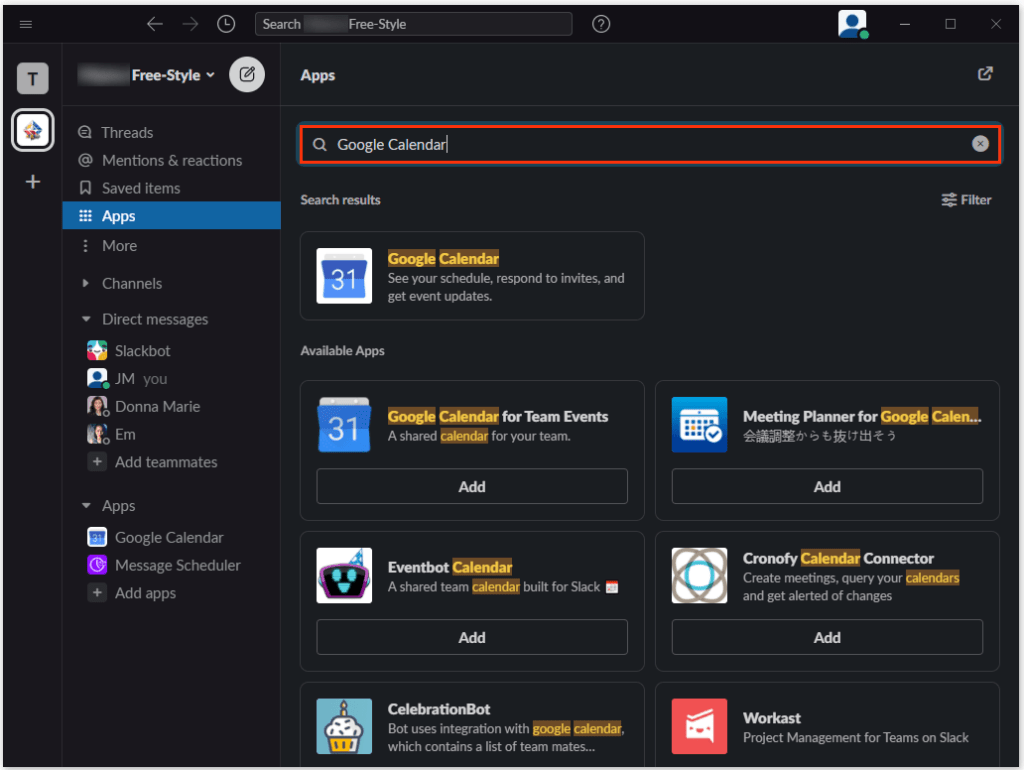
Next, click on apps and select google. • get notified when an event is starting soon, and join a hangout, zoom, webex, or microsoft teams meeting directly from the calendar reminder in slack. In this article, we’ll walk you through. Once the app is installed, members can connect their calendarsto slack. The first thing you’ll want to do.

Slack Connect With Google Calendar Janna Loraine
Connecting slack to google calendar is a relatively straightforward process. This guide will walk you through the process of connecting your. Once the app is installed, members can connect their calendarsto slack. To use the google calendar app in slack, one person needs to install the app. • automatically sync your calendar to your slack status to let your team know when you are in a meeting.
Google Calendar Slack Settings David Davidson
Let’s break it down step by step. In slack, click on more and then select automations. Follow simple steps to seamlessly connect slack and google calendar for instant updates on events. Slack + google is one of the most popular. Connecting slack to google calendar is a relatively straightforward process.
This Guide Will Walk You Through The Process
Showing your team's timetable on slack can boost neatness and teamwork in a big way. Learn how to integrate slack and google calendar to view schedules, get meeting reminders, join meetings from slack, and manage status updates. Slack + google is one of the most popular. With only a few clicks, you’ll be able to get notifications, enhance procedures, and access what you need.
Follow The Simple Steps Below To Sync Slack
By linking with google calendar, you can: In this comprehensive guide, we’ll walk you through the process of setting up and maximizing the slack google calendar integration. Use google calendar in slack to: Connect your google calendar account to slack.
Once The App Is Installed
If you want your team updates to sync with your schedule effortlessly, you need to integrate google calendar into slack. Track your schedules and appointments. Next, click on apps and select google. Install the google calendar app in slack.
How To Add Google Calendar
Syncing google calendar with slack is a simple and effective way to integrate these two essential tools, allowing team members to access and share their schedules in one place. To begin, you’ll need to have administrative access to your slack workspace, as well as a google account with a configured google calendar. Utilize slack reminders and sharing features to keep your team organized and. • get notified when an event is starting soon, and join a hangout, zoom, webex, or microsoft teams meeting directly from the calendar reminder in slack.