 National Holiday Calendar
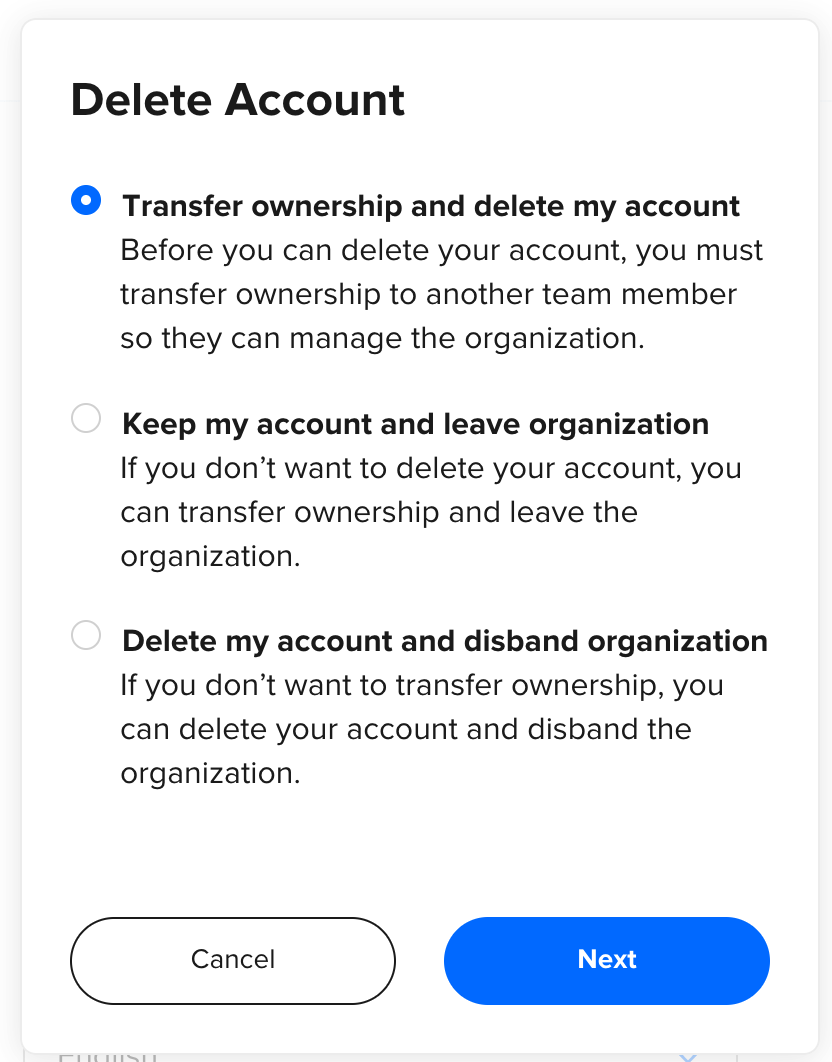
Delete Calendly Account - From your calendly home page: To cancel or delete an account, navigate to your account settings page and locate the delete account button in the bottom right corner. Scroll to the end of the. This article will explain how to cancel your calendly subscription, including how to do that, the refund policy, possible savings, investments for the money saved, and the list of calendly's. To delete your calendly account, log in, go to 'account', then select 'account settings', and choose 'delete account'. On your billing page, select change plan, then upgrade/downgrade.

How To Setup Calendly With A Google Account
To delete your calendly account, the first step is to access your account settings. On your billing page, select change plan, then upgrade/downgrade. Start by logging into your calendly account using your username and password. How to delete calendly account. Cancel your calendly account fast:

Back To Calendly. Log In To Your Account Here.
How do i delete my calendly account? Cancel your calendly account fast: Ready to cancel your calendly subscription? After clicking this, you’ll be prompted with. Use this procedure to delete your calendly account and all information related to it.

Manage Your Account Settings Help Center Calendly
Start by logging into your calendly account using your username and password. Visit the calendly.com website and log in to your account. Deleting your account is permanent and cannot be undone. Remove your account and disband your organization effortlessly. Request account deletion or a copy of your personal data from calendly.com quickly and easily.
How To Cancel Or Delete Your Account Help Center
This article will explain how to cancel your calendly subscription, including how to do that, the refund policy, possible savings, investments for the money saved, and the list of calendly's. Request account deletion or a copy of your personal data from calendly.com quickly and easily. Visit the calendly.com website and log in to your account. Team event types give the option to download event statistics as a csv file.

Calendly Webex App Hub
Click the account menu in the top right corner. Visit the calendly.com website and log in to your account. To delete your calendly account, the first step is to access your account settings. We take the work out of connecting with others so you can accomplish more. Once logged in, you will need.
Team Event Types Give The Option To Download Event
To delete your calendly account, log in, go to 'account', then select 'account settings', and choose 'delete account'. Visit the calendly.com website and log in to your account. Click the account menu in the top right corner. To keep your calendly information for future use, consider downgrading your account instead.
Start By Logging Into Your Calendly Account Using
Log in, adjust settings, confirm deletion. In calendly, select account, then go. For more information on how to cancel or delete your calendly account, check out this guide. Once logged in, you will need.
After Clicking This, You’ll Be Prompted With
This article will explain how to cancel your calendly subscription, including how to do that, the refund policy, possible savings, investments for the money saved, and the list of calendly's. From your calendly home page: Request account deletion or a copy of your personal data from calendly.com quickly and easily. After you’ve cancelled your paid plan, to delete an account, navigate to your.
Deleting Your Account Is Permanent And Cannot Be Undone
How to cancel your calendly subscription: Use this procedure to delete your calendly account and all information related to it. Scroll to the end of the. How to delete calendly account.