 National Holiday Calendar
Delta App Calendar Permissions Required - Looks like this might be a privacy setting on google calendar used to protect users' data. I've rebooted and reinstalled the app. Additionally, some users have reported being able to fix an. It prompts me “calendar permissions required”. I'm running current version (1.7.4) of fly delta iphone app on my iphone 4s running current ios version (6.0.1). Applications and services / calendar you can make a difference in the apple support community!

Settings Permissions My Calendar For Wordpress Documentation
I can choose no access, access to add events. Here's what i found and what the recommended answer said: Still, when i pull up one of my trips and. When you sign up with your apple id, you can provide valuable feedback. In privacy, no apps are listed under anything.
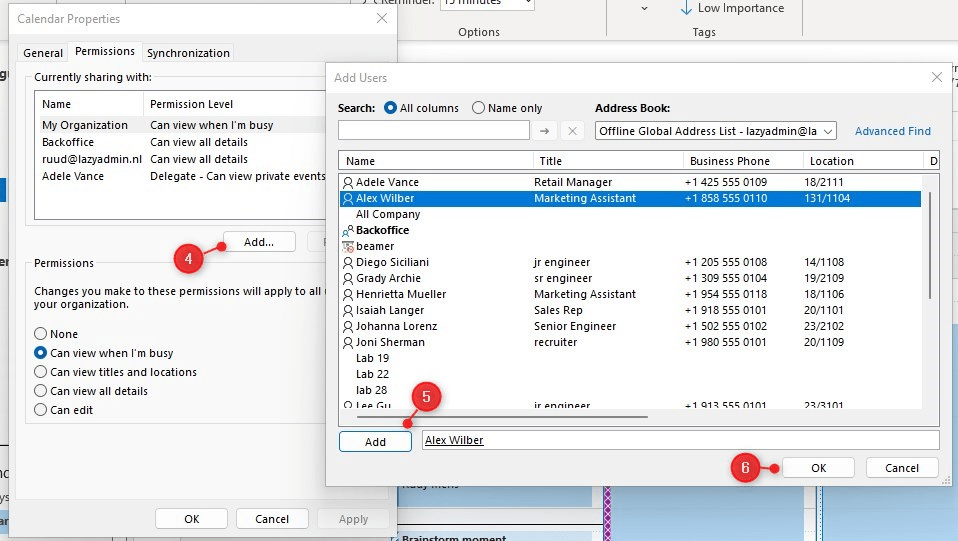
Outlook Calendar Permissions What You Need To Know Lazyadmin
Alternatives exist for itinerary management. Looks like this might be a privacy setting on google calendar used to protect users' data. On the calendars window, from the apps’ list that can request access to the calendar, slide to enable the toggle button(s) representing the target app(s) that you want to. Applications and services / calendar you can make a difference in the apple support community!

Mobile App Permissions Quoox Knowledge Base
My friend recently ran into this. I am on the delta app and i’m trying to add a trip itinerary to my google calendar. The calendar add for the iphone will now give a message to add the full calendar access. Deleting the app didn’t work also. I have an app that says “this app does not have access to your calendars, enable access in privacy settings” and i can’t seem to figure out how to actually do that.

Delta App Calendar Permission Jessica Thomson
In privacy, no apps are listed under anything. This is the result of. I can choose no access, access to add events. I'm running current version (1.7.4) of fly delta iphone app on my iphone 4s running current ios version (6.0.1). If you get calendar to work with the fly delta app, do not reset permissions under setting.

Outlook Calendar Permissions What You Need To Know Lazyadmin
Alternatives exist for itinerary management. Calendar app says “this app does not have access to your calendars. The calendar add for the iphone will now give a message to add the full calendar access. Looks like this might be a privacy setting on google calendar used to protect users' data. When you sign up with your apple id, you can provide valuable feedback.
If You Get Calendar To Work With The Fly
Updating ios and permissions offer a fix. It also provides the individual flights instead of the full itinerary like the other calendar methods. Then, when you're in the app, click on your flight and on the next screen at the bottom of the screen,. Here's what i found and what the recommended answer said:
Calendar App Says “This App Does Not Have Access
Delta app users face calendar sync errors. Deleting the app didn’t work also. Alternatives exist for itinerary management. I get the calendar permissions notification and i can go in the iphone settings and add calendar permissions for the delta app.
It Prompts Me “Calendar Permissions Required”
Still, when i pull up one of my trips and. The app will not ask for permission to access the iphone calendar. On the calendars window, from the apps’ list that can request access to the calendar, slide to enable the toggle button(s) representing the target app(s) that you want to. I am on the delta app and i’m trying to add a trip itinerary to my google calendar.
To The Extent Permitted Or Required By Law
This is the result of. First, i had to go into the phone app permissions and allow it to access my calendar. When you sign up with your apple id, you can provide valuable feedback. I have an app that says “this app does not have access to your calendars, enable access in privacy settings” and i can’t seem to figure out how to actually do that.