 National Holiday Calendar
Excel Drop Down List Calendar - That will open up the excel options dialog box. Here’s an example of a date picker in excel. Data validation is an important in microsoft excel. Start by selecting the cell where you want the. In cell b2, create a drop down list that shows all the month names. Below are the steps to create the.
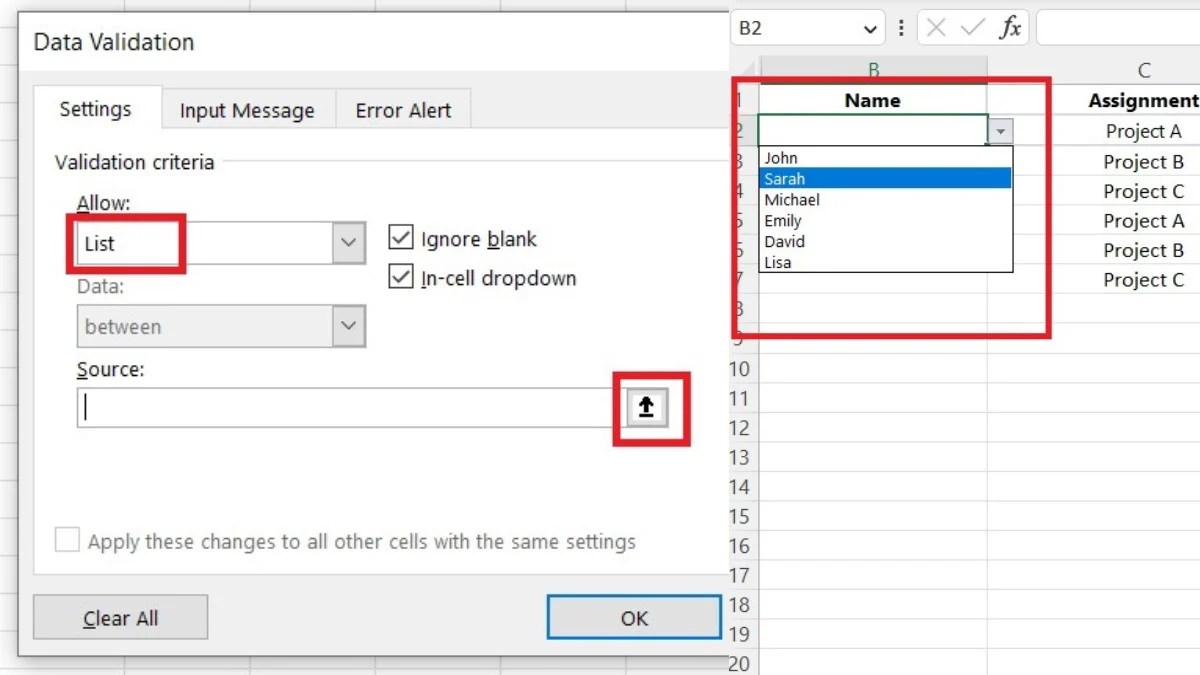
How To Create Drop Down List In Excel
Here’s an example of a date picker in excel. Below are the steps to create the. By following a few simple steps, you can create a list that. Setting up the excel spreadsheet involves entering the dates for. Hello, i am leonielhou, an independent advisor and a user like you, i am happy to help clarify any questions you may have.

How To Create A Drop Down List Calendar (Date
Learn how to integrate this feature into your spreadsheets to boost efficiency seamlessly. Scroll down and choose microsoft date and time picker control. This can be a valuable tool for. Here’s an example of a date picker in excel. That will open up the excel options dialog box.

How To Create A Dropdown Calendar In Excel Excelnotes
Microsoft’s date picker control is only available in 32. It primarily involves enabling the developer tab, inserting a date picker control, and linking it to a cell. For this, you need to use the names that we already have in the month names sheet. In cell b2, create a drop down list that shows all the month names. If there’s adevelopertab on the ribbon on the top, you can skip this step.

Excel 2020 Calendar Drop Down Calendar Template 20242025
In this tutorial, we will walk through the steps to set up a drop down calendar in excel, as well as how to customize it to fit your specific needs. By following a few simple steps, you can create a list that. Start by selecting the cell where you want the. Hello, i am leonielhou, an independent advisor and a user like you, i am happy to help clarify any questions you may have.

Calendar Drop Down List Excel Latest News Update
Scroll down and choose microsoft date and time picker control. In cell b2, create a drop down list that shows all the month names. With drop down calendar in excel worksheet, you can easily select a specific date from it without manually typing. That will open up the excel options dialog box. Here’s an example of a date picker in excel.
If There’s Adevelopertab On The Ribbon On The Top
It primarily involves enabling the developer tab, inserting a date picker control, and linking it to a cell. In cell b2, create a drop down list that shows all the month names. Microsoft’s date picker control is only available in 32. Data validation is an important in microsoft excel.
Below Are The Steps To Create The
Here’s an example of a date picker in excel. This can be a valuable tool for. Hello, i am leonielhou, an independent advisor and a user like you, i am happy to help clarify any questions you may have. This tutorial shows you how to create a calendar in excel worksheet using the.
By Following A Few Simple Steps
With drop down calendar in excel worksheet, you can easily select a specific date from it without manually typing. Scroll down and choose microsoft date and time picker control. Learn how to integrate this feature into your spreadsheets to boost efficiency seamlessly. That will open up the excel options dialog box.
Drop Down Calendar In Excel
Calendar drop downs in excel simplify date selection and reduce data entry errors. Setting up the excel spreadsheet involves entering the dates for. We can apply drop down list based on date validation.this video will explain how to create drop down list. Start by selecting the cell where you want the.