 National Holiday Calendar
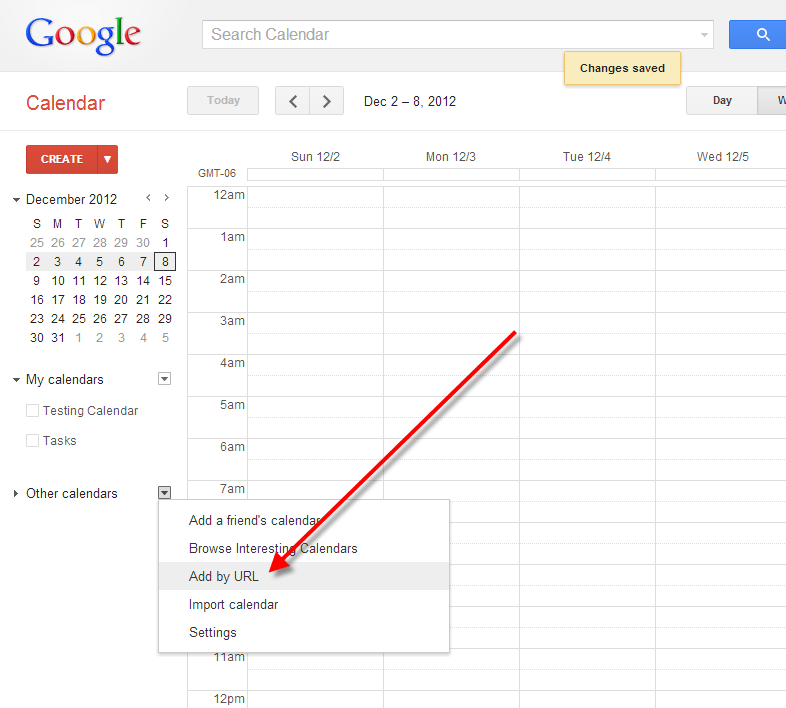
Google Calendar Add By Url - Go to google calendar and sign in if necessary. Google calendar allows you insert an ics file by adding an url (we are pointing to the web url that the ics file has been posted to). To let anyone save your calendar event, you'll need to make. You can add a google calendar button to your website so visitors can quickly save your event on their own google calendars. Then in google calendar, look for the add by url option in the calendar management pane (to the left of your main calendar window). Google maps, google drive) go to the app’s.
How To Add Url In Google Calendar
Log into your google calendar. Click the cog (gear) icon > select settings > select a particular calendar from the left sidebar. How to share a google calendar using a url. How to add a url to google calendar. Log in to your google.

Google Calendar Addon Pumble™
How to add a url to google calendar. In this video i'll show you how to add a shared calendar ics url to your google calendar. We then input the url of the. Sharing google calendar availability using onecal. If you want to link to a google calendar from other apps, you can use the following steps:

Google Workspace How To Add A Zoom Link
We then input the url of the. Log in to your google. If someone emails you a calendar link, use this method to add it to your list of calendars. To let anyone save your calendar event, you'll need to make. Onecal is an appointment scheduling app that.

How To Add Url To Google Calendar Mirna Tamqrah
This is usually not an issue, but it’s good to check that your calendar is set to. Sharing google calendar availability using onecal. Onecal is an appointment scheduling app that. The first way you will see below provides a link that lets another person subscribe to your calendar. You can add a google calendar button to your website so visitors can quickly save your event on their own google calendars.

Google Calendar How To Add Your Outlook Calendar
You need to do that using the web interface instead of the app. To be clear, you can only do this through the google calendar websi. You can find your calendar address in your calendar settings. Click on the + sign next to other calendars in the left column. If you want to link to a google calendar from other apps, you can use the following steps:.
Open The App You Want To Link To (E.g
Log in to your google. Onecal is an appointment scheduling app that. To import a google calendar into a url, open google calendar on the web. One of the easiest ways to share a google calendar is by just importing other calendars using a url.
How To Share A Google Calendar Using A Url
Sharing google calendar availability using onecal. Log into your google calendar. Click on the + sign next to other calendars in the left column. Google calendar allows you insert an ics file by adding an url (we are pointing to the web url that the ics file has been posted to).
In This Video I'll Show You How To Add
In this article, we will guide. Adding a url to google calendar is a straightforward process. Click the cog (gear) icon > select settings > select a particular calendar from the left sidebar. On the left, find “other calendars.” click the + button next to it.
To Let Anyone Save Your Calendar Event
Google calendar provides a couple ways you can share your calendar. The first way you will see below provides a link that lets another person subscribe to your calendar. If someone emails you a calendar link, use this method to add it to your list of calendars. Then in google calendar, look for the add by url option in the calendar management pane (to the left of your main calendar window).