 National Holiday Calendar
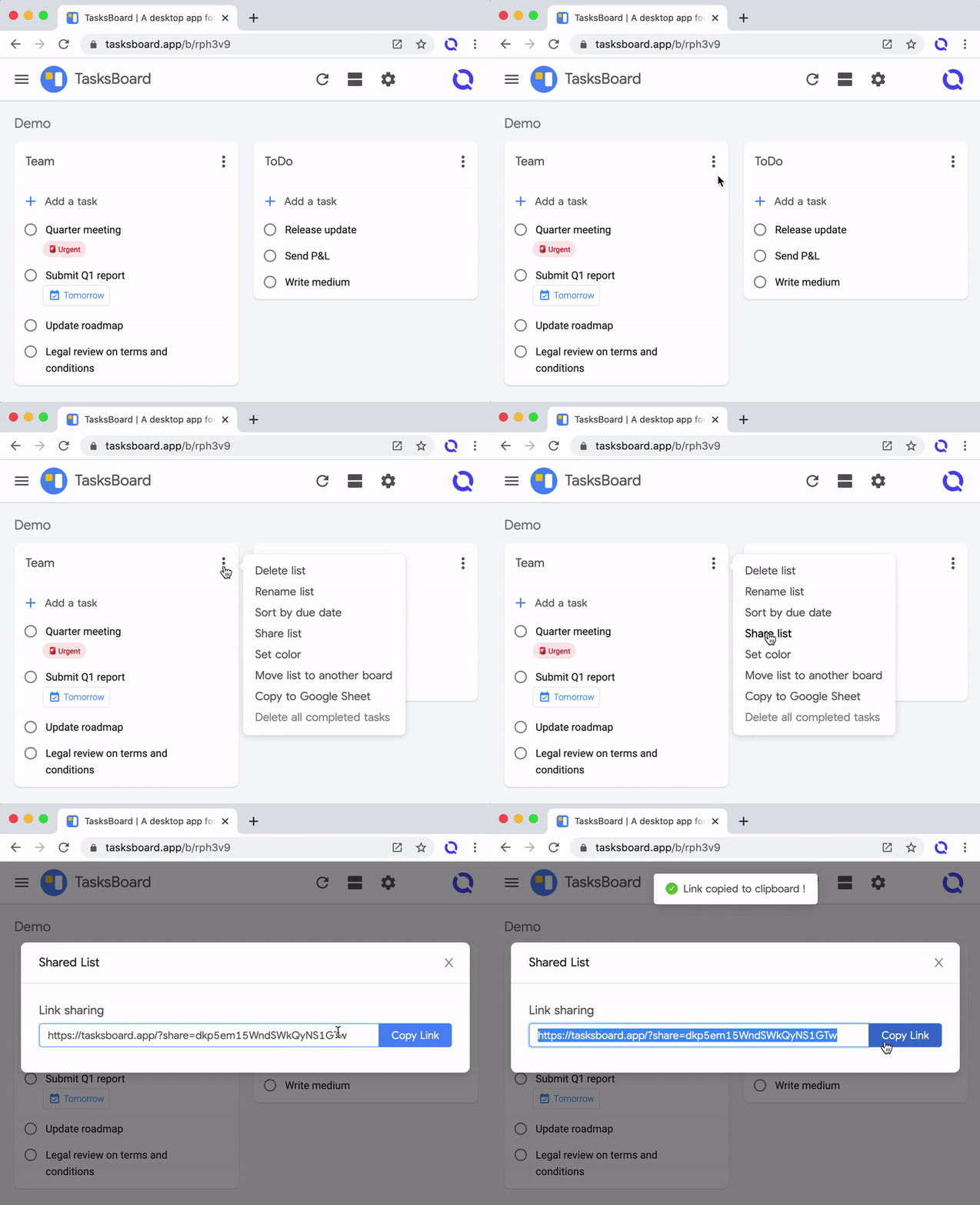
Google Calendar Share Tasks - Visit the help center to learn more about sharing your calendar with someone. To share tasks in google calendar, you can follow these steps: How to share tasks in google calendar. Google calendar is a powerful tool that allows you to schedule events, appointments, and tasks with others. It looks like taskboard is a 3rd party app that tries to overcome this. Sharing google calendar availability using onecal.

How To Share Google Calendar Plus
If you’re looking for more flexibility, onecal is a great alternative. Go to calendar.google.com and log in with your google account credentials. In google calendar, you can create, view, and change tasks. To share tasks in google calendar, you can follow these steps: Start by opening google calendar on your computer.
How Do I Share My Google Tasks With Someone?
On your computer, open google calendar. Go to calendar.google.com and log in with your google account credentials. There might not be a straightforward way, but there are a few methods to share google tasks with others, and the article talks about four. Once you’re in your calendar, locate the calendar you want to. In this article, we will explore how to share tasks in google calendar, including.

How To Add Tasks To Google Calendar
Sharing google calendar availability using onecal. Start by opening google calendar on your computer. The quickest way to share google. Just open the option menu of the list you want to share and. Go to calendar.google.com and log in with your google account credentials.
How To Add Tasks In Google Calendar
One of the most useful features of google calendar is the ability to share tasks with others. Sharing google calendar tasks is a useful feature that enables colleagues, team members, or friends to access and participate in your calendar events. By following the steps outlined in this article, you. When shared tasks are assigned to you: Start by opening google calendar on your computer.

How To Share Google Calendar The Full Guide! Upphone
It's similar to sharing a note on google keep: It’s simple to do and can help with coordinating meetings or events. Sharing google calendar availability using onecal. To share a task with someone, click on the share button in the top right corner of the. Struggling to find the perfect meeting time?
Google Docs For Eligible Google Workspace Plans
You'll need to approach their support. A space in google chat. For calendars where a user has “make changes to events” (aka “writer”). To share a task list, follow these steps:
The Quickest Way To Share Google
You can create and assign a shared task in: Once you’re in your calendar, locate the calendar you want to. It looks like taskboard is a 3rd party app that tries to overcome this. Struggling to find the perfect meeting time?
In Google Calendar
When shared tasks are assigned to you: Learn how to share tasks on google calendar in just a few clicks with our simple step by step guide. On your computer, open google calendar. It's similar to sharing a note on google keep:
Learn About Shared Tasks In Chat
Sharing google calendar availability using onecal. When it comes to sharing task lists, several essential features stand out: Shared tasks go into your default list in tasks, but you can move. Sharing calendars is a fantastic way to collaborate with.