 National Holiday Calendar
How Do You Propose A New Time In Google Calendar - This month sees new sign in options for g suite, proposed meeting times in the google calendar, and google+ integration in new google sites. If you’re using google calendar on your phone, you will also be able to propose a new time for an invited event/meeting. This feature allows you to suggest a different time that works better for you, without the hassle of starting. Proposing a new time on google calendar is a crucial step in scheduling meetings, appointments, and events with others. Google calendar has a convenient feature that allows you to propose a new time to accommodate everyone’s availability. Locate the date of the target event and click.

Propose New Time On Google Calendar Jinny Lurline
Locate the date of the target event and click. Proposing a new time on google calendar is a crucial step in scheduling meetings, appointments, and events with others. By considering the important factors and tips and tricks outlined in. If you’re using google calendar on your phone, you will also be able to propose a new time for an invited event/meeting.
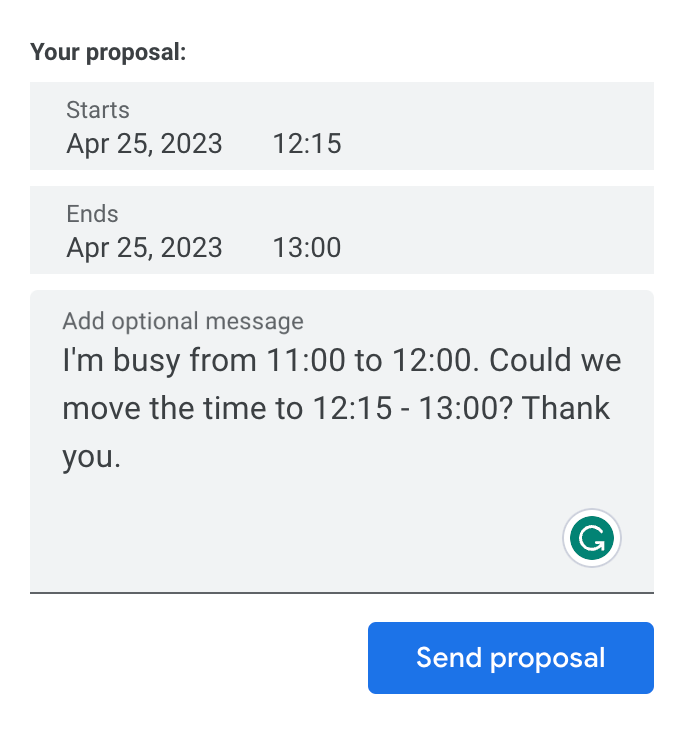
How To Propose A New Time In Google Calendar
Google keep reminders also appear in calendar. To propose a new time on google calendar for the web, follow these simple steps: Proposing a new time on google calendar is a crucial step in scheduling meetings, appointments, and events with others. Locate the date of the target event and click. Proposing a new time means suggesting a new time slot for an event or meeting to another user.

Propose New Time On Google Calendar Jinny Lurline
Proposing a new time on google calendar is a crucial step in scheduling meetings, appointments, and events with others. Locate the date of the target event and click. In this article, we will guide you through the process. How to propose a new time on phone. In google calendar, the “propose a new time” feature allows participants to suggest an alternative time for an event they have been invited to.

Google Calendar Propose A New Time Kelsy Mellisa
Proposing a new time in google calendar is a straightforward process that can be completed in a few steps. In this article, we’ll explore how to propose a new time in google calendar both on your phone and pc, ensuring that you stay organized and efficient in your daily life. If you’re using google calendar on your phone, you will also be able to propose a new time for an invited event/meeting.

How To Propose A New Time In Google Calendar
This feature is particularly useful when you need to schedule a meeting with a. In google calendar, the “propose a new time” feature allows participants to suggest an alternative time for an event they have been invited to. In this article, we will guide you through the process. In this article, we’ll explore how to propose a new time in google calendar both on your phone and pc, ensuring that you stay organized and efficient in your daily life.
This Feature Allows You To Suggest A Different Time
This month sees new sign in options for g suite, proposed meeting times in the google calendar, and google+ integration in new google sites. Smart suggestions for event titles. Proposing a new time on google calendar is a crucial step in scheduling meetings, appointments, and events with others. To propose a new time on google calendar for the web, follow these simple steps:
Open Google Calendar On Your Browser
If you’re using google calendar on your phone, you will also be able to propose a new time for an invited event/meeting. Instead of canceling, you can easily propose a new time using google calendar. Proposing a new time means suggesting a new time slot for an event or meeting to another user. How to propose a new time on phone.
Proposing A New Time In Google Calendar
In google calendar, the “propose a new time” feature allows participants to suggest an alternative time for an event they have been invited to. In this article, we will guide you through the process. By considering the important factors and tips and tricks outlined in. Locate the date of the target event and click.
If You Are Sent An Invitation To
Click on the scheduled event’s name. To propose a new time/date on mobile/app, open the google calendar on your device. In this article, we explored the steps of setting up your google calendar, understanding the need for a new time proposal, and utilizing the new time proposal feature. Find the event and tap it.