 National Holiday Calendar
How Import Other Calendars Into Google Calendar - If you have events in another calendar program or. Alternatively, you can click on import calendar. In this article, we will explore the different ways to import other calendars into google calendar. If you own a calendar, and your google account is deleted, your calendar will also be deleted. On ios and ipados, tap calendars, then the info (“i”) button next to a calendar, then add person. When you import an event, guests and conference data for that event will not be.

Import Apple Calendar To Google
Copying all events from one google calendar into another requires you to export the calendar first. Under connect calendar, click on. You will want to import your events on other calendars into your google calendar. You can transfer your events from a different calendar application or google account to google calendar. Remember to follow step by step for the best results.

Google Calendar On Iphone
Importing events from another calendar: Here's how you can do it:. If you own a calendar, and your google account is deleted, your calendar will also be deleted. Importing other calendars into google calendar can streamline your scheduling, reduce data entry, and increase productivity. If you have events in another calendar program or.

Import Apple Calendar To Google
Select import a calendar from a file. When you import an event, guests and conference data for that event will not be. The first step in integrating google calendar with google sheets is setting up the google calendar api. If you have events in another calendar program or. In this article, we will explore the different ways to import other calendars into google calendar.

Google Calendar On Iphone
Google calendar supports various calendar formats for import, including: Importing events from another calendar: When you import an event, guests and conference data for that event will not be. Under connect calendar, click on. To start, sign in to your google account using your.
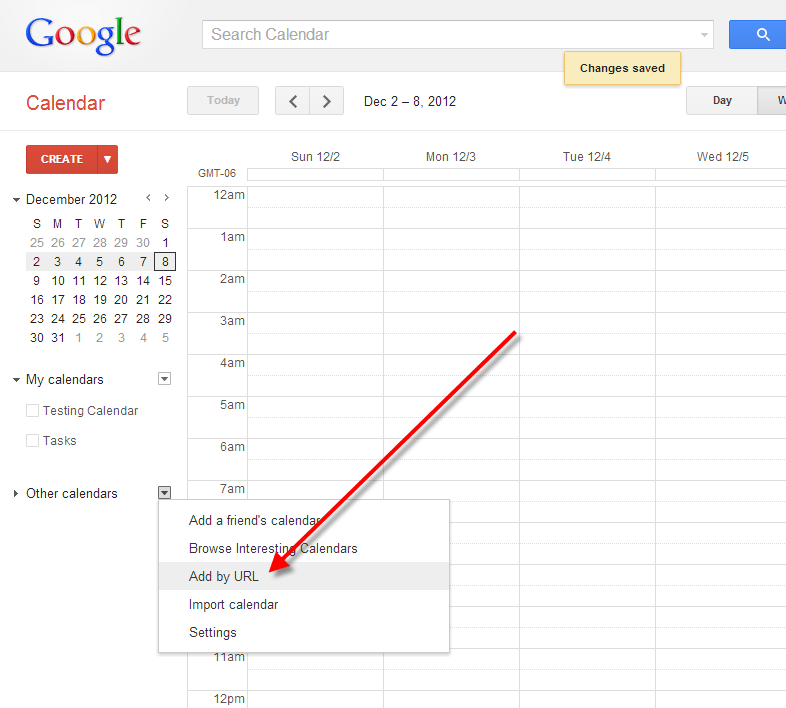
How To Import A Calendar Into Google Calendar
If you own a calendar, and your google account is deleted, your calendar will also be deleted. Learn how transferred google calendar event settings apply. Google calendar is a great tool for keeping track of your schedule. Then you can import the calendar file into a separate calendar. However, sometimes, you may need to import calendars from other sources, such as outlook, ical, or csv files, into google calendar.
In This Article
When you import an event, guests and conference data for that event are not imported. If you own a calendar, and your google account is deleted, your calendar will also be deleted. Google calendar supports various calendar formats for import, including: To save the calendar, transfer.
Then You Can Import The Calendar File
Alternatively, you can click on import calendar. Select import a calendar from a file. Importing these calendars into google calendar can help you stay. In this article, we will guide you through.
Log Into Your Facebook Account
Click + next to other calendars select create new calendar add a name and description, then save. Set up a google calendar account (if you don’t already have one) to start, create a new. Google calendar is a great tool for keeping track of your schedule. How to import a calendar into google calendar.
Importing Other Calendars Into Google Calendar Can Streamline
Copying all events from one google calendar into another requires you to export the calendar first. However, sometimes, you may need to import calendars from other sources, such as outlook, ical, or csv files, into google calendar. Here's how you can do it:. To start, sign in to your google account using your.