 National Holiday Calendar
How To Add Url To Google Calendar - Google maps, google drive) go to the app’s. Log in to your google. Click the image, press ctrl + k (cmd + k on mac), and paste the link. Creating a meeting link that doesn't expire is simple. Log into your google calendar. When using a form or survey to collect event registration, you may want to provide respondents with a url that allows them to directly add a google calendar event directly to their own.

How To Share Your Google Calendar
Google calendar provides a couple ways you can share your calendar. The first way you will see below provides a link that lets another person subscribe to your calendar. Can i link to a google drive file? To be clear, you can only do this through the google calendar websi. If you want to link to a google calendar from other apps, you can use the following steps:.

How To Add Url In Google Calendar
How to add a url to google calendar. Adding a url to google calendar is a straightforward process. If you’re looking for more flexibility, onecal is a great alternative. If you want to link to a google calendar from other apps, you can use the following steps: You need to do that using the web interface instead of the app.

How To Generate Urls To Add Events To Google
Adding a url to google calendar is a straightforward process that allows you to integrate external calendars or specific events into your schedule. In this video i'll show you how to add a shared calendar ics url to your google calendar. Log into your google calendar. If you want to link to a google calendar from other apps, you can use the following steps: Select ‘copy’ or select the url link and.
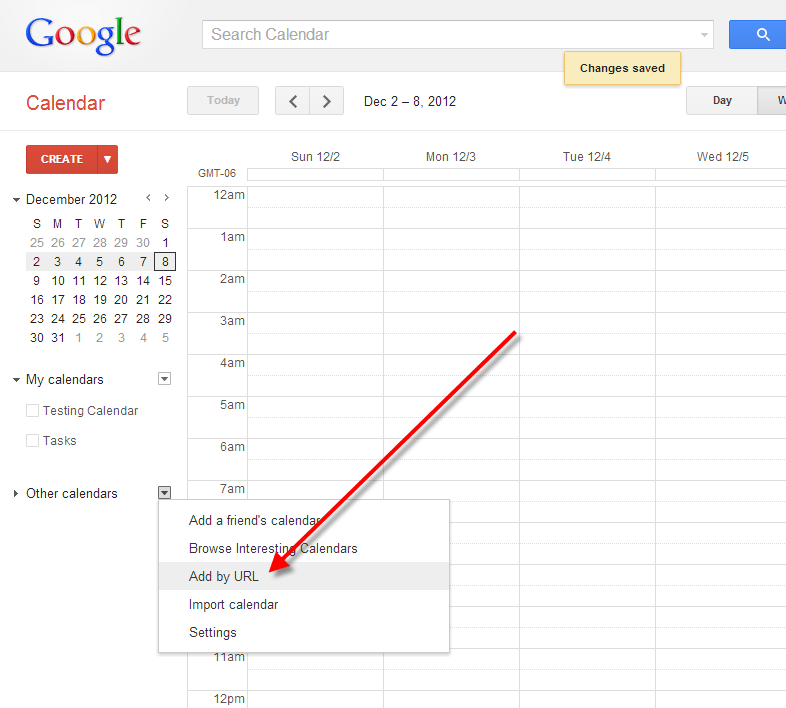
How To Add A Url To Google Calendar Abbye
From your google calendar, click the plus sign next to “other calendars” on the left menu. The first way you will see below provides a link that lets another person subscribe to your calendar. Can i link to a google drive file? Onecal is an appointment scheduling app that. Click on the + sign next to other calendars in the left column.

How To Add Url To Google Calendar Mirna Tamqrah
Adding public and friends’ calendars to your own google calendar account is quick and easy, as we have explained before. Onecal is an appointment scheduling app that. If you want to link to a google calendar from other apps, you can use the following steps: Creating a meeting link that doesn't expire is simple. Open the app you want to link to (e.g.
Click From Url. Paste Your Calendar Feed Url
You need to do that using the web interface instead of the app. Creating a meeting link that doesn't expire is simple. If someone emails you a calendar link, use this method to add it to your list of calendars. Adding public and friends’ calendars to your own google calendar account is quick and easy, as we have explained before.
In This Article, We Will Guide
How to add a url to google calendar. Select ‘copy’ or select the url link and. Can i link to a google drive file? Google calendar provides a couple ways you can share your calendar.
Open The App You Want To Link To (E.g
Click on the three dots to enable the option menu. But what if the information given to you was a. From your google calendar, click the plus sign next to “other calendars” on the left menu. Click on the + sign next to other calendars in the left column.
Visit The Google Meet Website Or Open The
Click the image, press ctrl + k (cmd + k on mac), and paste the link. Google maps, google drive) go to the app’s. Google calendar allows you insert an ics file by adding an url (we are pointing to the web url that the ics file has been posted to). This help content & information general help center experience.