 National Holiday Calendar
How To Add Work Hours To Google Calendar - On the top right, click the gear icon and choose “settings.” expand general on the top left and select “working hours &. Open the google calendar app. So, head to google calendar on the web and sign in. Click on the create a calendar button. 2 show a secondary time zone. One of the most important features of google calendar is the ability to set working hours, which allows you to block out specific times of the day when you are available to work.

How To Set Work Hours In Google Calendar
The first step is to open your google calendar. Sign in to your google account. Log in to your google account and open google. Open google calendar on the web. On the top right, click the gear icon and choose settings. expand general on the top left and select working hours &.

Office Hours Google Calendar
Sign in to your google account. The first step is to open your google calendar. Access your google calendar account. Click on the create a calendar button. So, head to google calendar on the web and sign in.

Unblocking Hours In Google Calendar Lisa By Dynasty Support
2 show a secondary time zone. Log in to your google account and go to the google calendar website. The first step is to open your google calendar. So, head to google calendar on the web and sign in. To add a different location, type it in the bar at the top.
Using Google Calendar
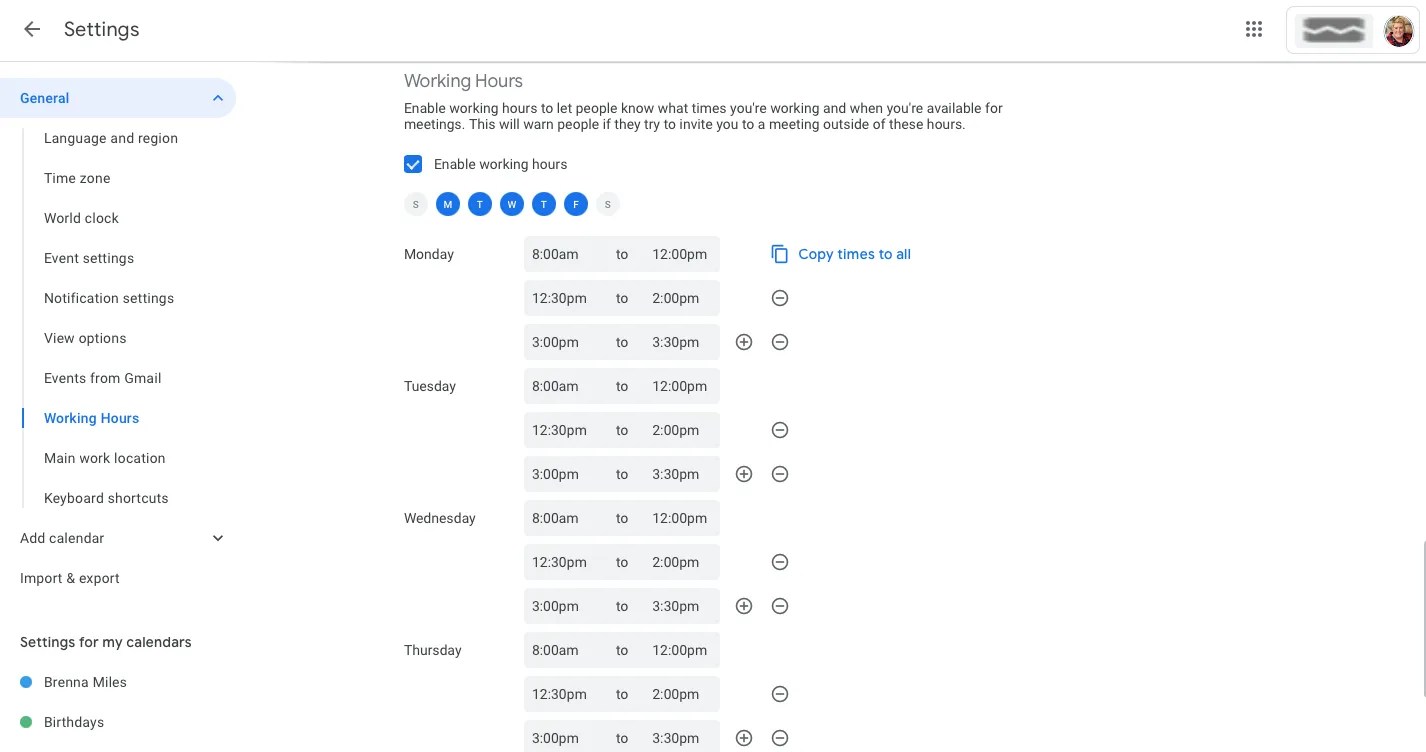
Here’s how to set working hours in google calendar. Go to google.com/calendar and sign in with your. To set working hours on google calendar, you need to access your calendar first. Select working hours & location under general. To add a different location, type it in the bar at the top.

How To Set Working Hours In Google Calendar
Log in to your google account and go to the google calendar website. Whether you’re using the web browser, mobile app, or an apple device,. Log in to your google account and open google. Select working hours & location under general. On the top right, click the gear icon and choose “settings.” expand general on the top left and select “working hours &.
2 Show A Secondary Time Zone
Click the gear icon on the top right. If you don't see the working hours or location option, your admin could have turned it off for your organization. In this post, we’ll walk you through the simple steps to set up your work hours and work location in google calendar. Tick the box next to enable working hours.
Sign In To Your Google Account
Setting working hours in google calendar is a simple process that can help you manage your time and schedule more effectively. Log in to your google account and open google. You can do this by going to the google calendar website or opening the google. To add a different location, type it in the bar at the top.
Head To Google Calendar On The Web And Sign
Adding work hours to google calendar is a straightforward process. Choose a calendar name and set the calendar type to personal. On the top right, click the gear icon and choose “settings.” expand general on the top left and select “working hours &. Open google calendar on the web.
The First Step Is To Open Your Google Calendar
One of the most important features of google calendar is the ability to set working hours, which allows you to block out specific times of the day when you are available to work. Sign in to your google calendar account using your google. You can use working hours and availability if your account is through your work or school organization. So, head to google calendar on the web and sign in.