 National Holiday Calendar
How To Cancel An Event On Google Calendar - Select the event you want to cancel. Google calendar is a powerful tool for organizing your schedule, but sometimes plans change, and you may need to cancel an event. Canceling an event on google calendar is a pretty straightforward process. Enter a reason for cancelling the event. Go to the date on the calendar that the event you want to cancel is on. When you cancel a google calendar event, you have the option to update everyone as to why it’s being cancelled.

How To Cancel A Meeting On Google Calendar
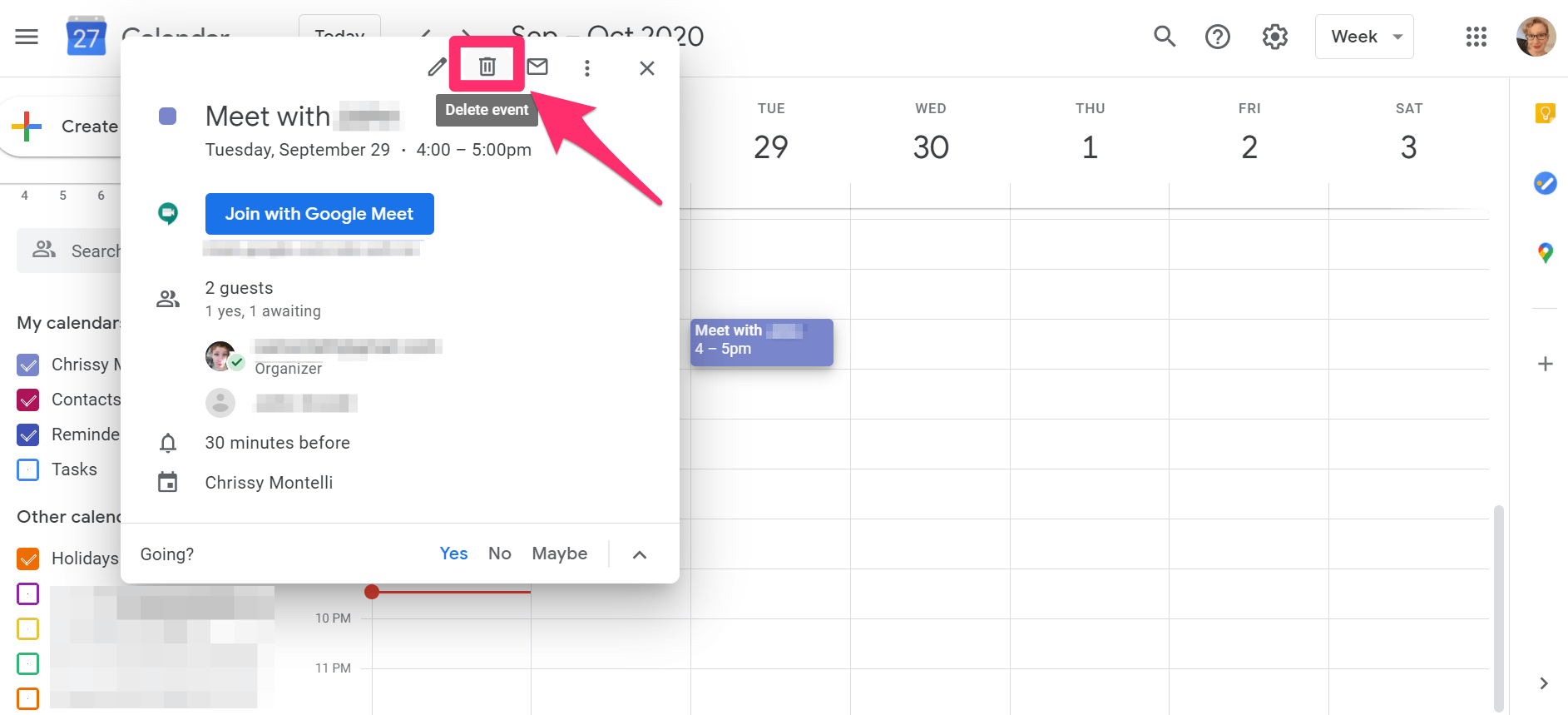
Click the event you want to delete. Click on the three dots on the top. If you’re using the google calendar app on your mobile device, you can also remove all events from your calendar using the app’s settings. In this comprehensive guide, we’ll walk you through the detailed process of canceling a google calendar event, notifying your guests, and even rescheduling if necessary.

How To Cancel An Event In Google Calendar
When you cancel a google calendar event, you have the option to update everyone as to why it’s being cancelled. Canceling an event on google calendar is a simple process that can be done in just a few steps. To cancel an event in google calendar, follow these steps: Google calendar is a powerful tool for organizing your schedule, but sometimes plans change, and you may need to cancel an event.

How To Cancel A Google Calendar Event
Google calendar no longer observes cultural holidays like black history month, indigenous people's month, and jewish american heritage month. The method for canceling google calendar. Why use google calendar to cancel an event? From your desktop computer or laptop, open google calendar. Click on the three dots on the top.
How To Cancel Event On Google Calendar
Learning how to cancel a scheduled event on google calendar can help you remain organized and keep other participants informed of recent plan changes. Click on the event you want to cancel. To cancel an event in google calendar, follow these steps: Let's dive in and ensure your calendar stays organized and tailored to your preferences. This guide will walk you through the various methods to cancel a google calendar event, whether it’s a single event, a recurring event, or an event with multiple attendees.

How To Cancel A Google Calendar Event
In this post, we’ll explain how to cancel a google calendar event notifying guests and how you can do it both on your computer and smartphone. Follow the easy steps with example images and tips. From your desktop computer or laptop, open google calendar. Let's dive in and ensure your calendar stays organized and tailored to your preferences. This guide will walk you through the various methods to cancel a google calendar event, whether it’s a single event, a recurring event, or an event with multiple attendees.
To Delete An Event From Your Google Calendar
When you cancel a google calendar event, you have the option to update everyone as to why it’s being cancelled. Click the trash can icon to delete the event. The method for canceling google calendar. Click the event you want to delete.
Click On The Three Dots On The Top
You just need to open the event, click on the delete button, and confirm the cancellation. Google calendar no longer observes cultural holidays like black history month, indigenous people's month, and jewish american heritage month. Learn how to cancel a google calendar event for organizers and attendees, and how to cancel recurring events. Why use google calendar to cancel an event?
Click On The Event You Want To Cancel
Canceling an event on google calendar is a pretty straightforward process. Enter a reason for cancelling the event. To proceed, follow these steps: This guide will walk you through the various methods to cancel a google calendar event, whether it’s a single event, a recurring event, or an event with multiple attendees.
Canceling An Event On Google Calendar Is A Simple
Learning how to cancel an event in google calendar is easy and features an automatic notification system to reach out to event guests. In this guide, we'll explore how to cancel a google calendar event or how to cancel event on google calendar, addressing potential limitations and suggesting alternative approaches for a more streamlined calendar experience. Let's dive in and ensure your calendar stays organized and tailored to your preferences. Learning how to cancel a scheduled event on google calendar can help you remain organized and keep other participants informed of recent plan changes.