 National Holiday Calendar
How To Create A Calendar Drop Down In Excel - Creating a drop down calendar in excel is quick and easy. Simply follow the steps of entering data validation, choosing the criteria to allow a date range, and then selecting the option to show. You will also learn a quick way to create a printable calendar based on. There are numerous activex controls available to be used in excel, but they. One of the useful features in excel is the calendar drop down, which allows users to select dates from a calendar interface instead of manually typing them. It primarily involves enabling the developer tab, inserting a date picker control, and linking it to a cell.

How To Create A Calendar Drop Down List In Excel
You will also learn a quick way to create a printable calendar based on. It primarily involves enabling the developer tab, inserting a date picker control, and linking it to a cell. There are numerous activex controls available to be used in excel, but they. Scroll down and choose microsoft date and time picker control. Simply follow the steps of entering data validation, choosing the criteria to allow a date range, and then selecting the option to show.

How To Create A Dropdown Calendar In Excel Excelnotes
Simply follow the steps of entering data validation, choosing the criteria to allow a date range, and then selecting the option to show. There are numerous activex controls available to be used in excel, but they. Scroll down and choose microsoft date and time picker control. You will also learn a quick way to create a printable calendar based on.

Creating A Drop Down Calendar In Excel Lawpcpar
Simply follow the steps of entering data validation, choosing the criteria to allow a date range, and then selecting the option to show. Creating a drop down calendar in excel is quick and easy. Learn how to integrate this feature into your spreadsheets to boost efficiency seamlessly. Scroll down and choose microsoft date and time picker control. One of the useful features in excel is the calendar drop down, which allows users to select dates from a calendar interface instead of manually typing them.

Drop Down Calendar Excel 2016 Lawpcbuilding
You will also learn a quick way to create a printable calendar based on. It primarily involves enabling the developer tab, inserting a date picker control, and linking it to a cell. Scroll down and choose microsoft date and time picker control. There are numerous activex controls available to be used in excel, but they. One of the useful features in excel is the calendar drop down, which allows users to select dates from a calendar interface instead of manually typing them.
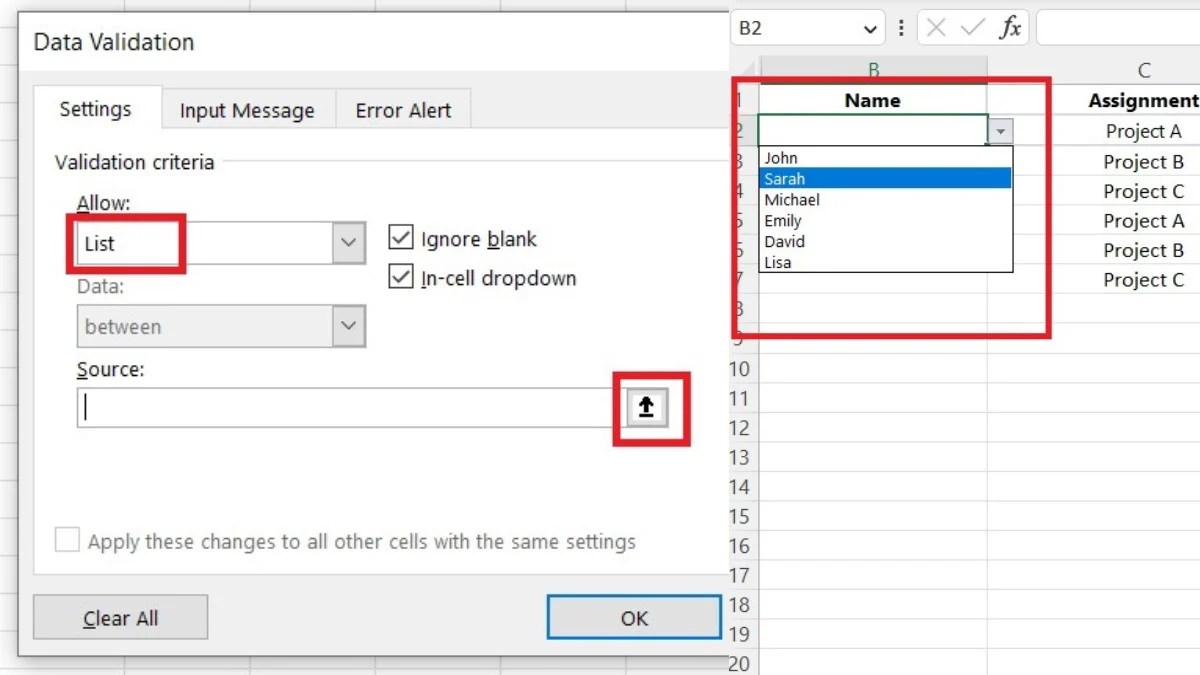
How To Create Drop Down List In Excel
One of the useful features in excel is the calendar drop down, which allows users to select dates from a calendar interface instead of manually typing them. Scroll down and choose microsoft date and time picker control. Simply follow the steps of entering data validation, choosing the criteria to allow a date range, and then selecting the option to show.
Simply Follow The Steps Of Entering Data Validation
Creating a drop down calendar in excel is quick and easy. There are numerous activex controls available to be used in excel, but they. You will also learn a quick way to create a printable calendar based on. Learn how to integrate this feature into your spreadsheets to boost efficiency seamlessly.
A Calendar
Scroll down and choose microsoft date and time picker control. It primarily involves enabling the developer tab, inserting a date picker control, and linking it to a cell.