 National Holiday Calendar
How To Create New Calendar In Google - On the right, click tasks. Select the appointment duration and your availability. Customize how you meet with others. Add a name and description for your calendar. When you create a new appointment schedule, you need to: On the left, next to other calendars, click add other calendars create new calendar.

Google Calendar Create New Calendar Tally Felicity
Add a name and description for your calendar. When you create a new appointment schedule, you need to: Check the box next to “enable keyboard shortcuts.” at the bottom of the page, click save. On the left, next to other calendars, click add create new calendar. To use calendar in your browser, turn on javascript and cookies.

Create And Remove Calendars Customguide
When you turn on keyboard shortcuts, you can press keys to make changes to your google calendar and quickly navigate to certain pages. If you want to share your calendar, click on it in the left bar, then select share with specific people. If you manage a shared space, like a conference room or basketball court, you can create a calendar for the space and let people book time in it.

Google Calendar Android
If you want to share your calendar, click on it in the left bar, then select share with specific people. Add a name and description for your calendar. Learn about supported browsers for calendar. Check the box next to “enable keyboard shortcuts.” at the bottom of the page, click save. Add the name of the calendar (for example, marketing team calendar), a description, and a time zone.
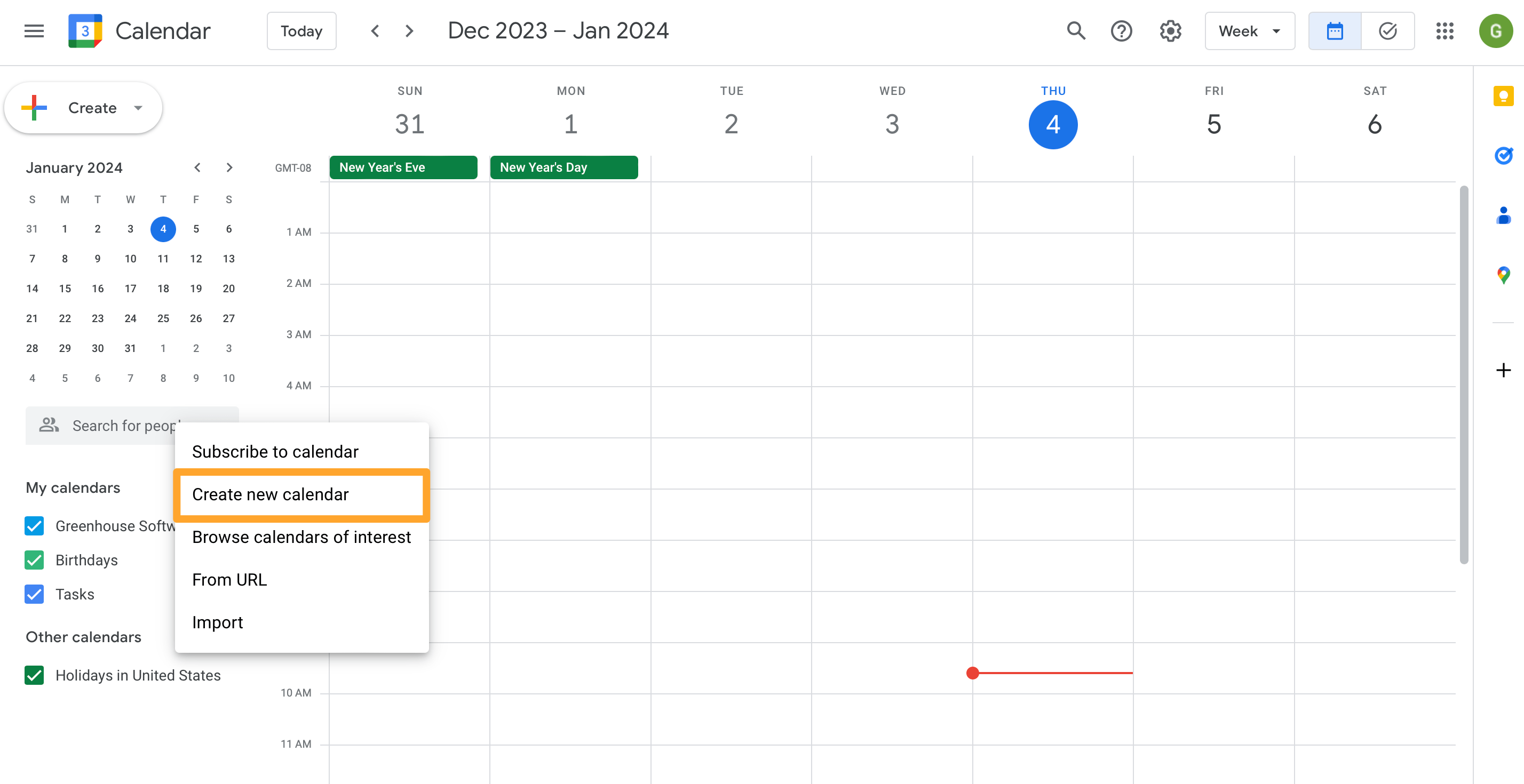
Create A Shared Calendar With Google Calendar Greenhouse Support
On your computer, open google calendar. Add the name of the calendar (for example, marketing team calendar), a description, and a time zone. Check the box next to “enable keyboard shortcuts.” at the bottom of the page, click save. On the right, click tasks. If you're using google calendar through your work, school, or organization, learn how.

How To Create A Shared Google Calendar? Kanbanchi
On the right, click tasks. To use calendar in your browser, turn on javascript and cookies. On the left, next to other calendars, click add other calendars create new calendar. This help content & information general help center experience. Select the appointment duration and your availability.
This Help Content & Information General Help Center Experience
If you manage a shared space, like a conference room or basketball court, you can create a calendar for the space and let people book time in it. When you turn on keyboard shortcuts, you can press keys to make changes to your google calendar and quickly navigate to certain pages. When you create a new appointment schedule, you need to: On your computer, open google calendar.
Customize How You Meet With Others
Add a name and description for your calendar. On the left, next to other calendars, click add create new calendar. If you want to share your calendar, click on it in the left bar, then select share with specific people. In the top right corner, click settings settings.
On The Left
At the top, click the down arrow. On the right, click tasks. If you're using google calendar through your work, school, or organization, learn how. Select the appointment duration and your availability.
With Google Calendar, You Can
Add a name and description for your calendar. Click create a new list. Add the name of the calendar (for example, marketing team calendar), a description, and a time zone. On the left, next to other calendars, click add other calendars create new calendar.