 National Holiday Calendar
How To Import A Calendar Into Google Calendar - Once the export is complete, log in to your google calendar account and click on the gear icon in the upper right corner. To create a reminder, tap or click on the +. Apple calendar recently got the ability to manage reminders, so you don’t need to jump between two different apps as much. When you import an event, guests and conference data for that event are not imported. You can transfer your events from a different calendar application or google account to google calendar. When you import an event, guests and conference data for that event are not imported.

Import Google Calendar Into Excel And Word
It can help you to quickly and easily add. When you import an event, guests and conference data for that event will not be. You can transfer your events from a different calendar application or google account to google calendar. To create a reminder, tap or click on the +. Choose a file with the following format:
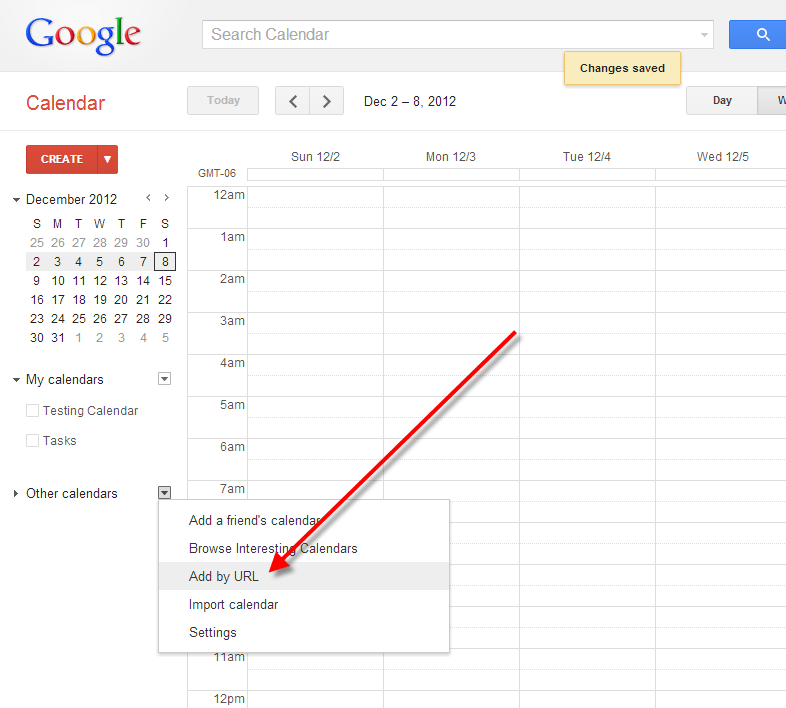
How To Import A Calendar Into Google Calendar
When you import an event, guests and conference data for that event are not imported. Choose a file with the following format: Alternatively, you can click on import calendar. There are several ways to import a calendar into google calendar, depending on the format of the calendar and the source of the data. If you would like to enter multiple google calendar events without creating each one individually, create a csv file of all your events, and then import that file into google.

Google Calendar On Iphone
Once the export is complete, log in to your google calendar account and click on the gear icon in the upper right corner. To import your calendar into google calendar, you need to create a new calendar. Google calendar supports various calendar formats for. Think of this as importing a guest list into a party. Importing events into google calendar from an excel or csv file is a straightforward process if you can use it correctly.

Google Calendar On Iphone
Once the export is complete, log in to your google calendar account and click on the gear icon in the upper right corner. This article will guide you on how to import a calendar into google calendar. Choose a file with the following format: To do this, follow these steps: Think of this as importing a guest list into a party.

How To Import Mac Calendar To Google Calendar David
Apple calendar recently got the ability to manage reminders, so you don’t need to jump between two different apps as much. Google calendar supports various calendar formats for. What types of calendars can be imported? There are several ways to import a calendar into google calendar, depending on the format of the calendar and the source of the data. Whether you’re switching from a different calendar app, combining multiple calendars, or simply wanting to backup your events, importing a calendar into google.
To Do This, Follow These Steps
It can help you to quickly and easily add. It's easy to copy google calendar events from one calendar to another, and you can even merge them all into one unified schedule. You can transfer your events from a different calendar application or google account to google calendar. Alternatively, you can click on import calendar.
Once The Export Is Complete
Whether you’re switching from a different calendar app, combining multiple calendars, or simply wanting to backup your events, importing a calendar into google. Go to the google calendar website ( calendar.google.com ) This article will guide you on how to import a calendar into google calendar. Importing a calendar into google calendar is a straightforward process that can help you streamline your scheduling, share and collaborate with others, and enhance visibility.
When You Import An Event
Importing csv into google calendar. Google calendar supports various calendar formats for. Select import a calendar from a file. If you would like to enter multiple google calendar events without creating each one individually, create a csv file of all your events, and then import that file into google.
Copying All Events From One Google
Apple calendar recently got the ability to manage reminders, so you don’t need to jump between two different apps as much. Choose a file with the following format: One of the ways to copy or import events from another calendar into your google calendar is by using the “import” feature. Importing your outlook calendar into google calendar is a great way to streamline your schedule and stay organized.