 National Holiday Calendar
How To Put Calendar On Home Screen Iphone - You'll now find the event in your calendar app. You can add widgets to your home screen for easy and quick access. If you are looking for a video about how to put calendar on iphone home screen, here it is! It's important to review the. This feature will help you steal quick. The app's complete feature set costs.

Top 8 How To Put App Back On Home
In this video i will show you how to put calendar widget on iphon. How can i add a calendar icon to my iphone se home screen? Did you know that you can set up a monthly calendar on your iphone's home screen? From the home screen, touch and hold a. If all of that sounds exciting, here’s how you can add widgets on the home screen, lock screen, or the today view on your iphone in ios 18.
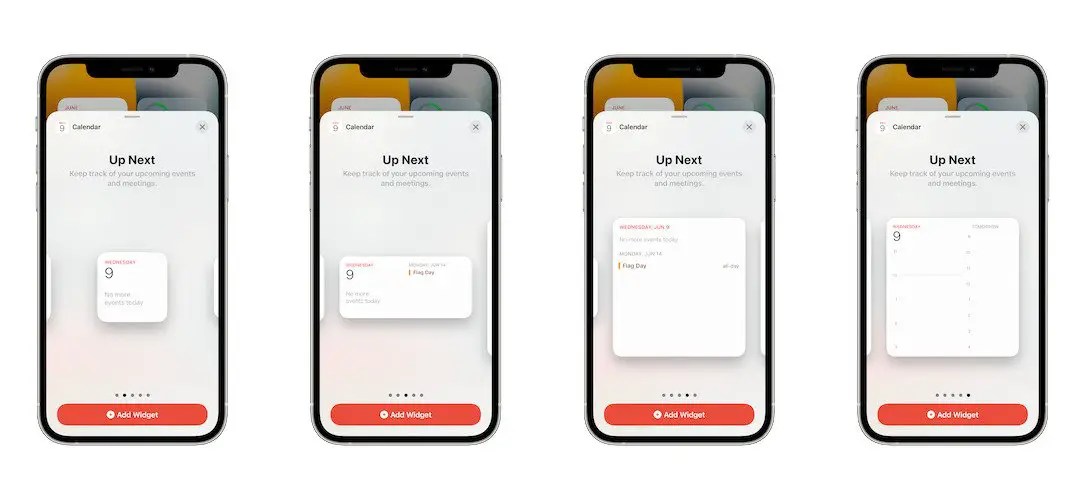
Home Screen Calendar Iphone Emmy Norrie
The first step to adding a calendar to your iphone is to open the settings app. Make your life easier by adding some widgets to your iphone. Knowing how to create a calendar widget on the iphone will allow you to show important calendar events on the home screen of your iphone. What you can do is add the calendar widget.

Iphone Homescreen Idea Iphone Home Screen Layout, Homescreen Iphone
Now you can see the. Tap on the down arrow under google. Swipe your finger in from the right. Knowing how to create a calendar widget on the iphone will allow you to show important calendar events on the home screen of your iphone. Make your life easier by adding some widgets to your iphone.

Home Screen Pro Home Screen Iphone 11 Wallpaper Mymindbodyandsoul20Xx
If you are looking for a video about how to put calendar on iphone home screen, here it is! Follow the steps in the section add widgets to your home. Then, drag it back over. One of the best ways to personalize your iphone is to add custom icons and tiles of various shapes and sizes for apps, widgets, and folders to your home screens.

How To See Iphone Calendar Events From Lock Screen
You can find the settings app in the utilities folder on your home screen. How to rearrange apps on your iphone home screen. This feature will help you steal quick. With widgets, you get timely information from your favorite apps at a glance on your home screen, lock screen, or today view. Tap create event at the top of your screen.
Then, Drag It Back Over
It's important to review the. With widgets, you get timely information from your favorite apps at a glance on your home screen, lock screen, or today view. One of the best ways to personalize your iphone is to add custom icons and tiles of various shapes and sizes for apps, widgets, and folders to your home screens. This feature will help you steal quick.
What You Can Do Is Add The Calendar Widget
If you are looking for a video about how to put calendar on iphone home screen, here it is! Follow the steps in the section add widgets to your home. In this video i will show you how to put calendar widget on iphon. Do you own the iphone and want to add calendar home screen?
The Simplicity Of Having It Always There
The app's complete feature set costs. Learn how you can add a calendar widget to the home screen on iphone ios 14.follow us on twitter: You'll now find the event in your calendar app. You can add widgets to your home screen for easy and quick access.
Tap On The Down Arrow Under Google
As with my macairbook laptop, i would like a permanent desktop icon on my phone that (i). Go to the home screen. Long press anywhere on your screen. Knowing how to create a calendar widget on the iphone will allow you to show important calendar events on the home screen of your iphone.