 National Holiday Calendar
Icalendar Google Calendar Import - For this, either opt for the freeways or a cigati ics converter for instant. In this article, we’ll walk you through the steps to sync your ical calendar with google calendar, ensuring that you have a seamless and organized digital calendar. Follow these steps to add icalendar to google calendar: Open the apple calendar on your smartphone. Think of this as importing a guest list into a party. Importing an ics file into google calendar is a simple process that can be accomplished using either the google calendar web interface or the google calendar api.

Googlecalendarimportics01 Booking Calendar Wordpress Plugin
Adding icalendar to google calendar is a straightforward process. Now that you have your csv file, it’s time to bring it into google calendar. Icalendar and calendar (google) integration method: You can create an icalendar file using various methods: For this, either opt for the freeways or a cigati ics converter for instant.

Google Calendar Import Excel Template
Adding icalendar to google calendar is a straightforward process. Before you can get started with seeing your google calendar events on your ios devices, you’ll need. With your csv file ready, it's time to bring that data into google calendar. Go to the google calendar website and sign in with your account. The first step in integrating google calendar with google sheets is setting up the google calendar api.
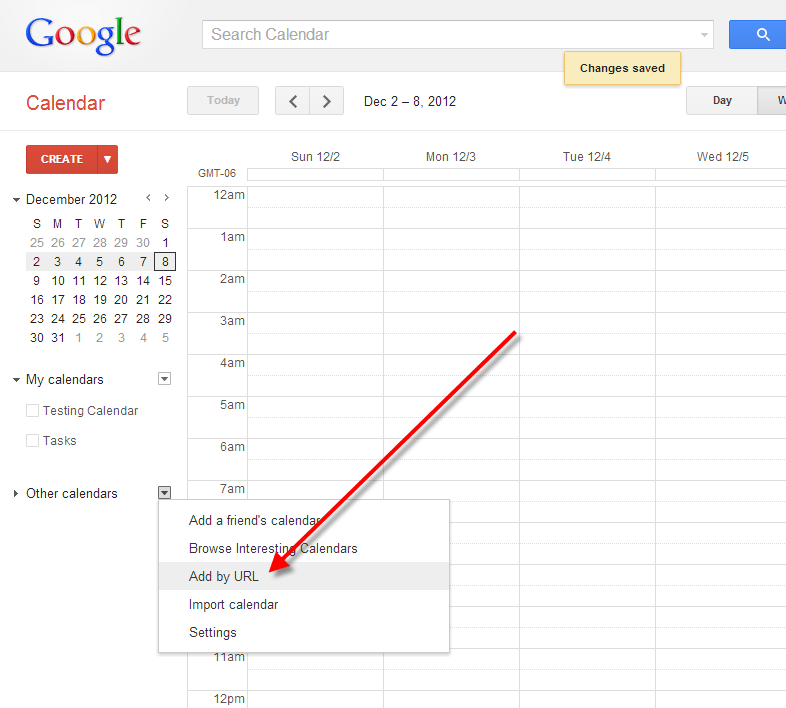
How Do I Import My Calendar Into Google Calendar?
Sign in to your google calendar account: The first step in integrating google calendar with google sheets is setting up the google calendar api. You can transfer your events from a different calendar application or google account to google calendar. Apple calendar recently got the ability to manage reminders, so you don’t need to jump between two different apps as much.

Wrong Time On Google Calendar Import
You can create an icalendar file using various methods: The first step in integrating google calendar with google sheets is setting up the google calendar api. For this, either opt for the freeways or a cigati ics converter for instant. Here's how you can do it:. By following the steps outlined in this.

Calendar? Google Calendar
Follow the steps below to sync your ical (apple calendar) with google calendar directly from your smartphone. Here's how you can do it:. Adding icalendar to google calendar is a straightforward process. Here are the ways you can sync google calendar with apple or vice versa. To create a reminder, tap or click on the +.
Digital Calendar
Sign in to your google calendar account: Adding icalendar to google calendar is a straightforward process. The first step in integrating google calendar with google sheets is setting up the google calendar api. Importing an ics file into google calendar is a simple process that can be accomplished using either the google calendar web interface or the google calendar api.
You Can Transfer Your Events From A Different Calendar
Follow these steps to add icalendar to google calendar: It requires a bit of conversion magic. To import icalendar into google calendar, follow these steps: Don’t worry, it’s not as daunting as it sounds.
Importing Ical Files To Google Calendar Is A Straightforward
Follow the steps below to sync your ical (apple calendar) with google calendar directly from your smartphone. Sign in to your google account: By importing your ical calendar into google calendar, you can: Log in to your google account using your email and password.
Now That You Have Your Csv File
Apple calendar recently got the ability to manage reminders, so you don’t need to jump between two different apps as much. Go to the google calendar website and sign in with your account. For this, either opt for the freeways or a cigati ics converter for instant. Think of this as importing a guest list into a party.