 National Holiday Calendar
Importing Ical To Google Calendar - To import ical into google calendar, you need to download your ical calendar file. Select the.ics file you downloaded and choose which calendar to add it to. To import ical into google calendar, you need a google account and an ical file (.ics) that you want to import. Export your calendar data as a.ics file. Try our ical viewer now! Whether you’re working on a desktop browser or using the google calendar.
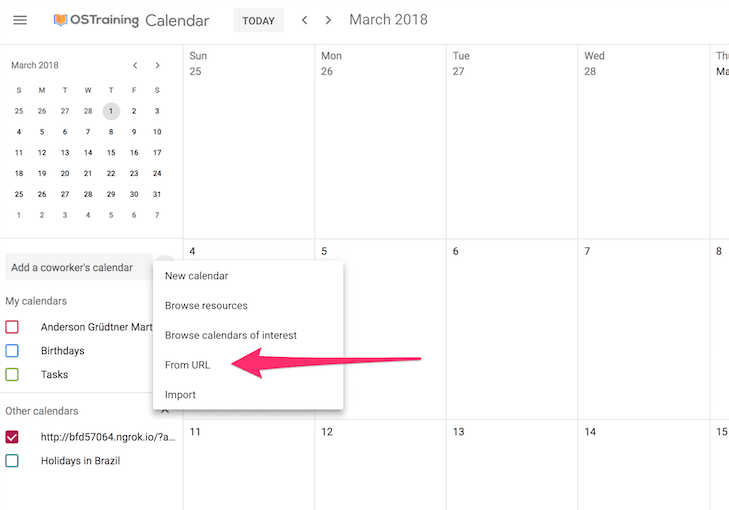
Subscribe To Your Wordpress Content In Ical Or Google
Easily sync and manage your calendars across different platforms. The ical file can be from any platform that supports the ical format, such as apple calendar, outlook, or yahoo calendar. However, sometimes, you may need to import a calendar from another platform or format to ensure seamless integration. Merge your ical calendar with google calendar, ensuring that all your events and.

Importing An Ical Feed From Google Event Organiser
Go to the google calendar website. Before you can import ical files, you need to create a new google calendar. To the left of your screen you'll see a list of your calendars. Try our ical viewer now! To import ical into google calendar, you need to download your ical calendar file.

Importing Events From Google Calendar Knowledgebase The Events Calendar
The ical file can be from any platform that supports the ical format, such as apple calendar, outlook, or yahoo calendar. How do i import ical events to google calendar? Then, open google calendar and click on. Adding icalendar to google calendar is a straightforward process. Click on the calendar icon.

Importing Ical Into Google Calendar
Click on the calendar icon. If you have an ical file that you want to import into google calendar, you can do so using the ical import feature. Merge your ical calendar with google calendar, ensuring that all your events and. To the left of your screen you'll see a list of your calendars. Easily sync and manage your calendars across different platforms.

Importing Ical Into Google Calendar
The ical file can be from any platform that supports the ical format, such as apple calendar, outlook, or yahoo calendar. Make sure you’ve selected the correct calendar and that the ical file is in the correct format (.ical).. Using ical with other apps: Start by opening google calendar on. Import, sync, and view your ical events in google calendar with ease.
Go To The Google Calendar Website
The ical file can be from any platform that supports the ical format, such as apple calendar, outlook, or yahoo calendar. Click on the calendar icon. Make sure you’ve selected the correct calendar and that the ical file is in the correct format (.ical).. Log in to your ical account.
Select The.ics File You Downloaded And Choose
This article will guide you on how to import a calendar. To the left of your screen you'll see a list of your calendars. Click on the settings icon in the top right corner of the page, and. Try our ical viewer now!
How Do I Import Ical Events To Google Calendar?
Before you can import ical files, you need to create a new google calendar. Import your.ics file to your calendar. Export your calendar data as a.ics file. Easily sync and manage your calendars across different platforms.
Import Ical Into Google Calendar
By importing your ical calendar into google calendar, you can: If you have an ical file that you want to import into google calendar, you can do so using the ical import feature. Once you have created a new google calendar, you need to set it up to import ical files. Create a new google calendar.