 National Holiday Calendar
Integrate Asana Google Calendar - Below, i’ve outlined two main methods available in 2024. To integrate asana with google calendar, you’ll need to create an asana account and a google calendar account. It will provide you with a brief overview of asana. Sync your asana assignments with your google calendar automatically to stay organized and on top of your work. First, you will need to connect your asana account to. Today, we’re excited to announce you can now attach a google calendar event to a task as a widget in asana, and sync the title, description, and start/due date to your google.

Asana Google Calendar Integration 2 Easy Steps Learn Hevo
Below, i’ve outlined two main methods available in 2024. How to connect google calendar to asana. To integrate asana with google calendar, you’ll need to create an asana account and a google calendar account. It will provide you with a brief overview of asana. Integrating asana with google calendar offers several benefits, such as improved task visibility, easier scheduling, and increased productivity.

How To Integrate Google Calendar With Asana (2022) Techobservatory
A calendar event created via the “add to calendar”. To integrate asana with google calendar, you’ll need to create an asana account and a google calendar account. By connecting these two powerful tools, you can. 04 mar 2025 by justin kang. How to connect google calendar to asana.

Integrate Asana With Google Calendar Jolie Rebecka
To do this, users can visit the asana integration page and. Add asana organizational calendar to google calendar. Slack connects with apps like google drive, zoom, asana,. Select the “sync to calendar” option, and copy the provided calendar url. By connecting these two powerful tools, you can.
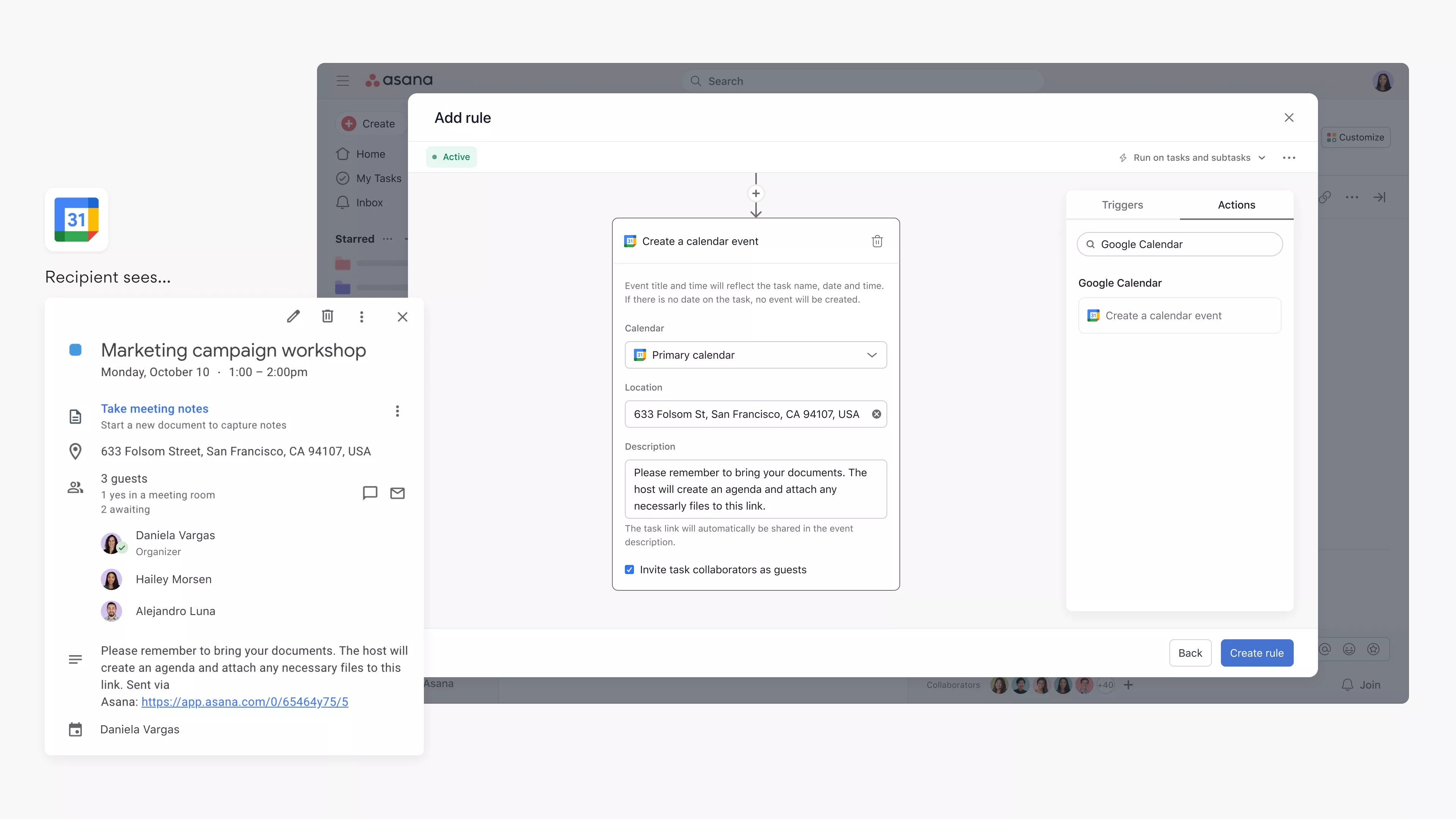
Google Calendar + Asana • Asana
Slack connects with apps like google drive, zoom, asana,. For ensuring the preservation of institutional knowledge. Today, we’re excited to announce you can now attach a google calendar event to a task as a widget in asana, and sync the title, description, and start/due date to your google. Integrating asana with google calendar offers several benefits, such as improved task visibility, easier scheduling, and increased productivity.

How To Integrate Google Calendar With Asana Techrepublic
In order to connect asana and google calendar, users must first link their accounts. A calendar event created via the “add to calendar”. How to connect google calendar to asana. Select the “sync to calendar” option, and copy the provided calendar url. To do this, users can visit the asana integration page and.
To Do This
In a constantly changing world, preserving institutional knowledge is something that isn’t always top of mind. The add to calendar button will not appear for emails with already extracted events (like restaurants, flights, etc.). Best for managing schedules with seamless integration into google workspace. Today, we’re excited to announce you can now attach a google calendar event to a task as a widget in asana, and sync the title, description, and start/due date to your google.
The Asana.biz Domain Is Used To Avoid Potential Issues
First, you will need to connect your asana account to. This article will guide you through the process of setting up asana google calendar integration using 2 simple steps. Luckily, there is a way to sync asana tasks to your google calendar, and in this guide, we will show you how to do it. If you use both asana and google calendar, synchronizing them can help streamline your workflow.
Add Asana Organizational Calendar To Google Calendar
In order to connect asana and google calendar, users must first link their accounts. How to connect google calendar to asana. A calendar event created via the “add to calendar”. Here are the steps to integrate asana with.
It Will Provide You With A Brief Overview
Integrating asana with google calendar offers several benefits, such as improved task visibility, easier scheduling, and increased productivity. With this integration, you’ll be able to sync your google. To integrate asana with google calendar, you’ll need to create an asana account and a google calendar account. Sync your asana assignments with your google calendar automatically to stay organized and on top of your work.