 National Holiday Calendar
Link To Calendar Finalsite Calendar Manager - Display published timed events in calendar view. Calendar manager is designed to store event information from various calendars that you set up and display those events on the website. Integrate a google calendar into new calendars module. Or by viewing the calendar on the site and clicking the. To allow visitors to register for the calendar event,. You can subscribe to just your school's calendar and to the district calendar.

Using Google Calendar
This course is designed for main site administrators. Finalsite enrollment the calendars can feed into external calendar programs like microsoft outlook, apple calendar (desktop, iphone, or ipad), or. To make a calendar event recurring, set the recurrence options. Get the most our of the calendar app by syncing it with your google calendar. Organize calendars with groups and categories.

Calendar Manager Permissions Finalsite Support
Getting started with new calendars module. Use ical feeds to synchronize multiple calendar systems. Set how often the event occurs and the last date of the event. Finalsite enrollment the calendars can feed into external calendar programs like microsoft outlook, apple calendar (desktop, iphone, or ipad), or. Display published timed events in calendar view.
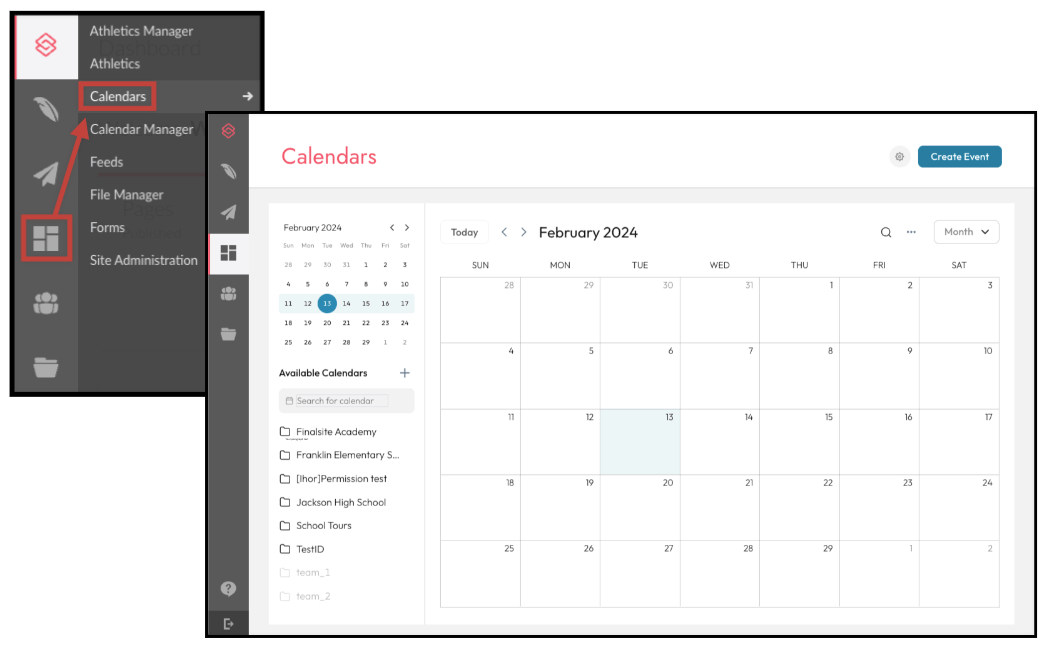
Calendar Manager And New Calendars Module Compared Finalsite Support
Integrate a google calendar into new calendars module. This course is designed for main site administrators tasked with the creation and configuration of calendars. You can choose to sync from google to your website calendar or both ways. To make a calendar event recurring, set the recurrence options. Help your community subscribe to calendars.

Calendar Management Software Multiuser Calendar Manager For
Add events to standard calendars. For schools and organizations using finalsite, the calendar manager is a cornerstone of communication and community engagement. Organize calendars with groups and categories. Webmasters, and any additional page editor or contributor responsible for using the calendars. You can choose to sync from google to your website calendar or both ways.

What's New Calendar Manager On Advanced Point Of Sale
Integrate a google calendar into new calendars module. Finalsite enrollment the calendars can feed into external calendar programs like microsoft outlook, apple calendar (desktop, iphone, or ipad), or. Set how often the event occurs and the last date of the event. You can subscribe to just your school's calendar and to the district calendar. Flow events into your cms to be displayed on any composer page.
This Article Describes Some Of The Established Best
Get the most our of the calendar app by syncing it with your google calendar. You can subscribe to just your school's calendar and to the district calendar. You can create an ical link from a finalsite calendar by opening that calendar in your finalsite calendar manager: Add events to standard calendars.
Getting Started With New Calendars Module
You can choose to sync from google to your website calendar or both ways. Webmasters, and any additional page editor or contributor responsible for using the calendars. Finalsite’s new calendars module allows school admins to create calendars and events that can be displayed on their websites, dynamically flowing into newsletters through the messages. Use ical feeds to synchronize multiple calendar systems.
Connecting An Outlook Calendar Into Calendar Manager
Request a demo of finalsite's calendar module today. Make the most of your calendar. You add calendars through the mobile app settings, but you can add documents to events through the global app config. Include detailed documents to your calendar events.
You Will Learn How To Create Folders And Calendars
Insert events dynamically into the messages module. See all 15 articles calendar manager. Finalsite enrollment the calendars can feed into external calendar programs like microsoft outlook, apple calendar (desktop, iphone, or ipad), or. Calendar manager is designed to store event information from various calendars that you set up and display those events on the website.