 National Holiday Calendar
Permissions For Outlook Calendar - Choose a calendar to share. You can give someone in your organization permission to manage your outlook calendar by granting them edit or delegate access. Depending on the permission you give them, they can view your calendar, edit it, or act as your delegate for meeting requests. Here’s a detailed look at some its advanced features: To adjust or revoke access to a shared contact folder, do this: Permissions allow you to give people access to your calendar.
Permissions Outlook Calendar Zoe Lindie
If you don’t have these permissions, don’t worry, you can finish setting this up later by granting. You can give someone in your organization permission to manage your outlook calendar by granting them edit or delegate access. To give someone permissions to. Permissions allow you to give people access to your calendar. In doing so, you can control the.

Give Calendar Permissions Outlook Linzy Phaidra
Calendar permissions in outlook determine how much details your colleagues can see and what they can or can’t do in your calendar. Depending on your outlook client version, you may see different settings. To adjust or revoke access to a shared contact folder, do this: If you don’t have these permissions, don’t worry, you can finish setting this up later by granting.

Outlook Calendar Permissions Notifications Audrey Edmunds
Here’s a detailed look at some its advanced features: In new outlook you can grant anyone within your organization editor or delegate access to your calendar. Log in to your outlook account. To give someone permissions to. Select add, decide who to share your calendar.

Outlook Calendar Permissions Explained Blair Adriena
Now that you have enabled calendar security, you can request calendar permissions for a specific user or group.to do this, follow these steps: In doing so, you can control the. Allow another person or delegate to. Calendar in outlook can don’t only be. Log in to your outlook account.

Calendar Permissions In Outlook
Select calendar > share calendar. To assign permissions to your calendar,. Calendar sharing may not be available for your account, or. Advanced features of outlook shared mailboxes. Choose a calendar to share.
Open A Shared Calendar In Outlook
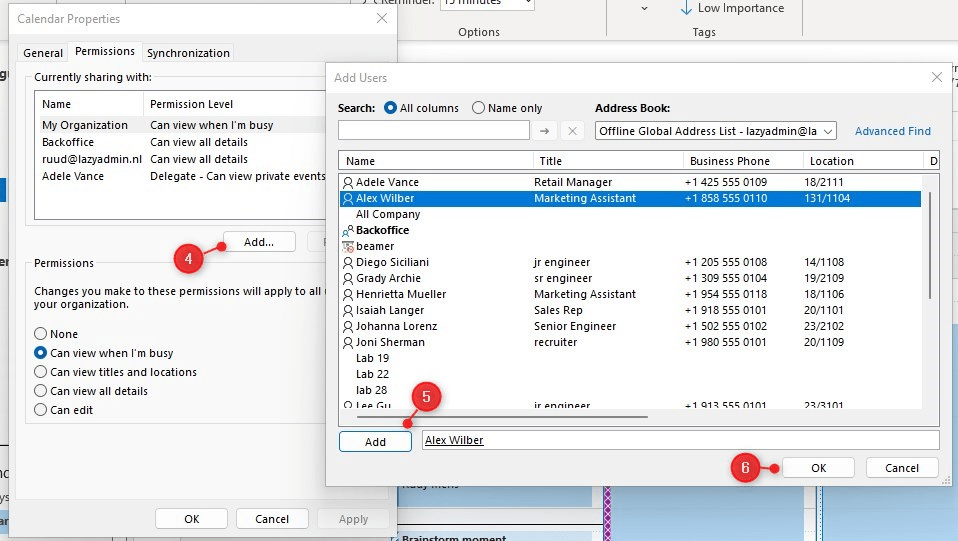
To adjust or revoke access to a shared contact folder, do this: In the below guide, i have clearly illustrated the steps needed to access and change your outlook calendar’s sharing permission level. With microsoft outlook, sharing your calendar only takes a few minutes and a handful of simple steps. Share a calendar | modify calendar permissions | open a calendar [.
Select Calendar > Share Calendar
Calendar permissions in outlook determine how much details your colleagues can see and what they can or can’t do in your calendar. Depending on the permission you give them, they can view your calendar, edit it, or act as your delegate for meeting requests. Select calendar > share calendar. These integrations require administrator permissions in the tools in question.
In Doing So, You Can Control The
This article describes how to share and access a calendar that can only be viewed. In the device's settings, go to apps and notifications > outlook > permissions > calendar. What's the difference between edit permissions and delegate. Allow messages to be sent on your behalf when sharing a folder or mailbox.
Select Add, Decide Who To Share Your Calendar
If you're using a work or school account, you can grant delegate privileges which. Outlook shared mailboxes offer more than just email management. Here, we will share two ways to manage microsoft outlook calendar permissions using the outlook desktop application and outlook online. If you have permissions to a shared mailbox, the shared calendar associated with the shared mailbox is automatically added to your my calendars list.