 National Holiday Calendar
Power Query Calendar Table - This post illustrates how easy it is to create a dynamic calendar table driven by only a few excel formulas and power query to serve your power pivot models There have been many techniques for creating a calendar date table in power bi using mostly dax. Learn how to create a dynamic calendar table in power query's m language. Today we’ll be learning create calendar table with power query. Zainab balogun writes the fourth part on how to create a date or calendar table in microsoft power bi, this time using power query. Day, start.date and end.date, these fields need to be configured based on the required table:

Create Calendar Table In Power Bi Query
However, there might be reasons one might want to do the same using power query m language which might be for model performance reasons or convenience reasons. Build your custom columns and claim your free date table script. Then use the =list.dates() function to generate the dates you want. Today we’ll be learning create calendar table with power query. In this step by step guide you'll learn how to create a calendar table using power query and save the code to reuse it later.

Power Query Calendar Excel University
Creating a calendar table or a data table in power query is much easier than dax. There have been many techniques for creating a calendar date table in power bi using mostly dax. However, there might be reasons one might want to do the same using power query m language which might be for model performance reasons or convenience reasons.

Power Query Calendar Table Prntbl.concejomunicipaldechinu.gov.co
Whether you’re new to power bi or an experienced user, this guide will help you understand the importance of a date table and provide you with the knowledge you need to create your own custom date table in power bi. Day, start.date and end.date, these fields need to be configured based on the required table: In this step by step guide you'll learn how to create a calendar table using power query and save the code to reuse it later.

Power Query Calendar Table Script Pen Leanor
Creating a calendar table using power query can be beneficial for several reasons like data consistency, customization, data modeling etc. Creating a calendar table or a data table in power query is much easier than dax. In this step by step guide you'll learn how to create a calendar table using power query and save the code to reuse it later.
Power Query Calendar Table Prntbl.concejomunicipaldechinu.gov.co
Whether you’re new to power bi or an experienced user, this guide will help you understand the importance of a date table and provide you with the knowledge you need to create your own custom date table in power bi. Build your custom columns and claim your free date table script. Creating a calendar table using power query can be beneficial for several reasons like data consistency, customization, data modeling etc.
A Calendar
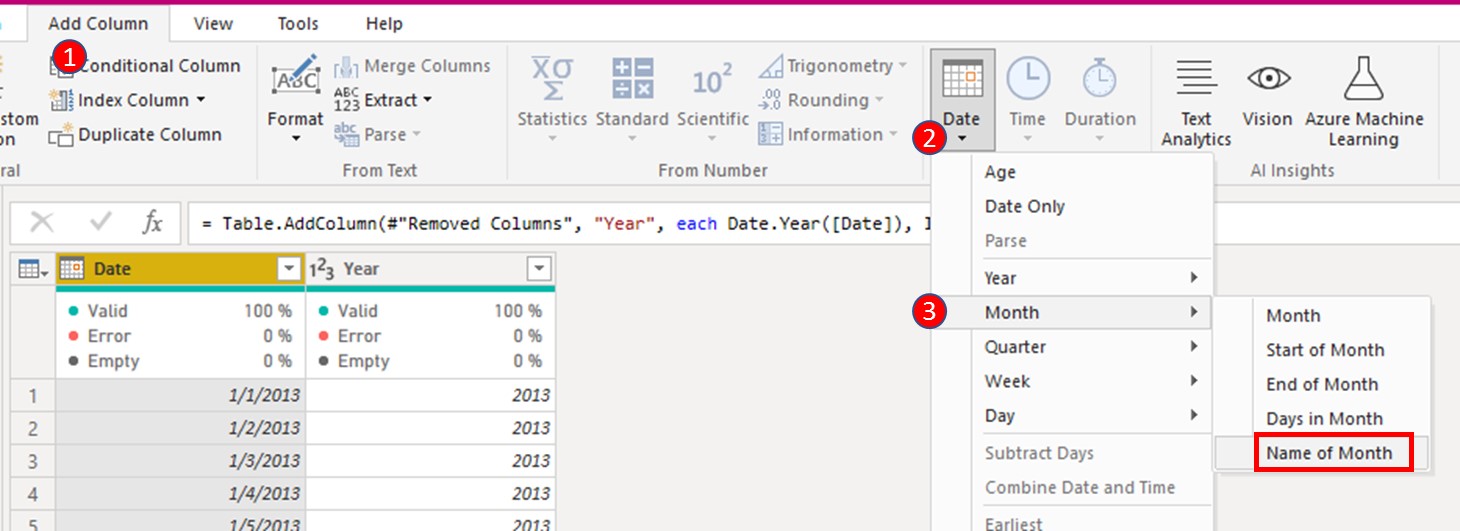
You just need to follow these 3 steps to create your desired table without writing or using any codes. However, there might be reasons one might want to do the same using power query m language which might be for model performance reasons or convenience reasons. In this step by step guide you'll learn how to create a calendar table using power query and save the code to reuse it later. This post illustrates how easy it is to create a dynamic calendar table driven by only a few excel formulas and power query to serve your power pivot models
Using M Language To Generate A Range Of Dates
Zainab balogun writes the fourth part on how to create a date or calendar table in microsoft power bi, this time using power query. How to create the perfect calendar table with power query? Build your custom columns and claim your free date table script. Then use the =list.dates() function to generate the dates you want.
A Calendar
Whether you’re new to power bi or an experienced user, this guide will help you understand the importance of a date table and provide you with the knowledge you need to create your own custom date table in power bi. Day, start.date and end.date, these fields need to be configured based on the required table: Learn how to create a dynamic calendar table in power query's m language. Creating a calendar table or a data table in power query is much easier than dax.
Today We’ll Be Learning Create Calendar Table With Power
Start by creating a new “blank query” connection in power bi.