 National Holiday Calendar
Sync Mac Calendar With Iphone - Make sure mail is selected. (from their calendar to yours) where you would not be the host but you would be a participant, you would then need. Both methods offer high security and compatibility with multiple. Tap see all (or show all), tap icloud calendar, then turn on “use on this [device].” ios 16 or. How to sync calendar from mac to iphone with itunes. In this article, we’ll walk you through the process of syncing your iphone and mac calendar, highlighting the key steps and important considerations.

How To Sync Calendar From Iphone To Mac
Click on the calendar tab at. Open the system preferences app on your mac. Start by opening the 'settings'. How to sync calendar from mac to iphone with itunes. Open the settings app on your iphone.

Best Calendar App For Iphone And Mac Sync Gostorama
Simply set up your google calendar account on your mac and iphone, and enable calendar. Start by opening the 'settings'. Yes, you can sync your mac calendar with your iphone using google calendar. Hi jim, so if someone sends you a meeting event request. Make sure mail is selected.

How To Sync Mac And Iphone Calendar Wmtide
This is what prompts gmail to allow your emails to arrive in the mac mail app. Hi jim, so if someone sends you a meeting event request. Manage and share your calendars seamlessly on iphone, ipad, and mac. On your iphone or ipad, go to settings > [your name] > icloud. Syncing your iphone calendar with your mac is a simple process that can be achieved using either icloud or caldav and exchange.

How To Sync Mac Calendar With Iphone Abbye Annissa
Ios 17, ipados 17, or later: Open the settings app on your iphone. In this article, we’ll walk you through the process of syncing your iphone calendar with your mac, covering the necessary steps and tips to ensure a seamless experience. Syncing your calendar between an iphone 15 and a mac is straightforward. Your mac also syncs this information from your device to your mac — for example, if you add contacts on your ipad,.
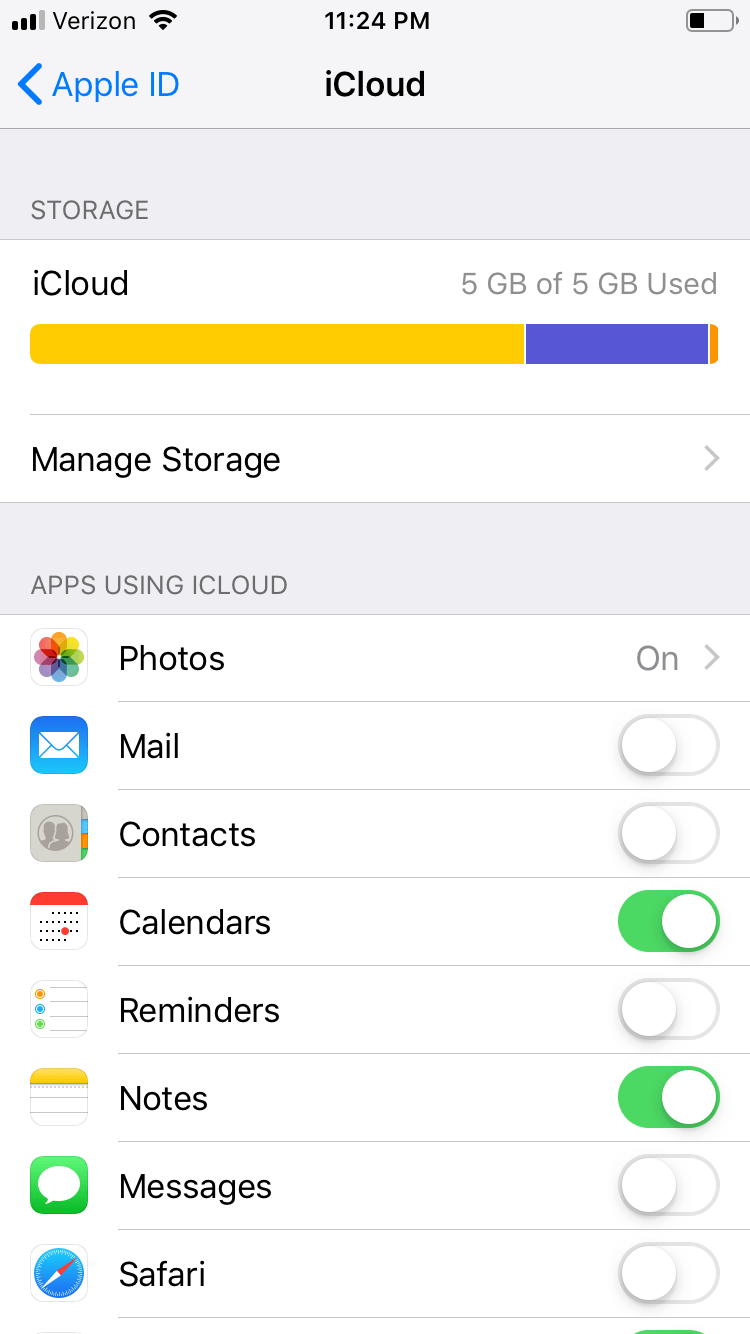
How To Sync Mac Calendar To Iphone Fred Kristal
If you’re a mac user, you’re likely familiar with the concept of syncing your calendar, but if you’re an iphone user, you might be wondering how to connect your mac. How to sync calendar from mac to iphone with itunes. Syncing your calendar between an iphone 15 and a mac is straightforward. To start syncing your mac calendar to iphone, you’ll need to enable calendar sync on your mac.
Syncing Your Iphone Calendar With Your Mac
If you’re using a mac with macos high sierra or later, you can. First, ensure that you’re signed in to icloud on both devices with the same apple id. In this article, we will introduce how to sync calendar from mac to iphone in 3 ways. Yes, you can sync your mac calendar with your iphone using google calendar.
How To Sync Calendar From Mac To Iphone
Syncing your calendar between an iphone 15 and a mac is straightforward. Hi jim, so if someone sends you a meeting event request. On your iphone or ipad, go to settings > [your name] > icloud. Open the system preferences app on your mac.
Icloud Calendar
Both methods offer high security and compatibility with multiple. Syncing your mac calendar to your iphone is a straightforward process that can be completed in just a few steps. Click on the calendar tab at. In this article, we’ll walk you through the process of syncing your iphone calendar with your mac, covering the necessary steps and tips to ensure a seamless experience.
You Can Sync The Contacts And Calendars
Ios 17, ipados 17, or later: If you’re a mac user, you’re likely familiar with the concept of syncing your calendar, but if you’re an iphone user, you might be wondering how to connect your mac. Your mac also syncs this information from your device to your mac — for example, if you add contacts on your ipad,. To start syncing your mac calendar with your iphone, you’ll need to enable calendar syncing on your mac.