 Photo Release Forms
Create Qr Code For Google Form - Track scans, update links anytime, and add logos or colors—unlimited scans, free with qrsurge. This wikihow article explains how to. Copy the form's share link, paste it into a qr generator, and export the image. If you're trying to create a qr code for a google form, the fastest path is also the most common one. Generate and customize qr code links to your google forms™. Generate a google form qr code and easily share your google form without having to type in a link.

Create Qr Code For Google Form
Generate a google form qr code and easily share your google form without having to type in a link. Copy the form's share link, paste it into a qr generator, and export the image. Track scans, update links anytime, and add logos or colors—unlimited scans, free with qrsurge. If you're trying to create a qr code for a google form, the fastest path is also the most common one.

Create A Qr Code For Google Form 6 Steps
You'll learn why qr codes are effective, especially for print materials, presentations, or mobile access. Generate a google form qr code and easily share your google form without having to type in a link. If you're trying to create a qr code for a google form, the fastest path is also the most common one. Create branded qr codes for any google form.
How To Make A Qr Code For A Google
You'll learn why qr codes are effective, especially for print materials, presentations, or mobile access. Copy the form's share link, paste it into a qr generator, and export the image. Generate and customize qr code links to your google forms™. Track scans, update links anytime, and add logos or colors—unlimited scans, free with qrsurge. Generate a google form qr code and easily share your google form without having to type in a link.
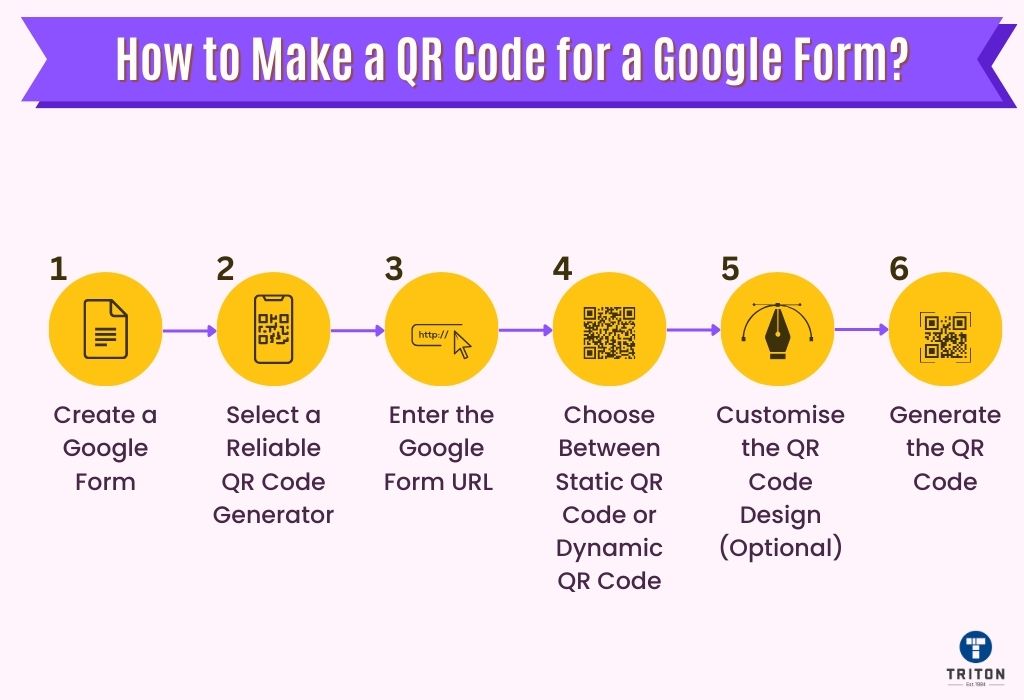
How To Make A Qr Code For A Google
You'll learn why qr codes are effective, especially for print materials, presentations, or mobile access. Most modern phones don't even need special apps to qr codes so anyone with a mobile phone can easily scan your code and get to your google form. If you're trying to create a qr code for a google form, the fastest path is also the most common one.

How To Use A Google Form Qr Code Comprehensive
You'll learn why qr codes are effective, especially for print materials, presentations, or mobile access. Copy the form's share link, paste it into a qr generator, and export the image. Generate a google form qr code and easily share your google form without having to type in a link. Create branded qr codes for any google form. If you're trying to create a qr code for a google form, the fastest path is also the most common one.
Generate A Google Form Qr Code And Easily Share
Most modern phones don't even need special apps to qr codes so anyone with a mobile phone can easily scan your code and get to your google form. Generate and customize qr code links to your google forms™. This guide walks you through how to create a qr code for a google form step by step. If you're trying to create a qr code for a google form, the fastest path is also the most common one.
Track Scans, Update Links Anytime
Copy the form's share link, paste it into a qr generator, and export the image. This wikihow article explains how to. Create branded qr codes for any google form. Create and customize your google form qr code for free.