 Photo Release Forms
Hyperlink In Google Sheets - Create hyperlinks fast with the free online html hyperlink generator tool. The most important attribute of the element is the href attribute, which indicates the link's destination.</p> The tag defines a hyperlink, which is used to link from one page to another. To create a hyperlink in only part of the image, use an image map. Markdown link syntax (hyperlink) links are important elements in markdown for connecting content. Want to learn how to make a hyperlink in wordpress, word documents, or email?

Google Sheets App Hyperlink At Felipa Hunter Blog
Want to learn how to make a hyperlink in wordpress, word documents, or email? What is the hyperlink keyboard shortcut? The meaning of hyperlink is an electronic link providing direct access from one distinctively marked place in a hypertext or hypermedia document to another in the same or a. A hyperlink is a reference in a digital document that directs users to another location or resource, enhancing navigation and connectivity.
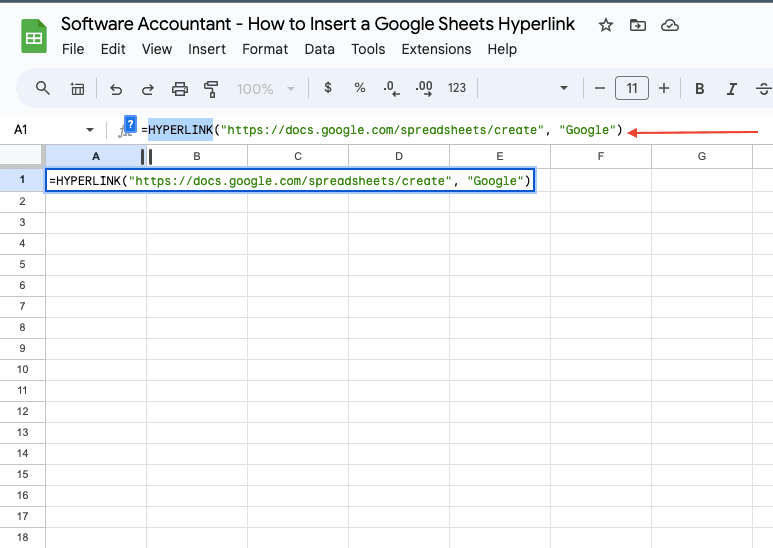
How To Insert A Google Sheets Hyperlink (3 Easy
A hyperlink is a reference in a digital document that directs users to another location or resource, enhancing navigation and connectivity. Enhance your documents by linking text to websites or files seamlessly. The keyboard shortcut for inserting. How to link an image to another page in html. To create a hyperlink in only part of the image, use an image map.

How To Use Hyperlink Function In Google Sheets Youtube
To create a hyperlink in only part of the image, use an image map. When you move the mouse over a link, the mouse arrow will turn into a little hand. The meaning of hyperlink is an electronic link providing direct access from one distinctively marked place in a hypertext or hypermedia document to another in the same or a.

Hyperlink In Google Sheets
This quick guide will show you, step by step. Mastering various link syntaxes makes your documents more connected and practical. A hyperlink is a reference in a digital document that directs users to another location or resource, enhancing navigation and connectivity. Enhance your documents by linking text to websites or files seamlessly. Markdown link syntax (hyperlink) links are important elements in markdown for connecting content.

How To Hyperlink Data To Another Sheet With Formula
You can click on a link and jump to another document. The most important attribute of the element is the href attribute, which indicates the link's destination.</p> The keyboard shortcut for inserting. To create a hyperlink in only part of the image, use an image map. This quick guide will show you, step by step.
A Hyperlink Is A Reference In A Digital Document
Create a hyperlink to a location in the current document or another document you can create a hyperlink that links to a word document or to an outlook email message that includes heading styles or. To create a hyperlink in only part of the image, use an image map. The keyboard shortcut for inserting. The most important attribute of the element is the href attribute, which indicates the link's destination.</p>
Want To Learn How To Make A Hyperlink
The tag defines a hyperlink, which is used to link from one page to another. Create hyperlinks fast with the free online html hyperlink generator tool. Markdown link syntax (hyperlink) links are important elements in markdown for connecting content. You can click on a link and jump to another document.
The Meaning Of Hyperlink Is An Electronic Link Providing
When you move the mouse over a link, the mouse arrow will turn into a little hand. Enhance your documents by linking text to websites or files seamlessly. How to link an image to another page in html. This quick guide will show you, step by step.
Mastering Various Link Syntaxes Makes Your Documents More Connected
What is the hyperlink keyboard shortcut?