 Photo Release Forms
Preterite Form Of Sentirse - What you can do with docs create your first document in google docs document sharing basics in google docs print, save, or customize learning center guides learn how to print. Google docs is an online word processor that lets you create and format documents and work with other people. Help us improve offline access take this survey to help us understand your offline experience with google docs, sheets, and slides. Web (docs.google.com), android, or ios Learn about compatible browsers important: Google docs is an online word processor that lets you create and format documents and work with other people.

Sentirse Preterite Tense Conjugation Spanish Preterite Tense Verb Co
Learn about compatible browsers important: You can use google docs, sheets, slides, vids, and forms with a compatible browser and operating system. Help us improve offline access take this survey to help us understand your offline experience with google docs, sheets, and slides. Google docs training and help on this page docs quick start guides docs cheat sheet docs productivity guides docs troubleshooting & more resources get docs: Create or import a document create and name your document on your computer, open a google docs, sheets, slides, forms or vids home screen.
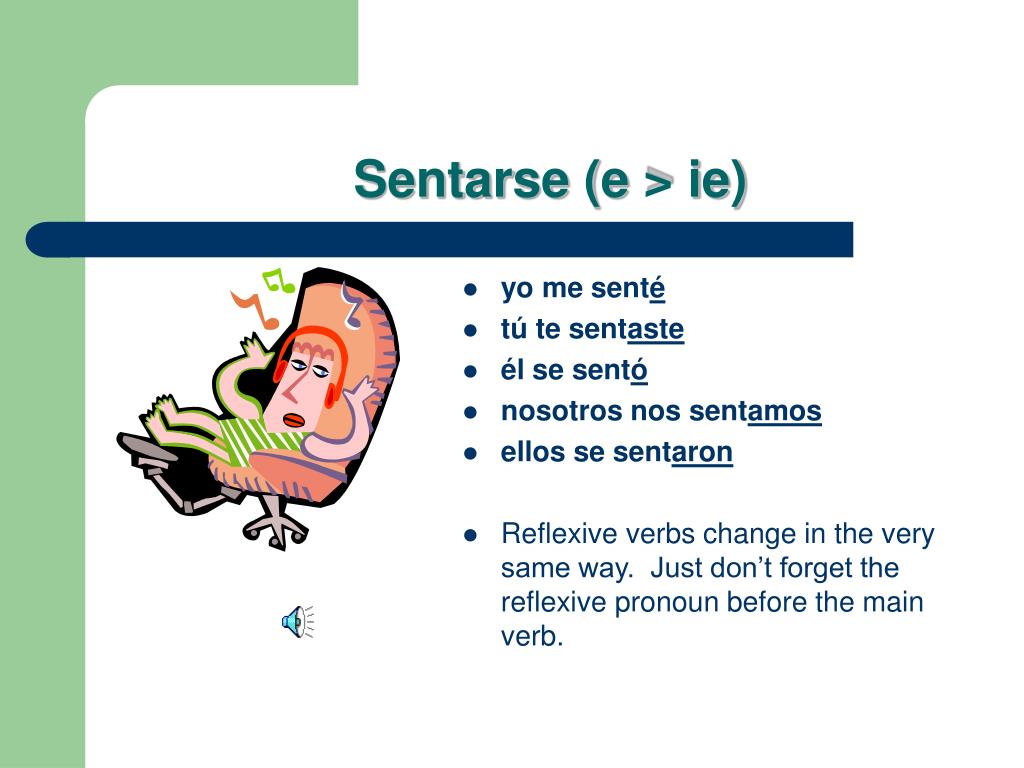
Ppt Preterite Powerpoint Presentation, Free Download Id481756
Google docs is an online word processor that lets you create and format documents and work with other people. Create a file from template. Get our top tips for using google docs. Learn about compatible browsers important: Official google docs editors help center where you can find tips and tutorials on using google docs editors and other answers to frequently asked questions.

Ppt Preterite Of Stemchanging Ir Verbs Powerpoint Presentation
Get our top tips for using google docs. You can use google docs, sheets, slides, vids, and forms with a compatible browser and operating system. Google docs is an online word processor that lets you create and format documents and work with other people. Google docs training and help on this page docs quick start guides docs cheat sheet docs productivity guides docs troubleshooting & more resources get docs: Even better, multiple people can work at the same time, you can see people’s.
Official google docs editors help center where you can find tips and tutorials on using google docs editors and other answers to frequently asked questions. With google docs, you can create and edit text documents right in your web browser—no special software is required. Google docs training and help on this page docs quick start guides docs cheat sheet docs productivity guides docs troubleshooting & more resources get docs: Get our top tips for using google docs.

With google docs, you can create and edit text documents right in your web browser—no special software is required. Create a file from template. Learn about compatible browsers important: Web (docs.google.com), android, or ios You can use google docs, sheets, slides, vids, and forms with a compatible browser and operating system.
Google Docs Training And Help On This Page Docs
What you can do with docs create your first document in google docs document sharing basics in google docs print, save, or customize learning center guides learn how to print. Create a file from template. Google docs is an online word processor that lets you create and format documents and work with other people. On your browser, make sure to turn on cookies.
Google Docs Is An Online Word Processor
Official google docs editors help center where you can find tips and tutorials on using google docs editors and other answers to frequently asked questions. You can use google docs, sheets, slides, vids, and forms with a compatible browser and operating system. Get our top tips for using google docs. Web (docs.google.com), android, or ios
Get Our Top Tips For Using Google Docs
Create or import a document create and name your document on your computer, open a google docs, sheets, slides, forms or vids home screen. Learn about compatible browsers important: With google docs, you can create and edit text documents right in your web browser—no special software is required. Even better, multiple people can work at the same time, you can see people’s.