 Printable Yoga Resources
Outline Map World Printable - Work with a document outline. Click tab options show outline. To hide outline, click tab options hide outline. The outline detects titles and headings to help frame your document. On your computer, open a document in google docs.. Official google search help center where you can find tips and tutorials on using google search and other answers to frequently asked questions.

Outline Format Template
Open a document in the google docs app. Click tab options show outline. Click where you want the table of contents. You can also show or hide rulers. To find the outline of each tab:
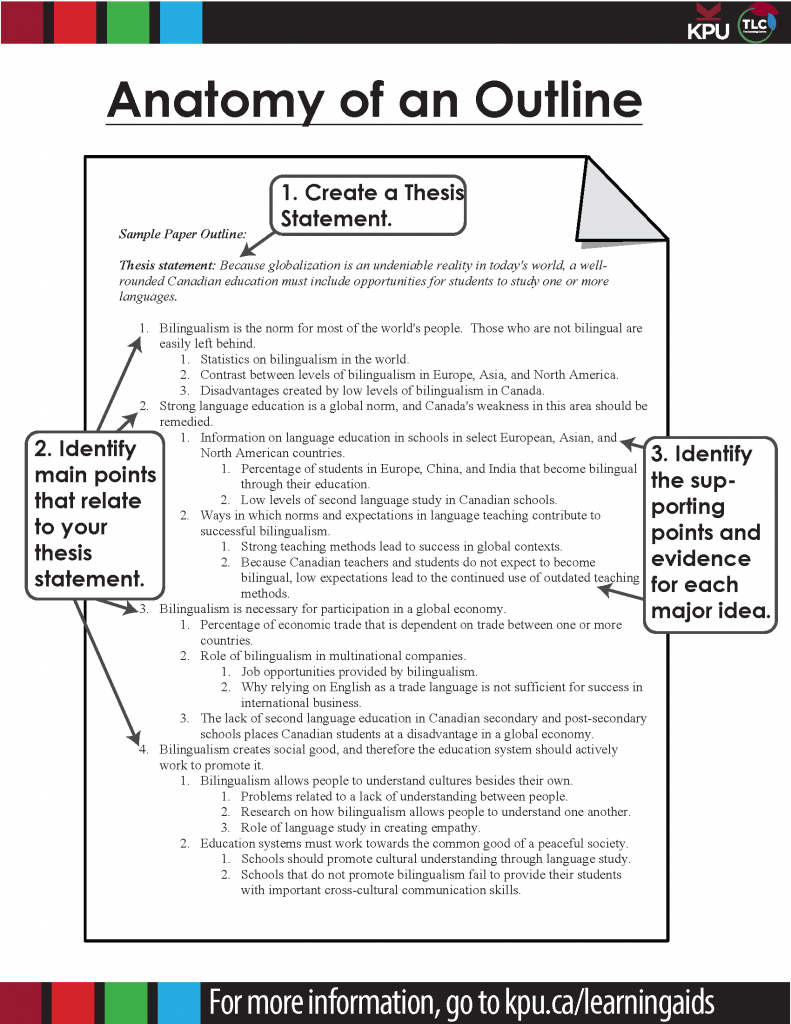
Outlining Advanced English
To hide outline, click tab options hide outline. You can also show or hide rulers. To use outline text, your device must run android 16 and up. Open a document in the google docs app. At the left, next to outline, click close document outline.

10.6 Writing For Success Outlining English 215 Rhetoric
Open a document in the google docs app. Official google search help center where you can find tips and tutorials on using google search and other answers to frequently asked questions. To temporarily close the document outline: The outline detects titles and headings to help frame your document. On this page sheets quick start guides

How To Write An Outline A Complete Guide
On your computer, open a document in google docs.. The outline detects titles and headings to help frame your document. On this page sheets quick start guides You can also show or hide rulers. To close the left panel,.

Outline Pencil Outline Svg Png Icon Free Download (17919)
Learn more about places you visit by exploring layers such as borders, labels, transportation, places, 3d buildings, photos, 3d. At the left, next to outline, click close document outline. On this page sheets quick start guides Work with a document outline. Click where you want the table of contents.
At The Top, Click View Show Outline
To completely hide the document outline: Layers show a variety of interesting geographic content. On your computer, open a document in google docs.. Work with a document outline.
At The Left
Click tab options show outline. Click insert page elements table of contents. The outline detects titles and headings to help frame your document. Learn more about places you visit by exploring layers such as borders, labels, transportation, places, 3d buildings, photos, 3d.
You Can Click On A Tab To Show
On this page sheets quick start guides Official google play help center where you can find tips and tutorials on using google play and other answers to frequently asked questions. Official google search help center where you can find tips and tutorials on using google search and other answers to frequently asked questions. You can also show or hide rulers.
To Close The Left Panel
To find the outline of each tab: Open a document in the google docs app. To temporarily close the document outline: To use outline text, your device must run android 16 and up.