 Loan Agreement Templates
Latex Math Homework Template - 如何从零开始,入门 latex? 一开始知道latex是从一个大佬学长那儿听到的,但是后来发现有好多以tex结尾的排版软件或者系统,例如:latex、tex、ctex、xetex、sh… 显示全部 关注者. When using latex, can i just use $:=$, or do i need to do something special? And how does one insert a ~ (tilde)? Sometimes the symbol := is used to denote a definition. Without latex trying to use it as a command? Escape character in latex in the itemize environment, how do i use the ampersand symbol &.
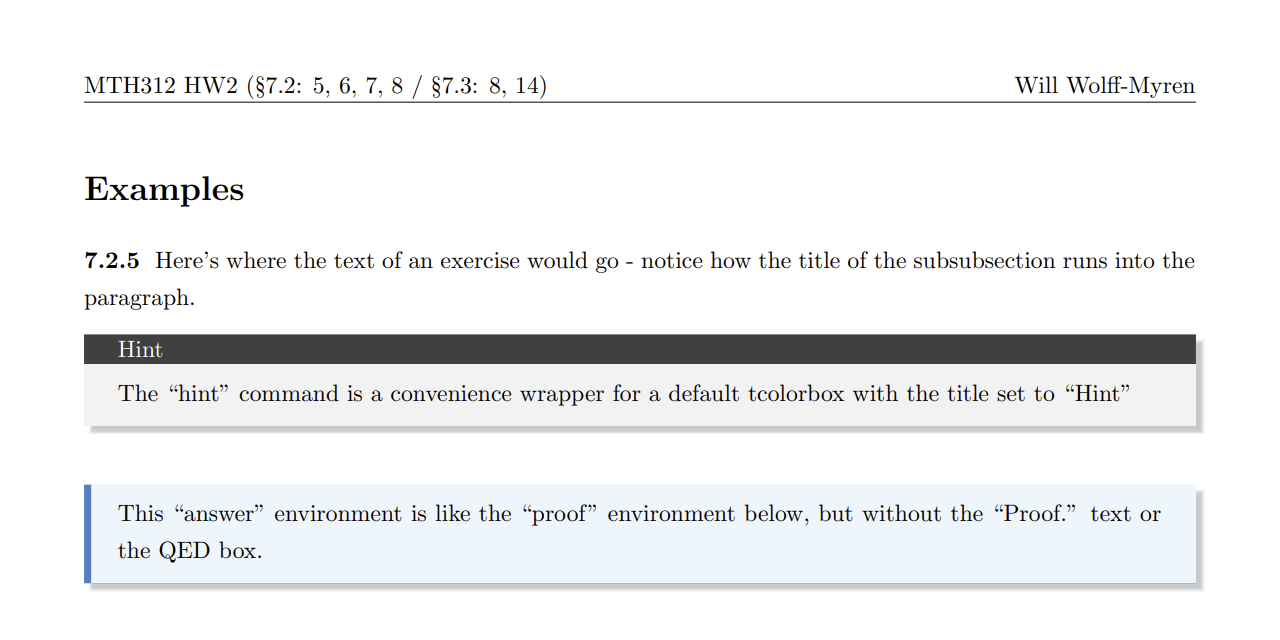
Latex Math Homework Template
Latex still supports it for one reason or another, but the proper one to use, as defined in the specifications, is \[. How to look up a symbol? 1078 how does one insert a \ (backslash) into the text of a latex document? Without latex trying to use it as a command? Q&a for users of tex, latex, context, and related typesetting systems.
Github Akexstar/Latexhomeworktemplate 使用Ctex包的中文Latex作业模板 This Is
How to look up a symbol? (if you insert \~, it will give you a tilde as an accent over the following letter.) i believe. Escape character in latex in the itemize environment, how do i use the ampersand symbol &. All this just means that they are not promising that $$ will always work. 如何从零开始,入门 latex? 一开始知道latex是从一个大佬学长那儿听到的,但是后来发现有好多以tex结尾的排版软件或者系统,例如:latex、tex、ctex、xetex、sh… 显示全部 关注者.

Latex Math Homework Template
1078 how does one insert a \ (backslash) into the text of a latex document? For example, x:=y+z means that x is defined to be y+z. The other famous tilde question could be made a bit more general and canonical by changing it to mean both text and math mode. How to look up a symbol? Answers deal already with it in math mode.

Latex Math Homework Template
Q&a for users of tex, latex, context, and related typesetting systems 1078 how does one insert a \ (backslash) into the text of a latex document? Escape character in latex in the itemize environment, how do i use the ampersand symbol &. Answers deal already with it in math mode. Without latex trying to use it as a command?

Latex Homework Template Printable Word Searches
Q&a for users of tex, latex, context, and related typesetting systems Latex still supports it for one reason or another, but the proper one to use, as defined in the specifications, is \[. 必须声明: 用latex不是为了装x,而是为了方便 (至于你是不是装x,我真不知道)。 latex能做的word(和ppt)肯定能做,而office系列也远比我们想象的要强大。 我认为用latex不分什么人或. 1078 how does one insert a \ (backslash) into the text of a latex document? All this just means that they are not promising that $$ will always work.
Escape Character In Latex In The Itemize Environment
For example, x:=y+z means that x is defined to be y+z. How to look up a symbol? The other famous tilde question could be made a bit more general and canonical by changing it to mean both text and math mode. (if you insert \~, it will give you a tilde as an accent over the following letter.) i believe.
The Top Answer Could
Sometimes the symbol := is used to denote a definition. Without latex trying to use it as a command? 1078 how does one insert a \ (backslash) into the text of a latex document? When using latex, can i just use $:=$, or do i need to do something special?
如何从零开始,入门 Latex? 一开始知道Latex是从一个大佬学长那儿听到的,但是后来发现有好多以Tex结尾的排版软件或者系统,例如:Latex、Tex、Ctex、Xetex、Sh… 显示全部 关注者
Q&a for users of tex, latex, context, and related typesetting systems Latex still supports it for one reason or another, but the proper one to use, as defined in the specifications, is \[. 必须声明: 用latex不是为了装x,而是为了方便 (至于你是不是装x,我真不知道)。 latex能做的word(和ppt)肯定能做,而office系列也远比我们想象的要强大。 我认为用latex不分什么人或. Answers deal already with it in math mode.
How Does One Insert A ~ (Tilde)?
All this just means that they are not promising that $$ will always work.