 TikTok Trend Analysis
How To Add Two Sounds On Tiktok - Play the video and tap the. “learn how to seamlessly combine two videos on tiktok with this easy tutorial. In today’s article, we’ll show you how to add two songs to tiktok in the simplest method possible to generate interesting content. Put two songs on tiktok (or multiple sounds) into one video. We’ll also explore creative ways to mix sounds and keep your videos fresh and. How to add more than one song on tiktok?

Discover How To Add Multiple Sounds On Tiktok
How to add two sounds. Simply follow along to become the next huge. Select the two sounds you want to use. Here are some reasons why: If you want to use more than 1 sound or song in your tiktok videos this is the solution you need.

Discover How To Add Multiple Sounds On Tiktok
Create or edit a new video. Tiktok video from queen_zoe forever (@queen_zoei): Tiktok was offline in the united states for about 14 hours, before the company said a post from trump gave it the confidence to restore access to the app. Uploading tiktok videos is easy. In today’s article, we’ll show you how to add two songs to tiktok in the simplest method possible to generate interesting content.
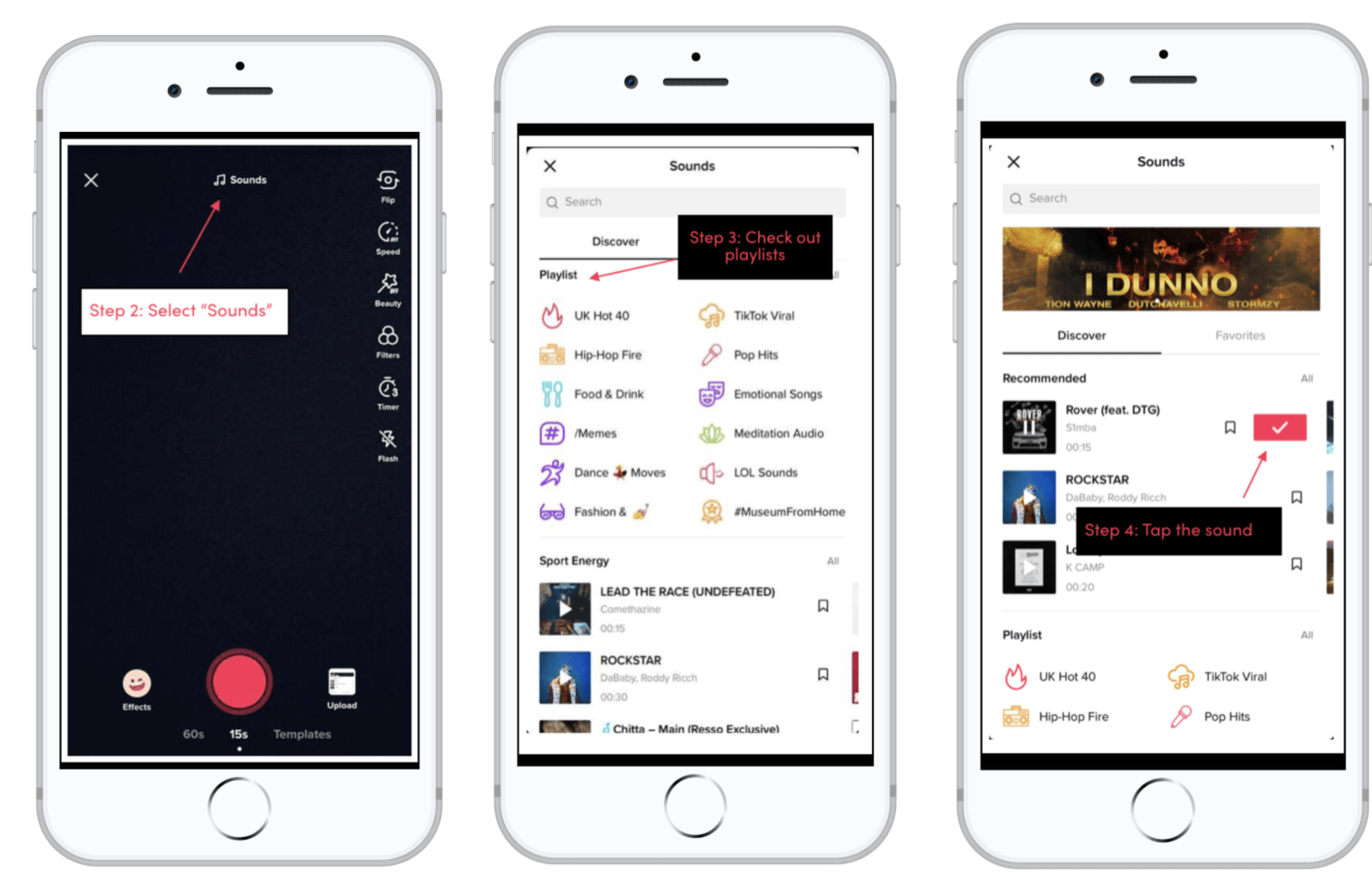
How To Add Sounds To Your Tiktok Creations Tiktok
Tiktok was offline in the united states for about 14 hours, before the company said a post from trump gave it the confidence to restore access to the app. Though tiktok doesn’t have the feature for adding multiple sounds to a video directly, you can use some tricks. Select the + icon at the bottom of the screen to create a new.

Discover How To Add Multiple Sounds On Tiktok
You can overlap multiple songs or transition between the. In this blog, we’ll walk you through the process of adding multiple sounds on tiktok. This blog will walk you through the entire process, step by step, so you can create. “learn how to seamlessly combine two videos on tiktok with this easy tutorial. Tiktok video from queen_zoe forever (@queen_zoei):

How To Find And Use Businessfriendly Tiktok Sounds
Since there is no direct way from within tiktok to add two sounds or songs, here is a workaround that will let you do exactly that. Here are a few methods to use two sounds on tiktok: You can overlap multiple songs or transition between the. How to add two sounds. Tiktok video from queen_zoe forever (@queen_zoei):
How To Add Two Sounds On Tiktok
If you want to use more than 1 sound or song in your tiktok videos this is the solution you need. So, you can not add two songs or sounds directly into your tiktok video from the app itself. Trump was the first to. Though tiktok doesn’t have the feature for adding multiple sounds to a video directly, you can use some tricks.
Since There Is No Direct Way From Within Tiktok
Play the video and tap the. Open the tiktok app on your mobile device. Select the two sounds you want to use. Simply follow along to become the next huge.
Create Or Edit A New Video
This step by step tiktok tutorial shows you how you can add multiple sounds to one. The extraordinary blackout prevents access to one of the. In today’s article, we’ll show you how to add two songs to tiktok in the simplest method possible to generate interesting content. But uploading tiktok videos with two or more songs takes a few extra steps.
Put Two Songs On Tiktok (Or Multiple Sounds)
Adding multiple sounds on tiktok can enhance the overall quality and entertainment value of your videos. Here are some reasons why: To add multiple sounds on tiktok, you can follow these steps: Tap “sounds” at the bottom of the screen, go to “my sounds,” and tap “add sound.” choose your audio by uploading a video or screen recording from your device or.