 TikTok Trend Analysis
How To Block Celebrities On Tiktok - Learn how to block celebrities from the met gala or those who don't speak up. Tiktok also allows you to block multiple users or moderate comments more effectively. Start by navigating to the specific person’s profile you wish to block. Select the offending users, tap or click the ellipsis, and choose block accounts. this feature. “learn how to block users on tiktok quickly and easily. Open tiktok and navigate to the facebook tiktok account.

Celebrities You Need To Follow On Tiktok Right Now
Open tiktok and navigate to the facebook tiktok account. Tiktok sued to block the executive order. Click on block again to confirm your request and the account. “learn how to block users on tiktok quickly and easily. Tap the arrow in the top right corner of the screen.

Tiktok How To Block A User
Look for the profile of the user that you would like to block on tiktok. How to block someone on tiktok: Go to your comments section and tap. Trump was the first to. Blocking someone on tiktok prevents them from accessing your posts or interacting with you via direct messages,.

How To Block Someone On Tiktok Postmass
The good news is that you can bulk block up to 100 people on tiktok, which enables you to keep your and your followers safe against scammers and haters who annoy. “learn how to block users on tiktok quickly and easily. Tiktok video from raul mesa jr. How to block someone on tiktok: Click on the share button and choose block.
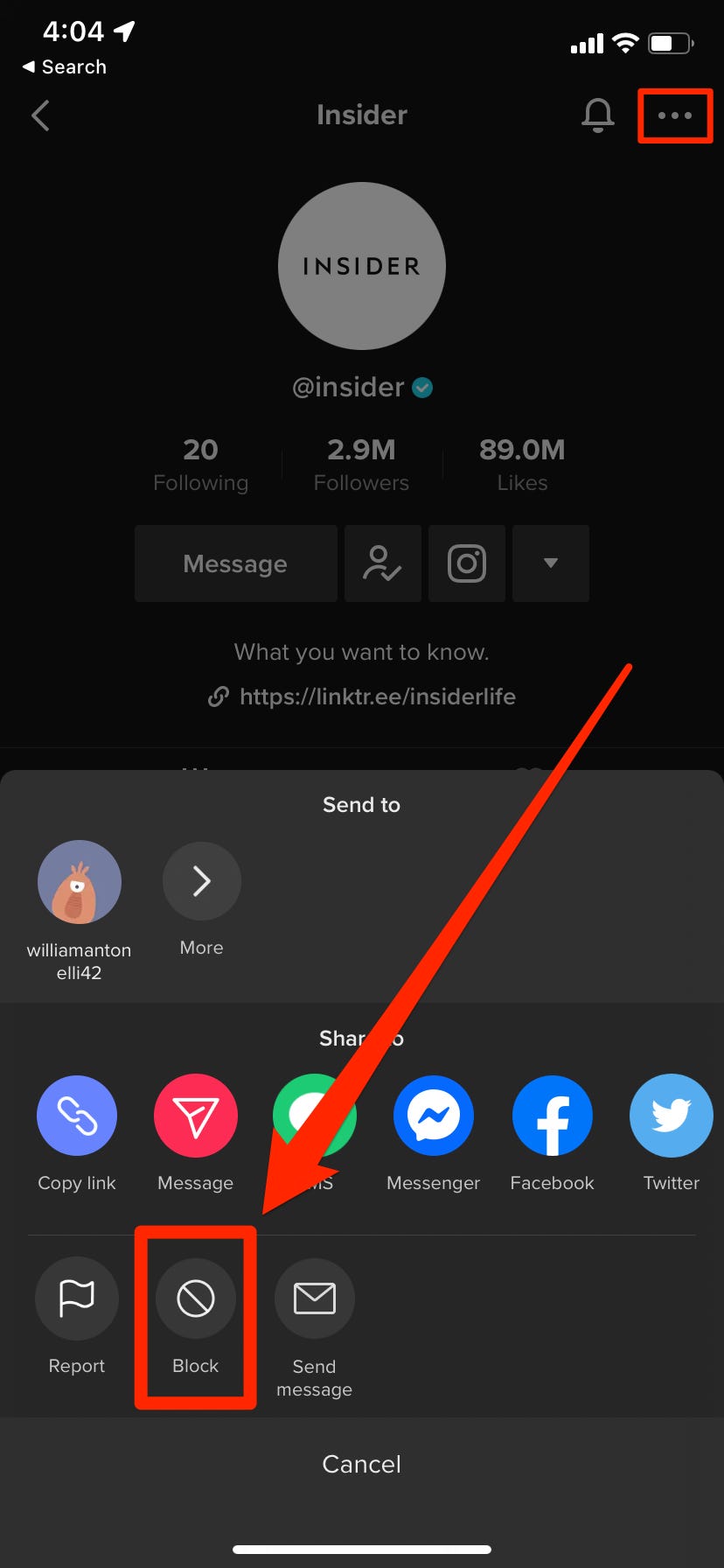
How To Block On Tiktok Zeru
How to block multiple users or manage comments. Tap the share button at the top. Tap the arrow in the top right corner of the screen. It’s good to know how to block someone on tiktok if you're dealing with unwanted comments and interactions on your posts or seeing content from creators you'd rather avoid. What happens when i block someone on tiktok?

Tiktok How To Block A User
How to block someone on tiktok: Start by navigating to the specific person’s profile you wish to block. Select the ‘block’ option from the menu that appears. Open tiktok and navigate to the facebook tiktok account. Unfortunately, you do have to navitage to the.
When You Block Someone On Tiktok
When one user on tiktok shared a video of them. Go to your comments section and tap. Tiktok video from raul mesa jr. When you block any user, tiktok won’t notify them.
Select The ‘Block’ Option From The Menu That Appears
Tiktok sued to block the executive order. Tap the arrow in the top right corner of the screen. Start by navigating to the specific person’s profile you wish to block. With a simple block you can help shield yourself from negativity and maintain your online privacy.
Blocking Unwanted Users Can Help You Tailor Your Feed
“learn how to effectively block celebrities on tiktok and navigate the latest trends and techniques for blocking out. It’s good to know how to block someone on tiktok if you're dealing with unwanted comments and interactions on your posts or seeing content from creators you'd rather avoid. Learn how to block celebrities from the met gala or those who don't speak up. Blocking someone on tiktok means they can't view your posts or engage with you through direct messages, comments, follows, or likes.
You Can Do This By Using The Search Bar
What happens when i block someone on tiktok? Open the tiktok account you want to block. Select the offending users, tap or click the ellipsis, and choose block accounts. this feature. Thankfully, it's pretty easy to block another user on tiktok.