 TikTok Trend Analysis
How To Block Videos On Tiktok - Tap the three dots (…) at the bottom right corner of. How to block a user’s videos on tiktok: The steps are similar for both desktop and mobile versions and it’s the same if you. Blocking videos on tiktok is a. Open the tiktok app and navigate to the video you want to block. Tap the share button at the top.

Tiktok How To Block A User
Are you tired of unwanted videos popping up on your tiktok feed? Block specific users whose content you don’t want to see or interact with. Blocking videos on tiktok is a. Tiktok allows you to keep anyone from interacting with you or your content for any reason. Follow our guide to maintain your online safety and.

Tiktok How To Block A User
To download a video on an ios or android device, go to your tiktok profile page, select the video you want, and tap the share button on the right side of the screen. How to block someone on tiktok. Blocking tiktok on your mobile phone is straightforward, whether you use an iphone, ipad, or android device. Blocking videos on tiktok is a.
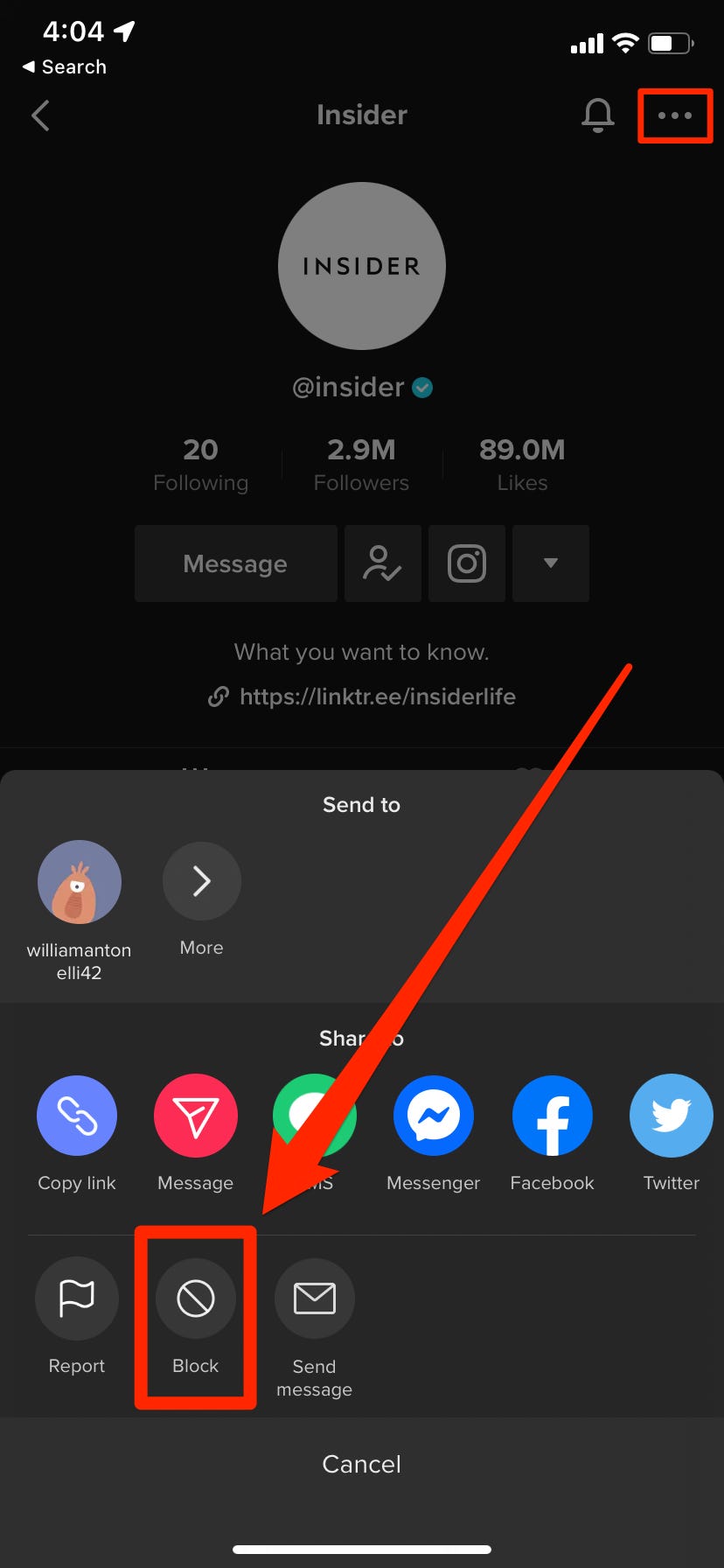
How To Block On Tiktok Zeru
Block specific hashtags to avoid seeing content. Block a user’s videos from. How to block certain videos on tiktok: Open the tiktok app and navigate to the video you want to block. Are you tired of unwanted videos popping up on your tiktok feed?

How To Block Tiktok On Iphone
To download a video on an ios or android device, go to your tiktok profile page, select the video you want, and tap the share button on the right side of the screen. Blocking a user on tiktok is a straightforward process, and we’ll guide you through it: In the tiktok app, go to the person's profile. How to block a user’s videos on tiktok: Understanding the importance of blocking videos.

Tiktok How To Block A User
Tap the share button at the top. Tiktok allows you to keep anyone from interacting with you or your content for any reason. Log in to your account using your username and password. Look for the profile of the user that you would like to block on. The fate of tiktok now rests in the hands of the us supreme court.
By Blocking Videos That Do Not Align
Block a user’s videos from. Tap the arrow in the top right corner of the screen. Go to the profile page of the user you want to. Tiktok video from raul mesa jr.
Understanding The Importance Of Blocking Videos
Follow our guide to maintain your online safety and. Tiktok used to provide an option to hide videos from a certain user or sound as additional options under “not interested” in videos. In the tiktok app, go to the person's profile. Blocking tiktok on your mobile phone is straightforward, whether you use an iphone, ipad, or android device.
The Steps Are Similar For Both Desktop And Mobile
Select the ‘block’ option from the menu that appears. Blocking a user on tiktok is a straightforward process, and we’ll guide you through it: Are you tired of unwanted videos popping up on your tiktok feed? How to block a user’s videos on tiktok:
• Reducing Unwanted Content
Blocking videos on tiktok can be beneficial in several ways, including: Block specific users whose content you don’t want to see or interact with. Tap the share button at the top. Log in to your account using your username and password.