 TikTok Trend Analysis
How To Check Blocked List On Tiktok - To check your blocked accounts list on tiktok: Here's what you can do: Tiktok — which has long said those concerns are meritless — and some of its users sued to block the law, challenging it from a first amendment standpoint. Type in their name in the search box and press “follow.” you can also try. After you block someone on tiktok, you can view a list of blocked accounts from your settings. To see the blocked list on tiktok, first open the tiktok app on your mobile device.

How To Tell If Someone Blocked You On Tiktok
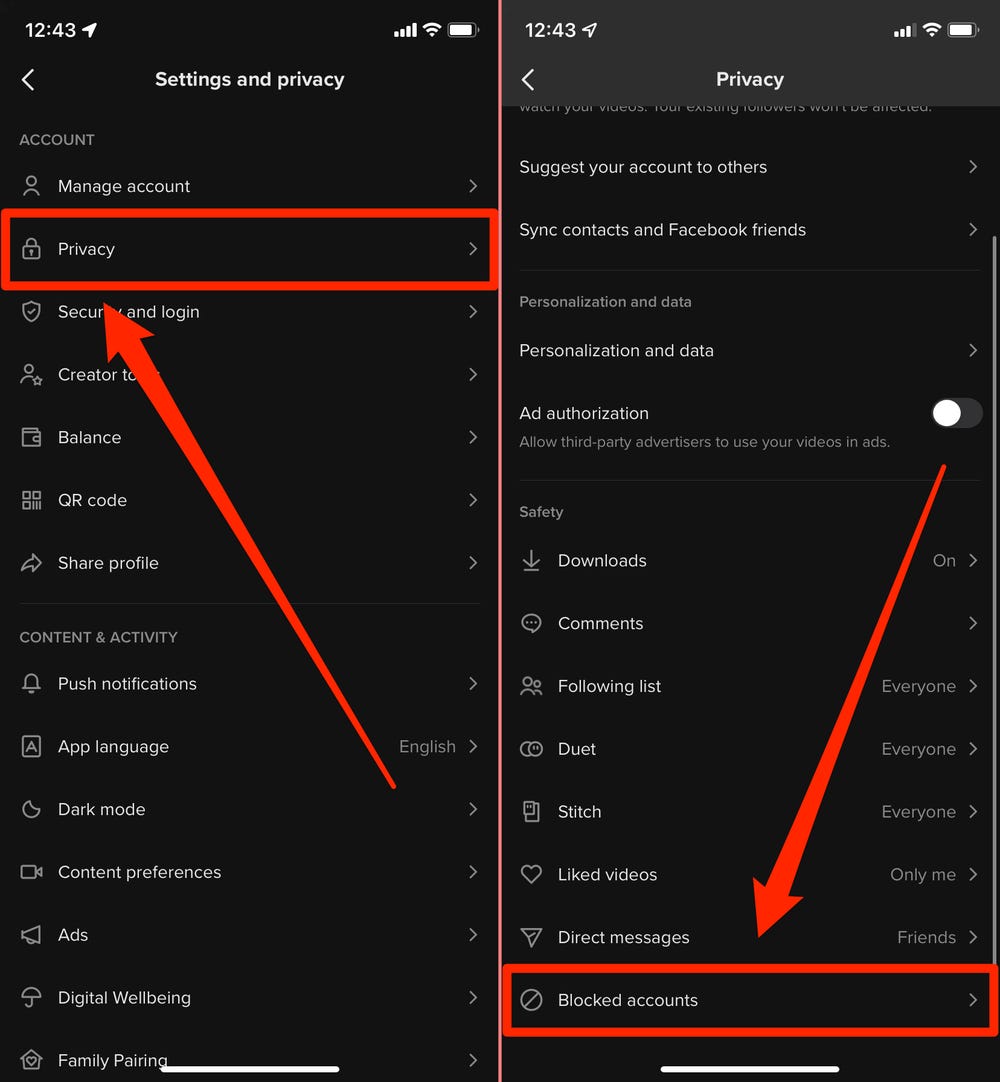
Follow these steps to access the list of accounts you have blocked on tiktok. We use both automated and human evaluation to detect and. In the tiktok app, tap profile at the bottom. Tap on the profile icon () on the bottom right corner of the screen. How to check your block list on tiktok?
How To See Your Blocked List On Tiktok?
To check your blocked accounts list on tiktok: Log in to your account using your username and password. What happens when i submit a report? Here's what you can do: Tiktok is owned by chinese internet company bytedance and was tailored for a global audience.

Tiktok How To See The Users You've Blocked
Tap the menu ☰ button at the top, then select settings and. The best tiktok vpn overall: Here's what you can do: Nordvpn nordvpn tops our list of the best vpns around, so it's not a surprise that it takes the crown as the best tiktok vpn, too. 📲 in this tutorial, we’ll show you how to check your blocked list on the tiktok app!managing your blocked users.

How To See Your Blocked List On Tiktok Zeru
Finding your blocked list on tiktok is a straightforward process that can help you maintain a private online presence and avoid unwanted interactions. 📲 in this tutorial, we’ll show you how to check your blocked list on the tiktok app!managing your blocked users. After you block someone on tiktok, you can view a list of blocked accounts from your settings.

How To See Your Blocked List On Tiktok Techcult
After you block someone on tiktok, you can view a list of blocked accounts from your settings. To check your block list on tiktok, follow these steps: When you block a user on tiktok, they can no longer see your videos or updates, can no longer send you messages, and are not able to access any personal information linked with your.
Block List On Tiktok
To see the blocked list on tiktok, first open the tiktok app on your mobile device. After you block someone on tiktok, you can view a list of blocked accounts from your settings. When you block a user on tiktok, they can no longer see your videos or updates, can no longer send you messages, and are not able to access any personal information linked with your. Tap the menu ☰ button at the top, then select settings and.
Follow These Steps To Access The List Of Accounts
Tap “settings and privacy” on the menu that appears at the bottom of the screen. 📲 in this tutorial, we’ll show you how to check your blocked list on the tiktok app!managing your blocked users. There are a few ways to check blocked accounts on tiktok: Type in their name in the search box and press “follow.” you can also try.
In This Article
Find the tiktok icon on your mobile device and tap to open it. In the tiktok app, tap profile at the bottom. Accessing your blocked list via settings. Launch the tiktok app on your mobile device or access the.
Log In To Your Account Using Your Username
You’ll see a list of users who have been blocked by you. Tiktok takes a proactive approach to keeping our community safe. You can view their profiles by tapping on their usernames. The best tiktok vpn overall: