 TikTok Trend Analysis
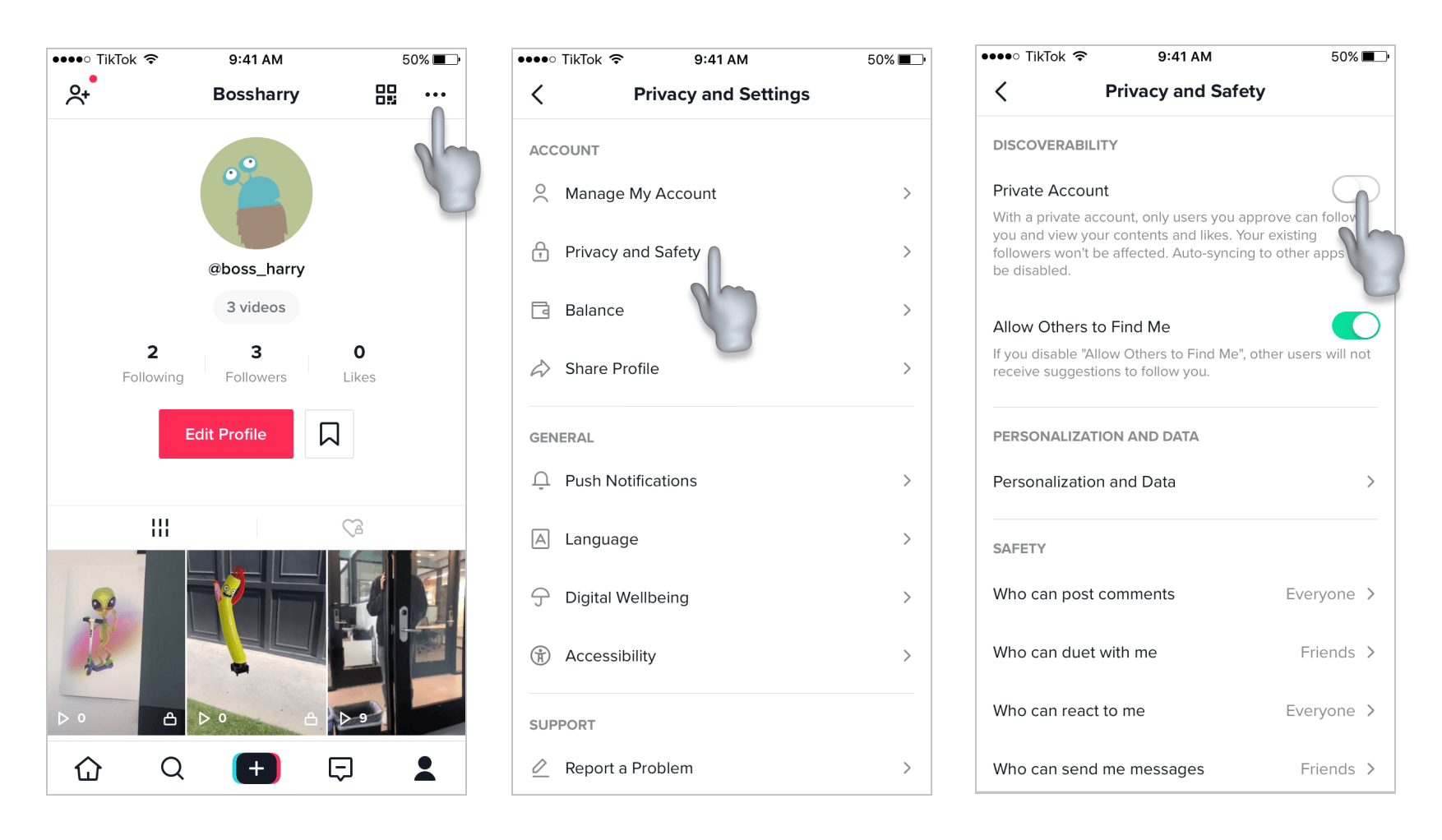
How To Make Followers Private On Tiktok - With private followers, you can choose who sees your videos, comments, and interactions. Depending on the privacy level you would like, you can now choose one of our methods for hiding who you follow on tiktok. Learn how to hide followers on tiktok with our methods. You can also adjust your settings later if you've changed your mind. To hide your follower list on tiktok, go to your profile page, tap on the three dots in the top right corner, select “privacy and safety,” then toggle off the “allow others to see followers” option. We’ll walk you through the steps to make your follower list private and control who can view your connections.

How To Get More Tiktok Followers 20 Free Hacks
Yes, it is possible to make the followers list private on tiktok from the privacy settings of your account. You can make your tiktok profile private by navigating to the menu > privacy > private account. If your tiktok profile is already set to private, then you don’t have to change the “who can see your following list?” setting to “only me”.

How To Make Your Tiktok Profile Private [Guide]
In the tiktok app, tap profile at the bottom. How to hide who you follow on tiktok in closing. Tap the menu ☰ button at the top. Turn private account on or off. You can private your tiktok profile by navigating to the menu > privacy > private account.
Tiktok Parental Guide Tiktok Newsroom
You can choose to make your posts available to everyone, restrict them to friends or followers, or make them private. Tap settings and privacy, then tap privacy. Learn how to hide followers on tiktok with our methods. You can private your tiktok profile by navigating to the menu > privacy > private account. You can also adjust your settings later if you've changed your mind.

Createaprivatetiktokvideo Thecellguide
You can make your tiktok profile private by navigating to the menu > privacy > private account. In the tiktok app, tap profile at the bottom. Yes, it is possible to make the followers list private on tiktok from the privacy settings of your account. Depending on the privacy level you would like, you can now choose one of our methods for hiding who you follow on tiktok.

The Visibility Of A Private Tiktok Account’s Followers Wlfa
In the tiktok app, tap profile at the bottom. Whether you're looking for more privacy or just want to keep your tiktok. If your tiktok profile is already set to private, then you don’t have to change the “who can see your following list?” setting to “only me”. Keep your content private, prevent harassment, and create an exclusive community on your account.
In The Tiktok App, Tap Profile At The Bottom
To do this, go to your profile and click on the “me” icon in the lower right corner of the screen. With private followers, you can choose who sees your videos, comments, and interactions. Turn private account on or off. Control who sees your content:
If Your Tiktok Profile Is Already Private
Learn how to hide followers on tiktok with our methods. You can make your tiktok profile private by navigating to the menu > privacy > private account. If your tiktok profile is already set to private, then you don’t have to change the “who can see your following list?” setting to “only me”. Keep your content private, prevent harassment, and create an exclusive community on your account.
To Learn More About Your Privacy On Tiktok
How to hide who you follow on tiktok in closing. To hide your follower list on tiktok, go to your profile page, tap on the three dots in the top right corner, select “privacy and safety,” then toggle off the “allow others to see followers” option. Private followers can help reduce the amount. You can also adjust your settings later if you've changed your mind.
Tap The Menu ☰ Button At The Top
You can choose to make your posts available to everyone, restrict them to friends or followers, or make them private. No matter your reason for wanting to hide your following list, we've presented you with two ways to make it happen! You can private your tiktok profile by navigating to the menu > privacy > private account. Depending on the privacy level you would like, you can now choose one of our methods for hiding who you follow on tiktok.