 TikTok Trend Analysis
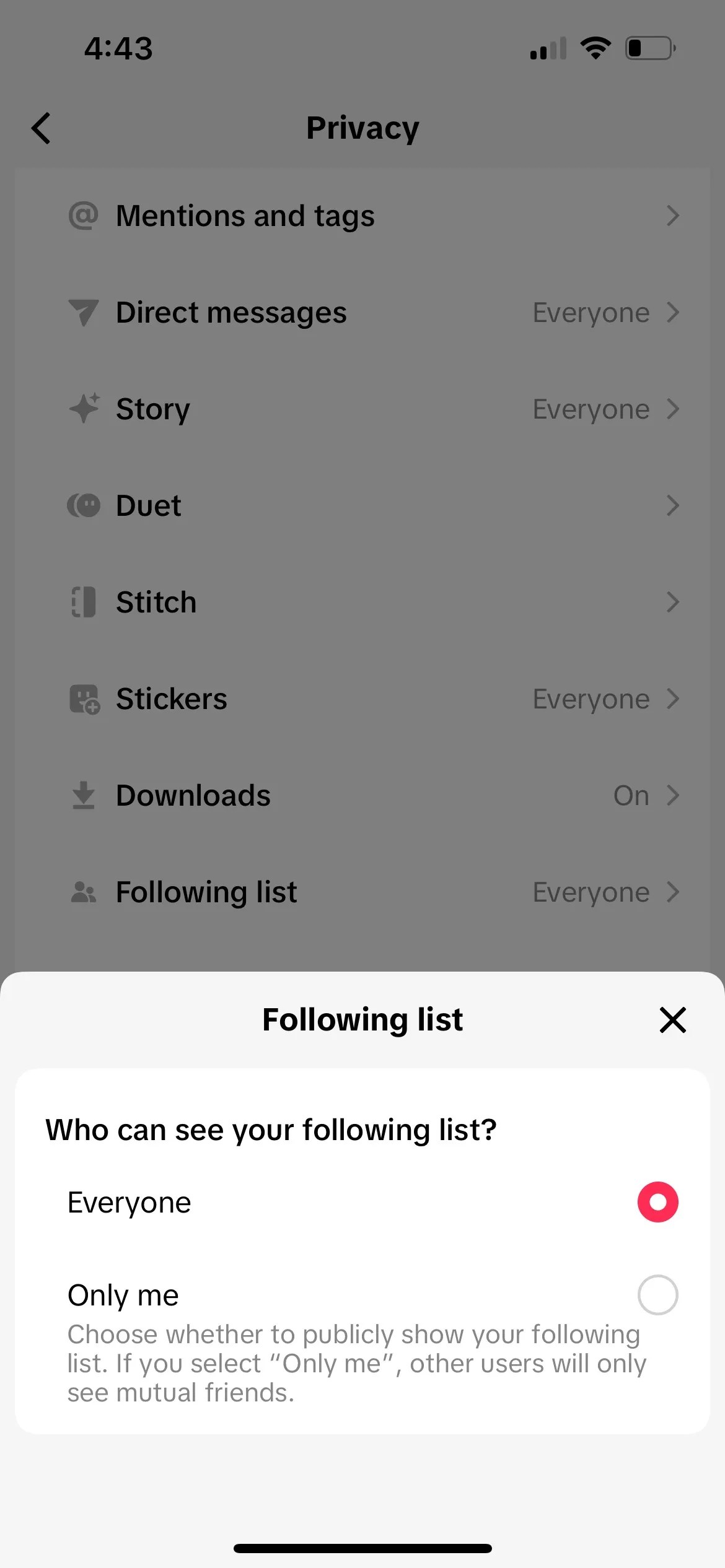
How To Make Following List Private On Tiktok - Go to your profile by tapping 'profile' in the bottom right corner. How to turn off who can see your following list on tiktok app? In this video, we'll walk you through the simple steps to hide your following list, ensuring your tiktok experience is as private as you want it to be.🔍 wha. By implementing these simple yet effective strategies, you can ensure. To hide your following list on tiktok, you need to navigate to the menu and tap on “privacy”. To enable this feature, go to your profile, tap the three dots in the top right corner, select “privacy and safety,” and toggle on the “private account” option.

Iphone Tiktok
How to set no one wil. After you’ve selected “only me”, your following list will be hidden from others. In this video, we'll walk you through the simple steps to hide your following list, ensuring your tiktok experience is as private as you want it to be.🔍 wha. Why make your following list private? To make your following list private on tiktok, follow these steps:.
How To Open Your Tiktok Following Feed
How to turn off who can see your following list on tiktok app? Select report and follow the prompts to tell tiktok why you're reporting them. Go to your profile by tapping 'profile' in the bottom right corner. Then, tap on “following list” and select “only me”. How to set no one wil.

How To View Private Tiktok Account Working Methods [2022]
Go to your profile by tapping 'profile' in the bottom right corner. You can make your tiktok profile private by navigating to the menu > privacy > private account. 409 likes, tiktok video from elia ! How to stop other people from seeing your following list on tiktok app? Making your following list private on tiktok is a straightforward process:

How To Hide Your Tiktok Following List And Keep
In this video, we'll walk you through the simple steps to hide your following list, ensuring your tiktok experience is as private as you want it to be.🔍 wha. Tap on the “following” tab to access your following list. How to set no one wil. Then, tap on “following list” and select “only me”. Launch the tiktok app and navigate to your profile by tapping the profile icon () located at the bottom.

Createaprivatetiktokvideo Thecellguide
To hide who you follow on tiktok: To make your following list private on tiktok, follow these steps: 409 likes, tiktok video from elia ! In this video, we'll show you how to make your tiktok following list private. Go to your profile by tapping 'profile' in the bottom right corner.
By Following These Steps, You Can Ensure
The simplest and most effective way to manage who sees your following list is by setting your tiktok account to private. So if you want to keep that private, but you don't want to turn y. By following these steps, you can. Go to your profile by tapping 'profile' in the bottom right corner.
409 Likes, Tiktok Video From Elia
If a user taps on your following list,. Making your following list private on tiktok is a straightforward process: Tap on the “following” tab to access your following list. When you switch to a private account, only your.
Tiktok Has A Very Useful Option That Lets You
You can make your tiktok profile private by navigating to the menu > privacy > private account. Open the tiktok app and navigate to your profile page. “learn how to keep your following list private and secure on social media platforms. To hide your following list on tiktok, you need to navigate to the menu and tap on “privacy”.
After You’ve Selected “Only Me”
To make your following list private on tiktok, follow these steps: How to set no one wil. Tap “settings and privacy.” step 3: By implementing these simple yet effective strategies, you can ensure.