 TikTok Trend Analysis
How To Make My Following List Private On Tiktok - In this video, we’ll show you how to hide your following list on tiktok so that only you can see who you fol. If a user taps on your following list,. Here’s how to make following private on tiktok: Yes, it is possible to make the followers list private on tiktok from the privacy settings of your account. In this video, i show you how to hide your tiktok following list and followers. Open the tiktok app on your device.
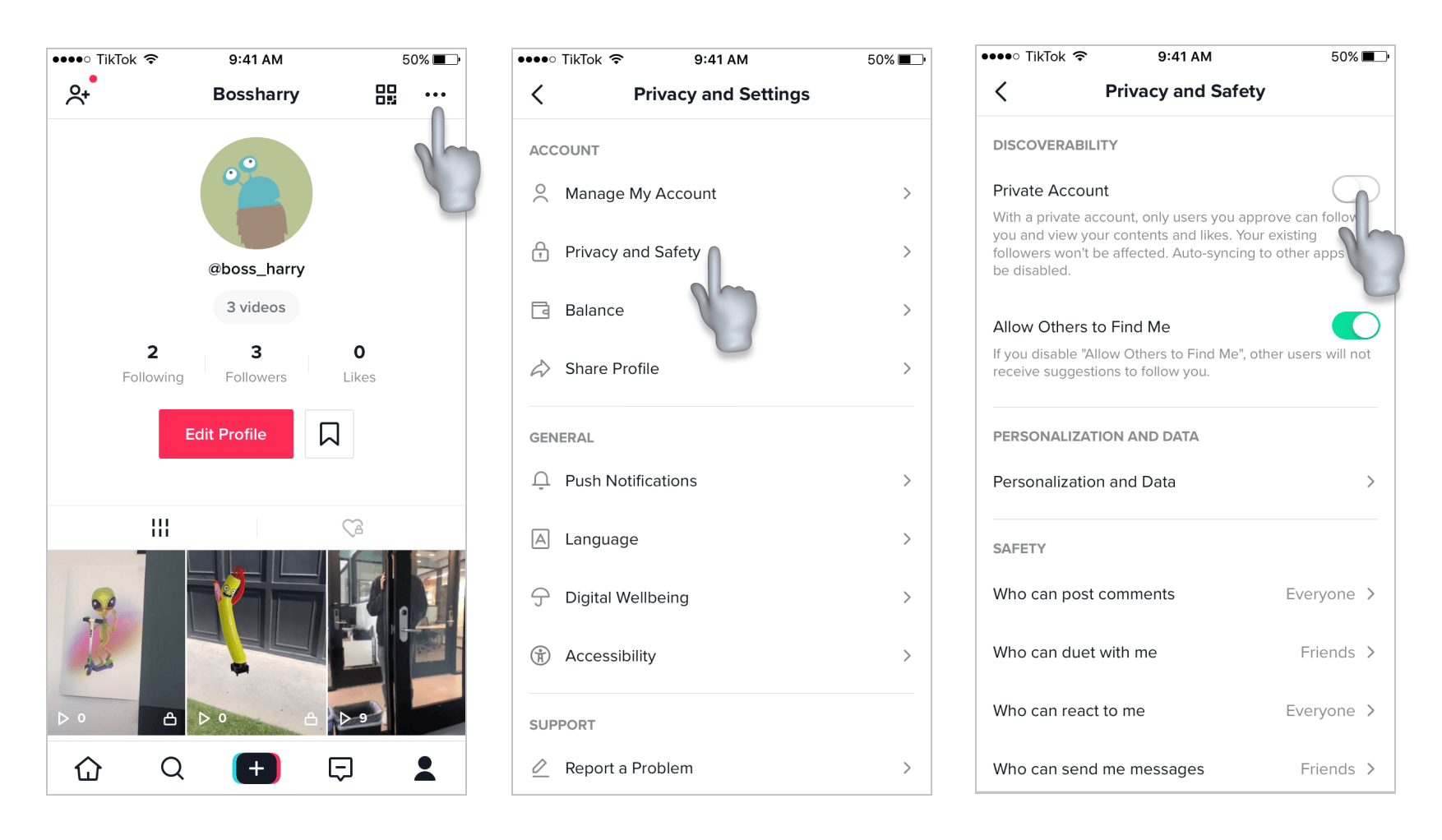
Tiktok Parental Guide Tiktok Newsroom
Follow the simple steps in this video tutorial! To hide your following list on tiktok, you need to navigate to the menu and tap on “privacy”. Choose the “only me” option to make your follower list private. Open the tiktok app, and then tap profile in the menu along the bottom of the screen. Fortunately, tiktok allows you to make your following list private, and in this article, we will guide you through the process.

How To Hide Your Following List On Tiktok
Tap the menu icon at the top of the. In this article, i show you why you may want to hide your following list on tiktok, the pros and cons it brings to your social media experience, and the steps you can take to hide. Yes, it is possible to make the followers list private on tiktok from the privacy settings of your account.

How To View Private Tiktok Account Working Methods [2022]
How to set no one wil. Then, tap on “following list” and select “only me”. Here’s how to do it: Additionally, blocking specific users allows you to control. Keeping record of your following list can help make sure that if you want to maintain a connection to a creator, you can follow them across platforms to sites like youtube.

How To Make Your Tiktok Account Private Akibia
The only way to do both is to private your account but there is a setting to hide your following list. Here’s how to make following private on tiktok: Open the tiktok app, and then tap profile in the menu along the bottom of the screen. Tiktok lets you control who can see your personal info, like your bio, and who can find.

How To Hide Following On Tiktok? Full Guide Otakukart
Choose the “only me” option to make your follower list private. Your tiktok profile screen opens. To hide your following list on tiktok, you need to navigate to the menu and tap on “privacy”. Open your tiktok profile to start, open the tiktok app and go to your profile page by tapping the icon in the bottom. To do this, go to your profile and click on the “me” icon in the lower.
Look For The “Who Can See My Followers List”
Why make your following list private? Here’s how to make following private on tiktok: Keeping your personal info private. Open the tiktok app, and then tap profile in the menu along the bottom of the screen.
Blocking Specific Users Allows You To Control
In this video, i show you how to hide your tiktok following list and followers. In this video, we’ll show you how to hide your following list on tiktok so that only you can see who you fol. Keeping record of your following list can help make sure that if you want to maintain a connection to a creator, you can follow them across platforms to sites like youtube. Fortunately, tiktok allows you to make your following list private, and in this article, we will guide you through the process.
Open The Tiktok App On Your Device
Learn how to hide your following list on tiktok and keep it private so only you can see the people you follow. To do this, go to your profile and click on the “me” icon in the lower. Tiktok lets you control who can see your personal info, like your bio, and who can find. To hide your following list on tiktok, you need to navigate to the menu and tap on “privacy”.
Learn The Steps To Control
So if you want to keep that private, but you don't want to turn y. Choose the “only me” option to make your follower list private. Your tiktok profile screen opens. Tiktok has a very useful option that lets you hide this, the following list here on tiktok.