 TikTok Trend Analysis
How To Make Your Followers Private On Tiktok - This guide will show you three easy ways to improve your tiktok. Discover how to take control of your tiktok privacy settings with this comprehensive guide. Making your followers private on tiktok gives you more control over who can see your follower list and, to some extent, protects your privacy. Set your account to private: Go to the tiktok app and tap on the + icon to create a new account. You can choose to make your tiktok post available to everyone, restrict it to friends (followers you follow back) or followers, or make it private so that only you can view it.

How To Increase Your Tiktok Followers 9 Steps (With
Learn how to manage who sees your content, control comments and messages, and. In the tiktok app, tap profile at the bottom. In this video, we will show you how to hide your tiktok from certain people, including. This can be useful if you want to. Go to the tiktok app and tap on the + icon to create a new account.

How To Hide Followers On Tiktok?
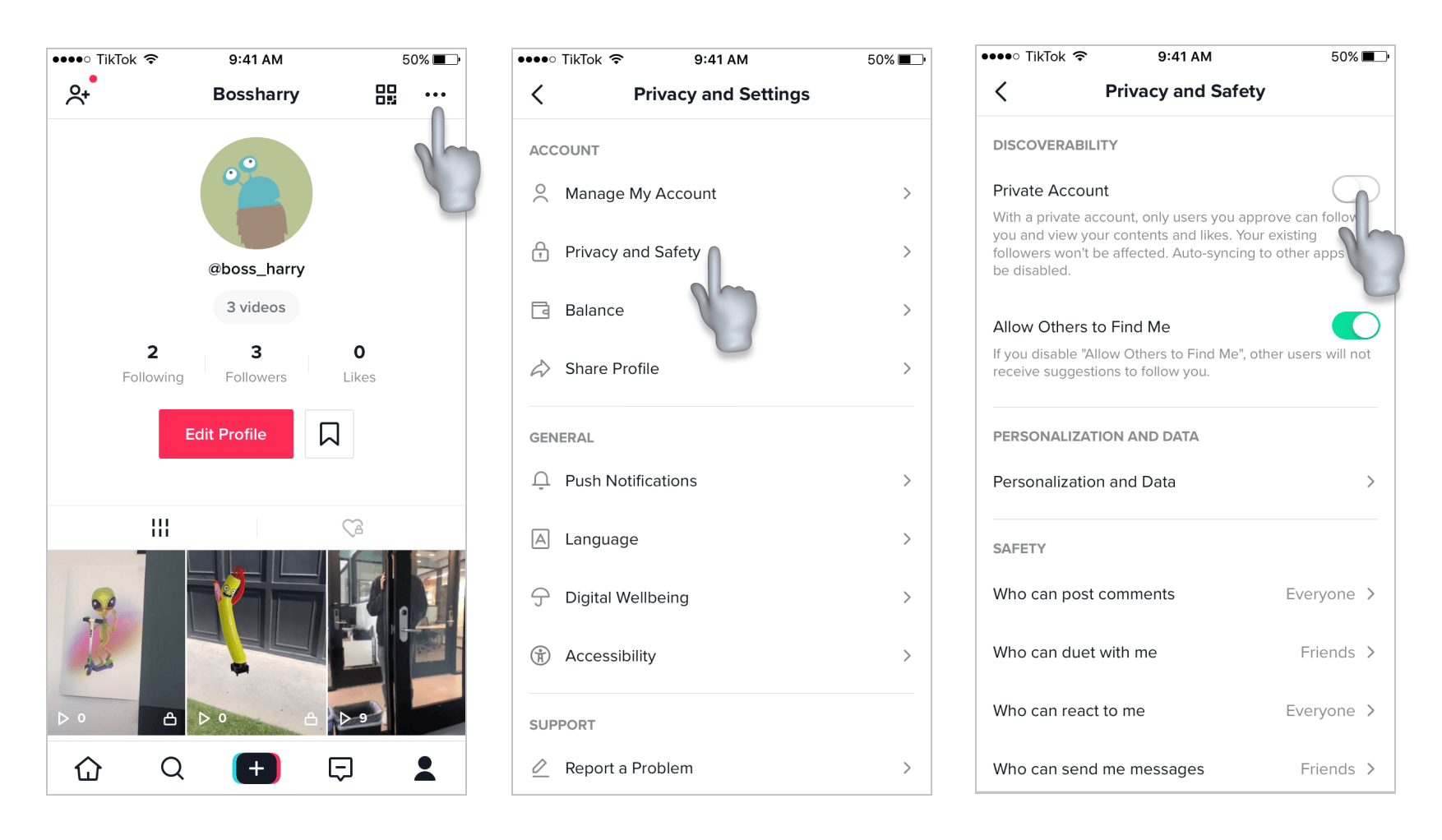
We offer a variety of privacy tools that enable people to choose who they allow to see the content they create and share and who they allow to interact with them. To do this, go to your profile and click on the “me” icon in the lower. There is no straight way to hide your followers on tiktok, but there are other ways to keep your privacy.
Tiktok Parental Guide Tiktok Newsroom
On tiktok, you can choose. To enable this feature, go to your. If your tiktok profile is already set to private, then you don’t have to change the. Learn how to hide followers on tiktok with our methods. Go to the tiktok app and tap on the + icon to create a new account.

Natural Tiktok Followers Guide Tikfreefollowers
Learn how to manage who sees your content, control comments and messages, and. Learn how to hide followers on tiktok with our methods. Tap settings and privacy, then tap privacy. Keep your content private, prevent harassment, and create an exclusive community on your account. To enable this feature, go to your.

How To Make Your Iphone Tiktok Account Private
Tap the menu ☰ button at the top. In this article, we will explain to you how to make your tiktok private. To enable this feature, go to your. If your tiktok profile is already set to private, then you don’t have to change the. Keep your content private, prevent harassment, and create an exclusive community on your account.
In The Tiktok App, Tap Profile At The Bottom
There is no straight way to hide your followers on tiktok, but there are other ways to keep your privacy. Learn how to manage who sees your content, control comments and messages, and. You can choose to make your tiktok post available to everyone, restrict it to friends (followers you follow back) or followers, or make it private so that only you can view it. Do you want to keep your tiktok activity private from specific users?
Navigate To Your Tiktok Account Profile Page
Many of these apps also require payment, putting your credit card information at risk. Tap the menu ☰ button at the top. Hide your list of followers and restrict visibility on specific posts using tiktok’s privacy options. You have control over who views your content and engages with your profile,.
Control Who Sees Your Content
To enable this feature, go to your. In the options menu, find and select the “privacy” option to access the privacy settings for your follower list. Yes, it is possible to make the followers list private on tiktok from the privacy settings of your account. This can be useful if you want to.
Discover How To Take Control Of Your Tiktok Privacy
Whether you're looking for more privacy or just want to keep your tiktok. We offer a variety of privacy tools that enable people to choose who they allow to see the content they create and share and who they allow to interact with them. If you link your tiktok account, they may even post content on your behalf. You can private your tiktok profile by navigating to the menu > privacy > private account.