 TikTok Trend Analysis
How To Stop Tiktok From Sending Emails - Bytedance has made its own decision to. So, if you scroll to the bottom of an email you receive from tiktok, you will find an ‘unsubscribe’ button that will stop all emails from being sent to your inbox. Here's what you can do: Receive only the notifications you want. Open the tiktok app on your. Learn how to manage your email preferences and reduce the frequency of emails.

How To Find Emails On Tiktok
Are you ready to learn how to stop tiktok from sending emails? Why does tiktok send emails? Tiktok was offline in the united states for about 14 hours, before the company said a post from trump gave it the confidence to restore access to the app. Unsubscribe from tiktok’s email newsletter. To stop tiktok from sending emails, you can follow these simple steps:.

How To Find Emails On Tiktok
Learn how to stop tiktok emails in a few simple steps. If all else fails… if you still receive unwanted emails, try. Stopping unwanted emails from tiktok is a straightforward process. Keep reading to find out how! “i have unsubscribed from emails from tiktok at least three times.

Tiktok Messages Not Sending
The act does not instruct bytedance to stop the tiktok service, and it prevents the app from being distributed from this point forward. If you are looking for how to stop tiktok from sending you emails, follow these detailed steps to disable email notifications from the platform. This simple guide will show. Many users have reported receiving unwanted emails from tiktok, and it can be overwhelming to stop them.
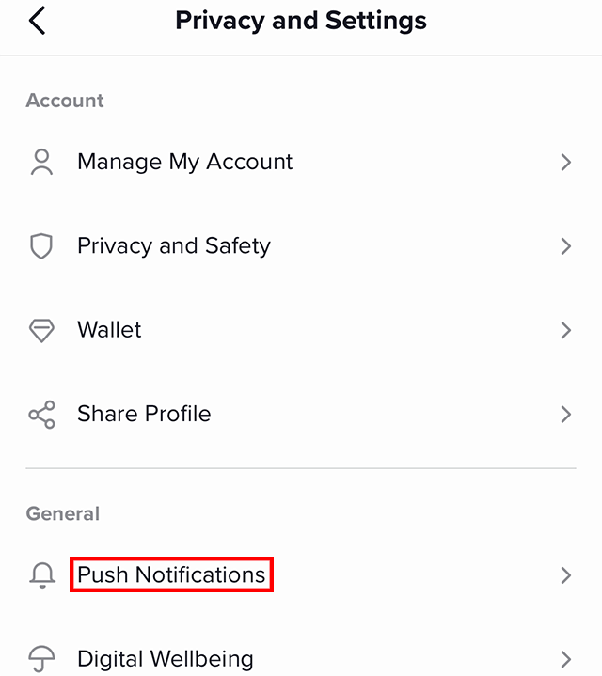
How To Stop Tiktok Emails Quora
Here's what you can do: Tiktok was offline in the united states for about 14 hours, before the company said a post from trump gave it the confidence to restore access to the app. Many users have reported receiving unwanted emails from tiktok, and it can be overwhelming to stop them. The act does not instruct bytedance to stop the tiktok service, and it prevents the app from being distributed from this point forward.

Tiktok Here's How To Stop Users From Sending You
Go to your tiktok account settings by clicking on the profile icon and selecting settings. scroll. Tiktok emails can get overwhelming. If all else fails… if you still receive unwanted emails, try. Turning off tiktok emails is a simple process that can help you regain control over your inbox. Keep reading to find out how!
Tiktok Takes A Proactive Approach To Keeping Our Community
By following the steps outlined in this article, you can disable account notifications,. We use both automated and human evaluation to detect and. Do you feel like you’re bombarded with notifications and promotions every time you log into your account? If you are looking for how to stop tiktok from sending you emails, follow these detailed steps to disable email notifications from the platform.
Tired Of Constant Email Notifications From Tiktok?
Trump was the first to. Bytedance has made its own decision to. Stopping unwanted emails from tiktok is a straightforward process. To stop tiktok from sending emails, you can follow these simple steps:
This Simple Guide Will Show
Discover ways to unsubscribe, adjust app settings, and use email filters to reduce unwanted. Log in to your tiktok account: Receive only the notifications you want. Are you tired of receiving unwanted emails from tiktok?
Learn How To Stop Tiktok Emails In A Few
Many users have reported receiving unwanted emails from tiktok, and it can be overwhelming to stop them. What happens when i submit a report? Why does tiktok send emails? Manage your notifications and declutter your inbox by customizing tiktok email preferences.