 TikTok Trend Analysis
Private Account Tiktok - This article will serve as a comprehensive guide on how to set your tiktok. 917 likes, tiktok video from _private_000 (@_private_000): In the tiktok app, tap profile at the bottom. Find out how to set your account to private or public, suggest your. “explore the world of private social media accounts and their impact on privacy. By default, all new accounts on tiktok are public.

How To Watch Private Account Videos On Tiktok? Kids
One of the simplest yet most effective ways to do this is by setting your tiktok account to private. In the tiktok app, tap profile at the bottom. By default, all new accounts on tiktok are public. New users will have to send you a follow. Learn how to manage your online presence and privacy settings on tiktok.

How To Make A Private Tiktok Account In 5
You can review and manage your account in. “explore the world of private social media accounts and their impact on privacy. Enable these tiktok privacy settings to keep your activity secure and confidential. Your privacy matters at tiktok, so your account is private. When your tiktok account is private, it means that only people who follow you can see your videos and engage with your content.

What Are The Best Tiktok Private Account Viewers?
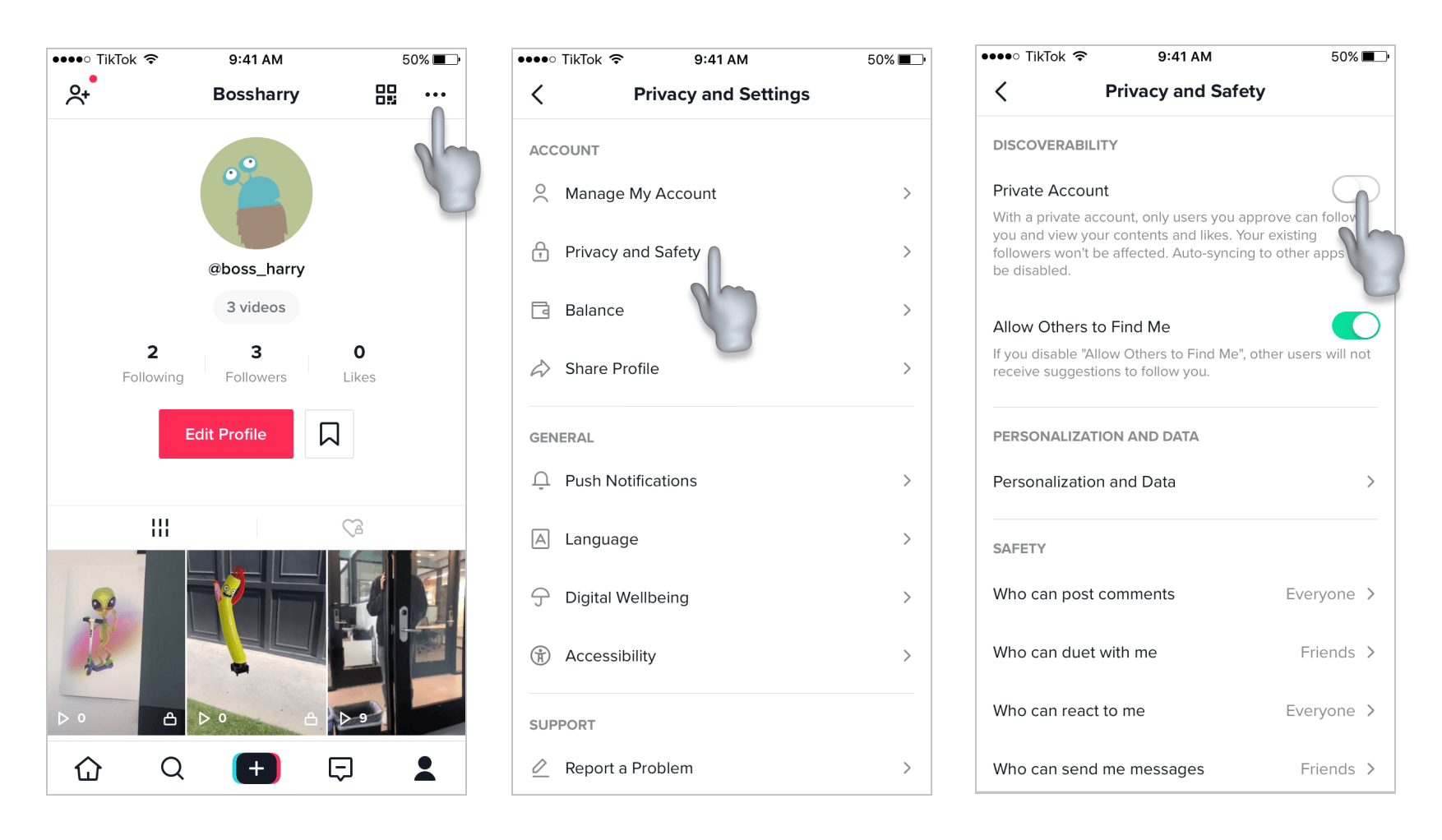
In the tiktok app, tap profile at the bottom. Tap the menu ☰ button at the top. Find out how to set your account to private or public, suggest your. Account privacy settings choosing between a private or public account suggested accounts tiktok global privacy center link your email on android devices If you want to hide your videos, as well as control who can follow you, then you can privatize your account by following these.
Tiktok Parental Guide Tiktok Newsroom
Tap the menu ☰ button at the top. This lets you control who can follow you, view your tiktoks,. In the tiktok app, tap profile at the bottom. Learn how to manage your online presence and privacy settings on tiktok. One of the simplest yet most effective ways to do this is by setting your tiktok account to private.

The 6 Best Tiktok Private Account Viewers In 2023
If you’re one of the 170 million tiktok users in the u.s., it’s time to start making sure your account is properly secured and updated ahead of the impending january ban. These scams prey on curiosity and the desire to access private content, tricking users into believing such access is possible. To learn more about your privacy on tiktok, visit our privacy center.
One Of The Simplest Yet Most Effective Ways
Learn how to manage your online presence and privacy settings on tiktok. Tap settings and privacy, then tap privacy. Do you know that you can make your tiktok account private? Looking for a more private tiktok experience?
Find Out How To Set Your Account To Private
This article will serve as a comprehensive guide on how to set your tiktok. Why make your tiktok account private? The first and simplest way you can make your tiktok account more private is to set your tiktok account to private. To set your tiktok account as private or public:
In The Tiktok App, Tap Profile At The Bottom
You can choose between public and private account, control your visibility and comment settings, and send and. When your tiktok account is private, it means that only people who follow you can see your videos and engage with your content. New users will have to send you a follow. Turn private account on or off.
To Learn More About Your Privacy On Tiktok
Tap the menu ☰ button at the top. If you’re one of the 170 million tiktok users in the u.s., it’s time to start making sure your account is properly secured and updated ahead of the impending january ban. Account privacy settings choosing between a private or public account suggested accounts tiktok global privacy center link your email on android devices Learn how to manage your account information, privacy preferences, and public presence on tiktok.