 Biology Genetics Worksheets
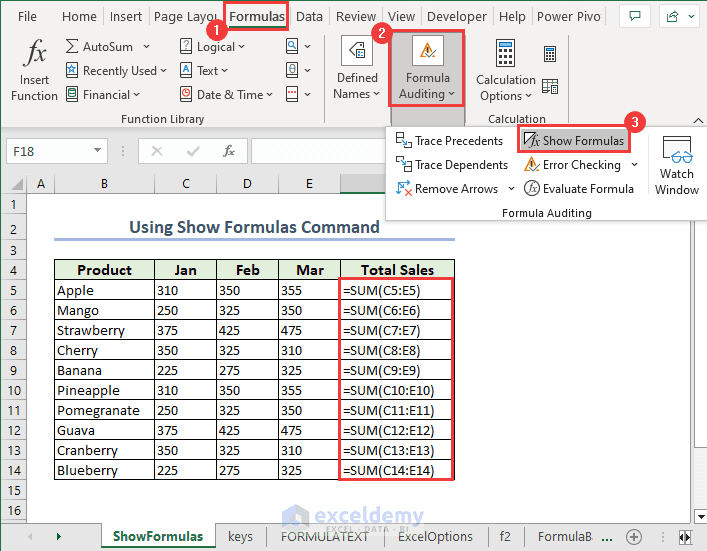
Display The Formulas In This Worksheet - Download the attached workbook for free and practice with along with it. Some of the most useful shortcuts include ctrl + ` (tilde) for displaying all formulas in a worksheet and ctrl + ‘ (apostrophe) for displaying formulas in individual cells. Click on show formulas, and. Go to the ribbon > formulas tab > formula auditing group. Things you should know press ctrl + ~ to see all the formulas, then print it. Here are the steps to show formulas in excel instead of the value:
Display Formulas In Worksheet
Go to the worksheet where you want to view the formulas (this feature is worksheet specific). In the formula auditing group, click on the show formulas option. Here’s how you can do it. Locate the formula auditing group, where you’ll see the show formulas button. As soon as you click on.

Display The Formulas In The Worksheet
Locate the formula auditing group, where you’ll see the show formulas button. Click on show formulas, and. Open your excel workbook and navigate to the formulas tab in the ribbon. Things you should know press ctrl + ~ to see all the formulas, then print it. Go to the worksheet where you want to view the formulas (this feature is worksheet specific).

Display The Formulas In The Worksheet
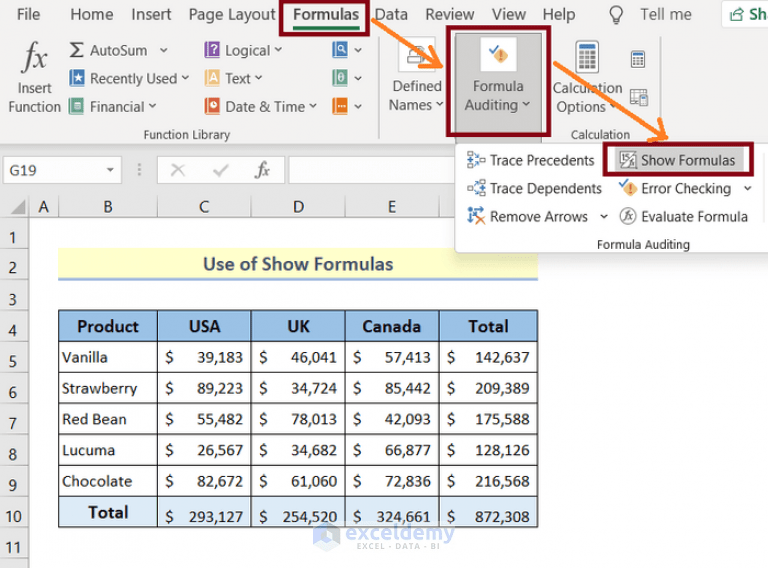
Things you should know press ctrl + ~ to see all the formulas, then print it. Open your excel workbook and navigate to the formulas tab in the ribbon. In the formula auditing group, click on the show formulas option. Click on the button ‘show formulas’. When the formulas are visible, print your worksheet as you normally would.
Display The Formulas In The Worksheet
Click on show formulas, and. Locate the formula auditing group, where you’ll see the show formulas button. Go to the formulas tab and then click show formulas or use the keyboard shortcut ctrl + ` (that is an accent,. Includes printing tips and troubleshooting guide. Go to the worksheet where you want to view the formulas (this feature is worksheet specific).

Display Formulas In Worksheet
Click on the button ‘show formulas’. Things you should know press ctrl + ~ to see all the formulas, then print it. As soon as you click on. Open your excel workbook and navigate to the formulas tab in the ribbon. Here are the steps to show formulas in excel instead of the value:
Things You Should Know Press Ctrl + ~
Some of the most useful shortcuts include ctrl + ` (tilde) for displaying all formulas in a worksheet and ctrl + ‘ (apostrophe) for displaying formulas in individual cells. Go to the worksheet where you want to view the formulas (this feature is worksheet specific). As soon as you click on. Click on the ‘formulas’ tab in the ribbon.
Normally When You Create A Formula In Excel
Download the attached workbook for free and practice with along with it. In the formula auditing group, click on the show formulas option. Select any cell of your worksheet. Alternatively, go to formulas > show formulas.
Click On The Button ‘Show Formulas’
Go to the formulas tab and then click show formulas or use the keyboard shortcut ctrl + ` (that is an accent,. To show formulas in all cells press ctrl+` (that little mark is the grave accent mark key). Includes printing tips and troubleshooting guide. Here are the steps to show formulas in excel instead of the value:
Go To The Ribbon > Formulas Tab > Formula
This post is going to show you all the different ways you can show the formulas in your microsoft excel spreadsheets. Here’s how you can do it. Open your excel workbook and navigate to the formulas tab in the ribbon. Learn six distinct methods to display the cell formulas in excel.