 Biology Genetics Worksheets
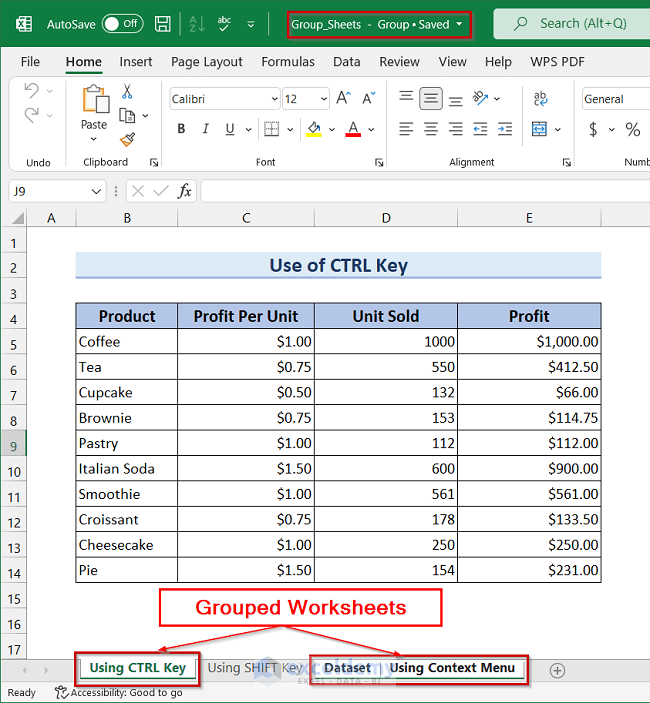
Group Worksheets In Excel - Press and hold down the ctrl key and select the worksheet tabs you want to group. Learn how to quickly group worksheets in excel. Read more about them here. Right click one of the sheet tabs. If you want to group consecutive worksheets, select the first worksheet tab in the range, press and hold the shift key, and. This allows you to make changes to the same range of cells across multiple worksheets.
How To Group Worksheets In Excel
4 ways to group and ungroup worksheets in microsoft excel do you need to group or ungroup the sheets in your excel workbook? If you want to group consecutive worksheets, select the first worksheet tab in the range, press and hold the shift key, and. All your worksheets are grouped now. Here, we'll present examples of grouping and ungrouping sheets in excel using keyboard shortcuts and vba while mentioning required cautions.

How To Group Sheets In Excel
You can now edit all. This tutorial demonstrates how to group and ungroup worksheets in excel. 4 ways to group and ungroup worksheets in microsoft excel do you need to group or ungroup the sheets in your excel workbook? Press and hold down the ctrl key and select the worksheet tabs you want to group. You can group/ungroup specific worksheets or all the worksheets in the workbook at one go.

Mastering Excel A Comprehensive Guide On How To Group
In microsoft excel, if you have the same layouts in all the worksheets, you can edit or add formulas more easily by grouping the needed worksheets. Grouping sheets in excel can be a great way to perform. Group all worksheets to quickly group all worksheets, follow these steps. You can group/ungroup specific worksheets or all the worksheets in the workbook at one go.

How To Excel Group Sheets
Check the top of the workbook. If you have multiple worksheets that have the same layout and formatting, grouping these sheets together can. Read more about them here. Grouping sheets in excel can be a great way to perform. Right click one of the sheet tabs.

How To Group Worksheets In Excel Smart Worksheets Uk
In microsoft excel, if you have the same layouts in all the worksheets, you can edit or add formulas more easily by grouping the needed worksheets. This tutorial demonstrates how to group and ungroup worksheets in excel. Read more about them here. Press and hold down the ctrl key and select the worksheet tabs you want to group. If you're editing multiple worksheets in microsoft excel, it might be helpful to group them together.
All Your Worksheets Are Grouped Now
Learn how to quickly group worksheets in excel. 4 ways to group and ungroup worksheets in microsoft excel do you need to group or ungroup the sheets in your excel workbook? Right click one of the sheet tabs. This allows you to make changes to the same range of cells across multiple worksheets.
The Worksheet
If you have multiple worksheets that have the same layout and formatting, grouping these sheets together can. Check the top of the workbook. In microsoft excel, if you have the same layouts in all the worksheets, you can edit or add formulas more easily by grouping the needed worksheets. You can group/ungroup specific worksheets or all the worksheets in the workbook at one go.
Read More About Them Here
If you want to group consecutive worksheets, select the first worksheet tab in the range, press and hold the shift key, and. Here, we'll present examples of grouping and ungrouping sheets in excel using keyboard shortcuts and vba while mentioning required cautions. Group all worksheets to quickly group all worksheets, follow these steps. Grouping sheets in excel can be a great way to perform.
Ungroup Worksheets In Excel
If you're editing multiple worksheets in microsoft excel, it might be helpful to group them together. You can now edit all. In this tutorial, i am going to explain 3.