 Biology Genetics Worksheets
How To Copy A Worksheet In Excel - We've searched our database for all the emojis that are somehow related to symbols. Copy (publishing), written content in publications, in contrast to photographs or other elements of layout. Check alt codes and learn how to make specific symbols on the keyboard. A plus sign appears next to your cursor, letting you. From a computer or phone document, you create another version of it that is exactly the same and put it in a different place or a different document: The meaning of copy is an imitation, transcript, or reproduction of an original work (such as a letter, a painting, a table, or a dress).
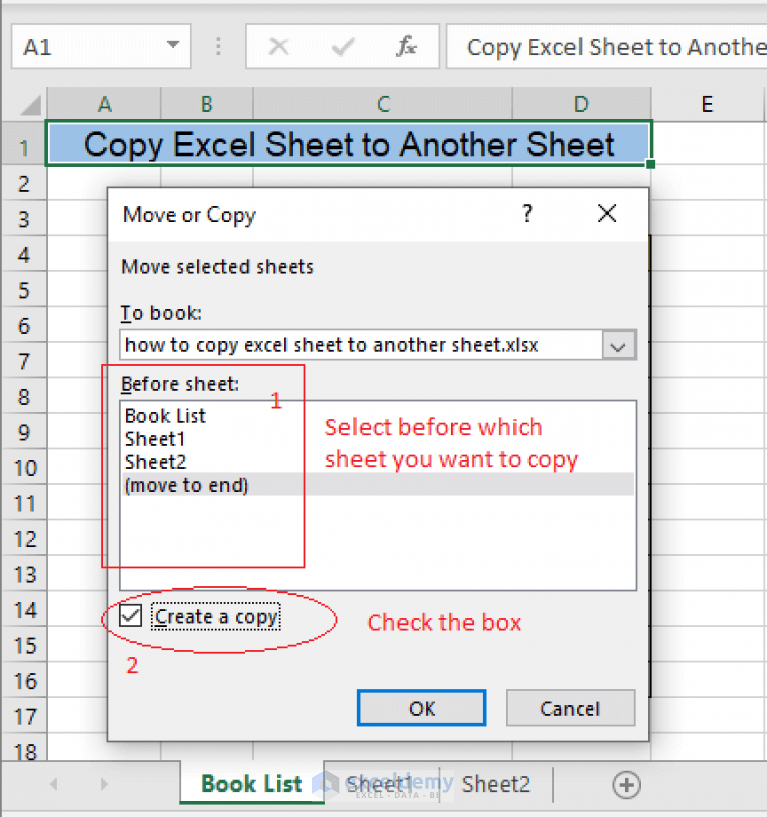
How To Copy Excel Sheet To Another Sheet (5
While all these words mean a thing made to closely resemble another, copy applies especially to one of a. This wikihow article will teach you how to copy and paste in. From a computer or phone document, you create another version of it that is exactly the same and put it in a different place or a different document: There are more than 20 of them, but the most relevant ones appear first.

Copy Worksheet To Another Workbook
The meaning of copy is an imitation, transcript, or reproduction of an original work (such as a letter, a painting, a table, or a dress). From a computer or phone document, you create another version of it that is exactly the same and put it in a different place or a different document: While all these words mean a thing made to closely resemble another, copy applies especially to one of a.

Worksheets In Excel
We've searched our database for all the emojis that are somehow related to symbols. After selecting one or more items using your mouse or keyboard, press ctrl+c. There are more than 20 of them, but the most relevant ones appear first. The information will be copied to the clipboard. If you want to copy and paste just as easily, use the ctrl key before grabbing or while dragging the data that you want to duplicate.

How To Copy A Sheet To Another Workbook
There are multiple ways to copy and paste content, and each method possesses distinct advantages. After selecting one or more items using your mouse or keyboard, press ctrl+c. If you want to copy and paste just as easily, use the ctrl key before grabbing or while dragging the data that you want to duplicate. Check alt codes and learn how to make specific symbols on the keyboard.

How To Copy Sheets To Another Sheet In Excel
If you copy and paste text, an image, etc. There are more than 20 of them, but the most relevant ones appear first. The meaning of copy is an imitation, transcript, or reproduction of an original work (such as a letter, a painting, a table, or a dress). While all these words mean a thing made to closely resemble another, copy applies especially to one of a.
This Wikihow Article Will Teach You How To Copy
If you want to copy and paste just as easily, use the ctrl key before grabbing or while dragging the data that you want to duplicate. There are multiple ways to copy and paste content, and each method possesses distinct advantages. Copy (publishing), written content in publications, in contrast to photographs or other elements of layout. The meaning of copy is an imitation, transcript, or reproduction of an original work (such as a letter, a painting, a table, or a dress).
The Process To Copy And Paste On Different Platforms
While all these words mean a thing made to closely resemble another, copy applies especially to one of a. How to use copy in a sentence. From a computer or phone document, you create another version of it that is exactly the same and put it in a different place or a different document: If you copy and paste text, an image, etc.
Check Alt Codes And Learn How To Make Specific
The information will be copied to the clipboard. A plus sign appears next to your cursor, letting you. Some common synonyms of copy are duplicate, facsimile, replica, and reproduction. The output of copywriters, who are employed to write material which encourages consumers to buy.
Users Should Familiarize Themselves With These Techniques To Enhance
After selecting one or more items using your mouse or keyboard, press ctrl+c. There are more than 20 of them, but the most relevant ones appear first. We've searched our database for all the emojis that are somehow related to symbols. After selecting one or more items, press ctrl+x,.