 National Holiday Calendar
Sync Google And Apple Calendar - You can sync google calendar with the calendar app that comes on your iphone or ipad. This is what prompts gmail to allow your emails to arrive in the mac mail app. 5) i've tried deleting that apple calendars, then adding them back (copying the url, paste, etc). To have google calendar properly synced to your apple calendar, enabling you to have google calendar across all devices that you’ve connected your apple calendar, and. 6) but, again when i. Sign in to your google calendar.

How To Sync Google And Apple Calendars Popular Science
The first step is to open your google account and navigate to the calendar section. To ensure that changes made on. You can sync google calendar with the calendar app that comes on your iphone or ipad. Make sure mail is selected. The easiest way to sync your events is to download the.

How To Sync Google Calendar With Apple Calendar
The first step is to open your google account and navigate to the calendar section. Yep, it is possible to. Since apple calendar syncs via icloud, a temporary sync issue may be preventing search results from appearing. 5) i've tried deleting that apple calendars, then adding them back (copying the url, paste, etc). Make sure mail is selected.

Calendar For Free
If you’re not already signed in, you’ll. To synchronize your apple calendar with your google calendar, follow these steps: The app is features natural language parsing, reminder integration, and even a dashboard to easily see an overview of your events. Regardless of what apple does to upgrade the calendar app, fantastical 2 keeps me coming back. Make sure mail is selected.
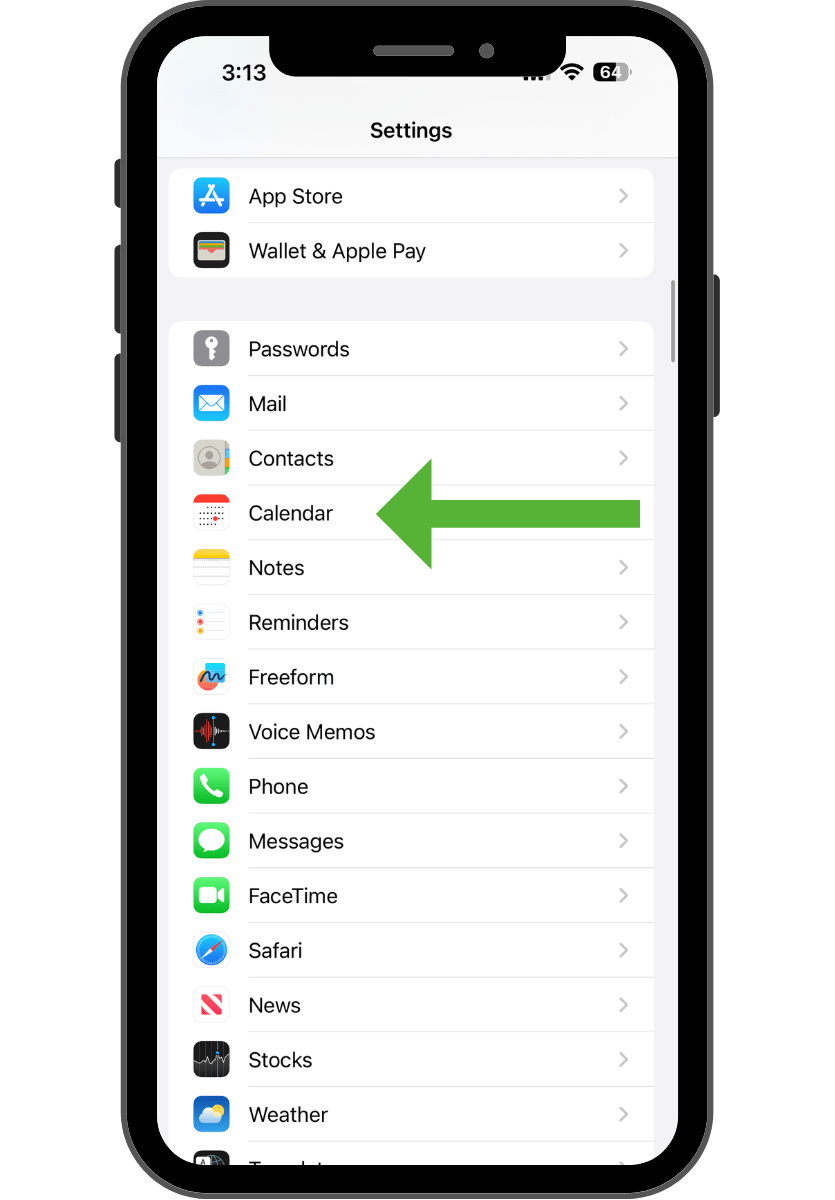
Set Up Ios Device To Sync Google Calendar
Enable caldav sync on your iphone or ipad. Tired of managing a calendar on your iphone and another one on your pc? Add google calendar account to calendar app. Regardless of what apple does to upgrade the calendar app, fantastical 2 keeps me coming back. 5) i've tried deleting that apple calendars, then adding them back (copying the url, paste, etc).

How To Sync Google Calendar With Apple Calendar
Syncing your google calendar with your apple calendar is a straightforward process that can help you reduce double bookings, stay organized, and eliminate conflicts. You can add google calendar events to your apple calendar on your mac, iphone, or ipad. When you sync your calendar on your mobile device, the same events will show up when you use google calendar on your computer.
Yep, It Is Possible To
Make sure you have the latest version of apple calendar and the latest apple. Syncing your google calendar with your apple calendar is a straightforward process that can help you reduce double bookings, stay organized, and eliminate conflicts. To ensure that changes made on. You can sync google calendar with the calendar app that comes on your iphone or ipad.
Using Icloud And Google Calendar
The first step is to open your google account and navigate to the calendar section. With clear instructions and helpful images, you'll have. 5) i've tried deleting that apple calendars, then adding them back (copying the url, paste, etc). This calendar syncing tutorial will help you manage.
Add Google Calendar
This is a personal favorite and one that i have purchased across ios and macos. Tap on [your name] > icloud. Enable caldav sync on your iphone or ipad. Your mac will now ask what google apps you want to sync.
A Calendar
Since apple calendar syncs via icloud, a temporary sync issue may be preventing search results from appearing. If you’re not already signed in, you’ll. Go to your google calendar account settings by clicking on the gear icon. 6) but, again when i.