 TikTok Trend Analysis
How To Find Blocked List On Tiktok - Open the tiktok app and log in to your account. Go to their profile : You can sort the list by username or date by tapping on the. How to find your blocked list on tiktokare you looking for a tutorial on how to find your blocked list on tiktok? To check your blocked list on tiktok, follow these steps: You’ll see a list of users who have been blocked by you.

How To Tell If Someone Blocked You On Tiktok
In this article, we’ll guide you through the process of finding your blocked list on tiktok, so you can easily manage your online interactions. Open the tiktok app and log in to your account. How to find your blocked list on tiktokare you looking for a tutorial on how to find your blocked list on tiktok? Tiktok is also not accessible in china, where a sister app, douyin, serves the.
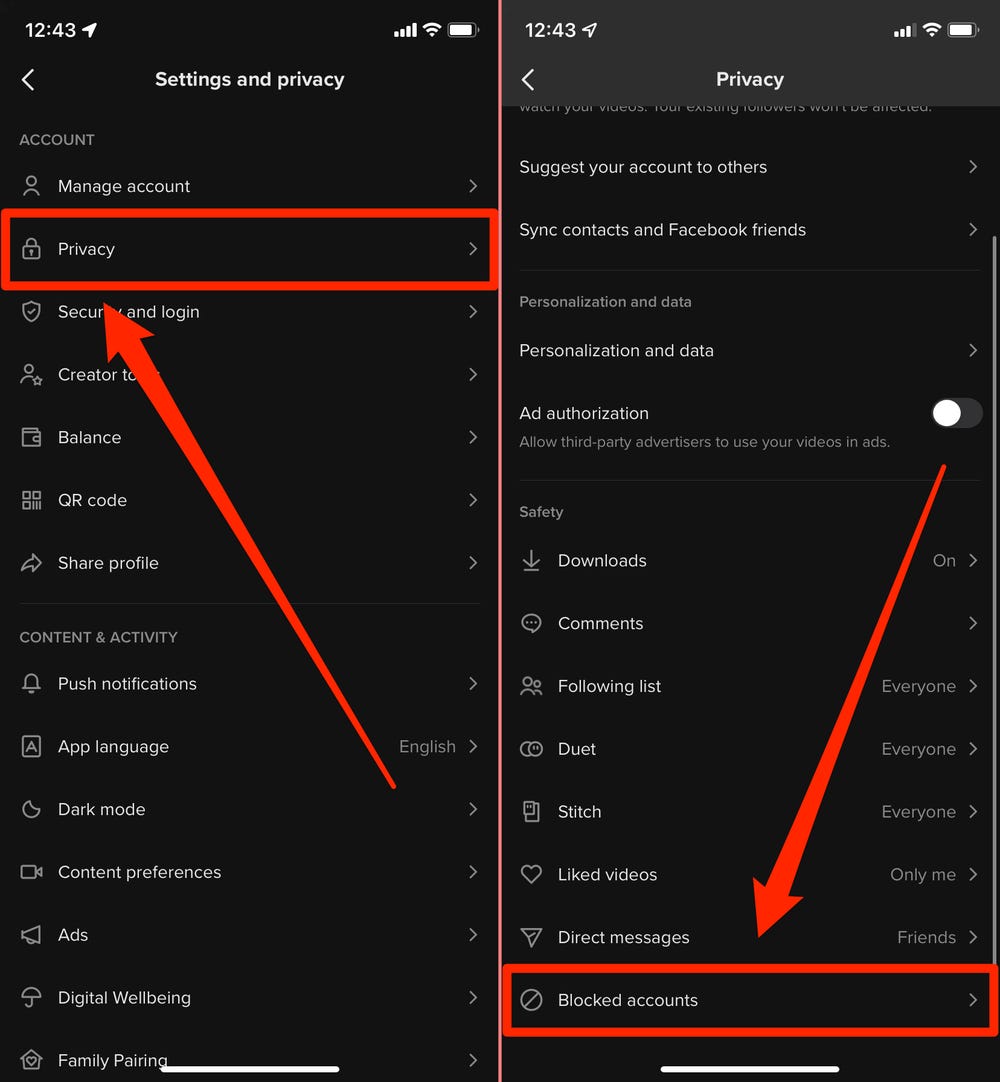
How To See Your Blocked List On Tiktok?
To see the blocked list on tiktok, first open the tiktok app on your mobile device. How to find your blocked list on tiktokare you looking for a tutorial on how to find your blocked list on tiktok? Open tiktok and use the search bar to find the official accounts for facebook and instagram. Open the tiktok app and log in to your account.

See Who Blocked You On Tiktok
Scroll down and tap on block. The best tiktok vpn overall: To see the blocked list on tiktok, first open the tiktok app on your mobile device. Why you need to check your blocked list: We can learn more about the tiktok block list from the video.

How To Tell If Someone Blocked You On Tiktok
Open the tiktok app and navigate to your profile page. In this article, we’ll guide you through the process of finding your blocked list on tiktok, so you can easily manage your online interactions. When you block a user on tiktok, they will no longer be able to view your videos,. To see the blocked list on tiktok, first open the tiktok app on your mobile device.

Tiktok How To See The Users You've Blocked
Finding your blocked list on tiktok: To check which accounts you've blocked on tiktok: We can learn more about the tiktok block list from the video. Why you need to check your blocked list: Open the tiktok app and log in to your account.
Finding Your Blocked List On Tiktok
Open the tiktok app and navigate to your profile page. Tap on the profile icon () on the bottom right corner of the screen. The best tiktok vpn overall: You can sort the list by username or date by tapping on the.
Scroll Down And Tap On Block
In this article, we’ll guide you on how to find the blocked list on tiktok, as well as provide some additional tips to help you manage your online presence on the platform. In the tiktok app, tap profile at the bottom. Finding your blocked list on tiktok is a straightforward process that can help you maintain a private online presence and avoid unwanted interactions. Tiktok is also not accessible in china, where a sister app, douyin, serves the.
To See The Blocked List On Tiktok
To find your block list using the tiktok app: You will see a list of users you’ve blocked. Tap the menu ☰ button at the top, then select settings and. You’ll see a list of users who have been blocked by you.
A Blocked List On Tiktok Is A List
After you block someone on tiktok, you can view a list of blocked accounts from your settings. Sending emails to inactive subscribers will demonstrate potential. On an email contact list with poor hygiene, you’ll find lots of inactive addresses as well as a few spam traps. In the tiktok app, tap profile at the bottom.